
CraftUI
Unknown · Image · Coding
CraftUI turned screenshots, sketches, and text prompts into editable interface components in the browser. The official site is offline, so treat it as history, not a live tool.
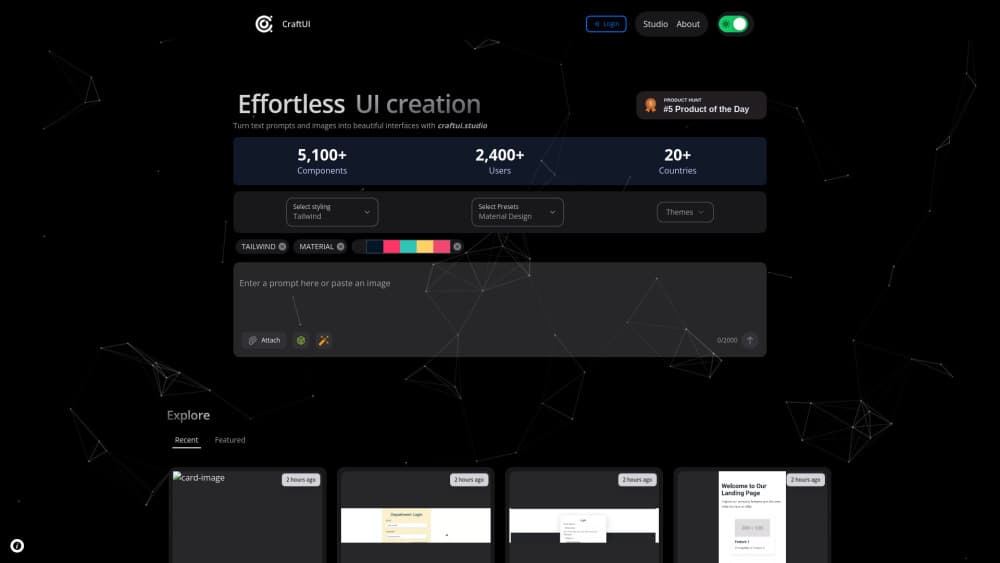
About CraftUI
What Is CraftUI
CraftUI was a small AI design tool, one of many that appeared after prompt driven interfaces took off. The pitch was narrow: describe a screen in words, or drop in an image, and get back interface components you could adjust instead of drawing every element from scratch. Its product listing sums it up as a tool for creating polished interfaces by generating components from image and text prompts.
That's a different job from a full app builder. CraftUI worked at the component level, meaning the buttons, cards, forms, and navigation bars that make up a screen. The appeal is speed in the messy middle of a project. You know roughly what you want, you need something concrete to react to, and a blank canvas is not helping.
One caveat comes first. The official domain no longer hosts a working product. As of late 2026, craftui.studio redirects to a domain resale listing, and no public pricing page, changelog, or documentation survives. Everything below describes the tool as it was announced, not a service you can sign up for today.
Getting Started
This is how the workflow ran when the app was live, based on its published description.
- Open the web app in a browser. Nothing to install, no desktop client.
- Pick an input. Type a prompt describing the screen you want, or upload an image to work from.
- Read the generated components and keep the closest match to your intent.
- Move the result into your design file or code editor, then restyle colors, spacing, and type to fit your project.
The fourth step was the manual part. No source I could find documents export formats or a plugin handoff, so plan on copying output by hand rather than syncing it.
Product Information
A quick look at CraftUI's pricing, supported platforms, and performance.
Best for
The users, tasks, and scenarios where this tool fits best.
Users
- Product designers who need a first draft fast
- Solo founders without a designer on the team
- Frontend developers who think in components
Tasks
- Turning a screenshot into editable components
- Filling gaps in a small design system
- Testing a layout idea before committing
Scenarios
- A design review tomorrow morning
- Rebuilding an old screen for a redesign
- A side project with no budget for design help
Key features
Image to Component Generation
CraftUI's stated core was reading an image and returning interface components from it. Screenshots, mockups, and sketches all count as input, which is useful when your reference exists as a picture rather than a description. The output lands at the component level, so you get pieces you can rearrange rather than one flat picture of a screen.
Text Prompt to Interface
The second input path was text to UI generation in plain language. You described what you wanted in a sentence or two, and the tool produced components to match. That's the lowest effort way to start, and it's the path most people try first in this category of tool.
Component Level Output
This is the detail that separated CraftUI from prompt to website tools. As a UI component generator it produced pieces, not whole products. For design work that's often what you want, since a single good card or filter bar can be reused across a dozen screens.
Browser Only Workflow
Everything ran in the browser with no install step, which is the main draw of a browser based design tool. That makes it easy to try on a borrowed laptop or a locked down work machine, and it keeps the tool out of your local setup until you decide it earns a place there.
Lightweight Iteration
Because the unit of work was a component, changes stayed small. Rerunning a prompt for one card didn't mean regenerating a whole page, which is the usual frustration with larger generators.
Pros and cons
Pros
- Clear scope: it did one job, generating UI components, and didn't pretend to be a full app builder.
- Two input types: image and text covered both the "I have a reference" and the "I have a rough idea" cases.
- No install and no setup: browser only meant a fast first test with nothing to configure.
- Output you can restyle: components are easier to make yours than a locked rendered screen.
Cons
- The product is gone: the domain now points to a resale listing, so you can't sign up, log in, or recover old work.
- Very little public documentation: no surviving pricing page, changelog, or help center means claims about limits can't be checked.
- Handoff was manual: without a documented export path or plugin, getting output into Figma or a codebase meant copying it yourself.
Frequently asked questions
No. The official domain craftui.studio no longer serves a working product and currently redirects to a domain resale listing. Treat any older link or tutorial as historical.
Related content
Explore related tools, skills, and articles for CraftUI.
CraftUI Alternatives

Google EmbeddingGemma 2
Google DeepMind · Writing · Image · CodingGoogle EmbeddingGemma 2 is a 740M-parameter open model that turns text, code, images, audio, and video frames into vectors in one 768-dimension space, running on phones and laptops.

Tractionwave
TractionWave · Image · MarketingTractionWave is an AI attention heatmap tool for static ads. Upload a PNG or JPG and it returns predicted attention, ranked hotspots, and fixes before you spend budget.

Imejis.io
Imejis.io · Image · MarketingImejis.io is an AI design studio for agents and marketing teams. Describe an image in plain words, and it writes the copy, builds the layout, reflows it to every size, then exports a finished file.