

Createvision AI
Create Vision Inc. · Image · Video
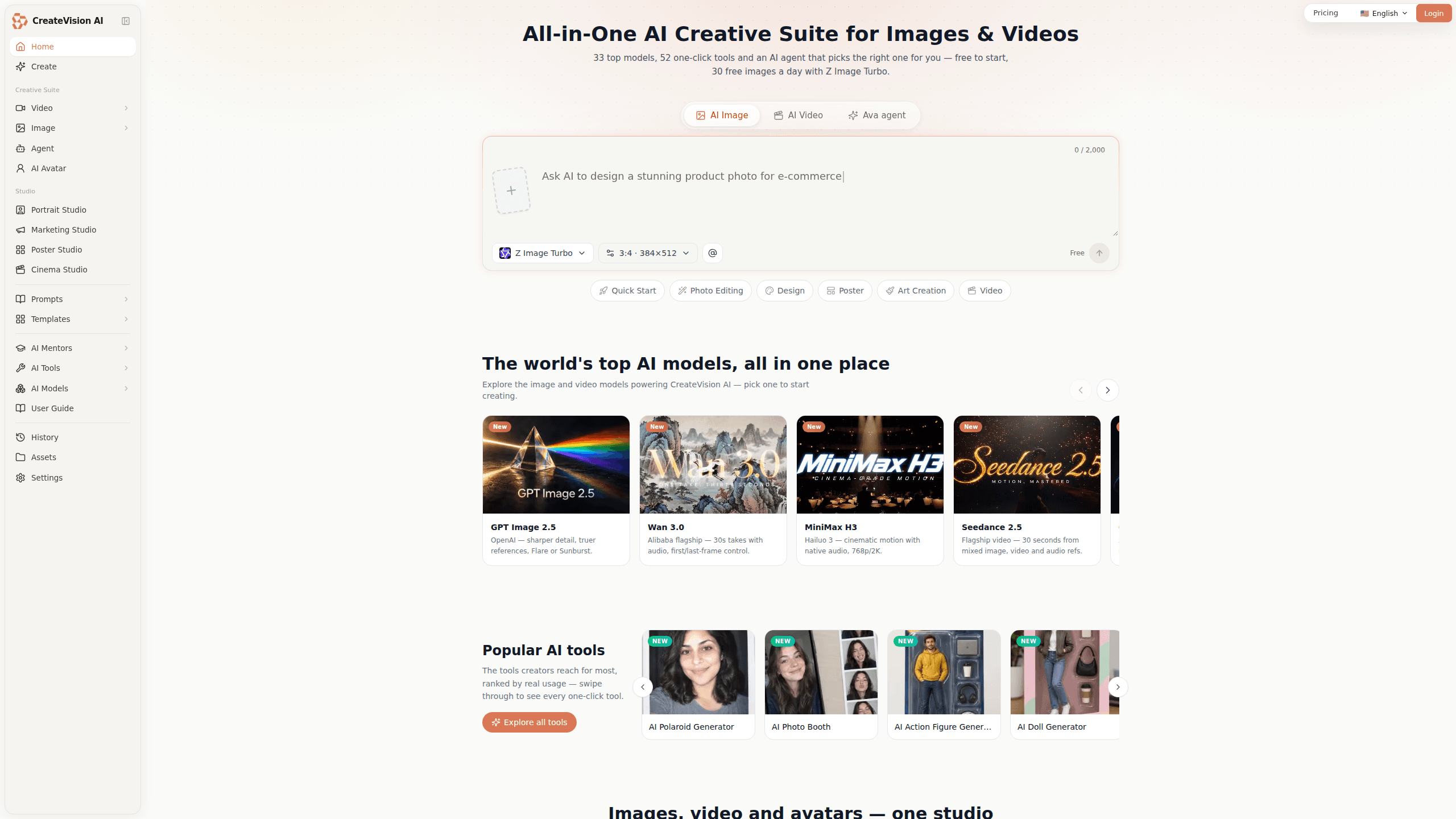
CreateVision AI is a free AI creative suite for images and video, built around 33 generation models, 52 one-click tools and an AI agent that plans the work for you. Instead of wiring up API keys or learning a single engine, you describe what you want in plain words and the platform routes the job to the model it thinks fits. As an AI art generator it reaches everything from photoreal shots to Studio Ghibli styles, and its AI image editor handles cleanup without a separate app. The Z Image Turbo model stays free on every plan, so you can draft as many takes as you like before spending credits on a flagship model.
About Createvision AI
What Is CreateVision AI
CreateVision AI is a browser-based studio from Create Vision Inc. that bundles image generation, video generation, avatars and editing into one workspace. The pitch is simple: you shouldn't have to know which model wins at photoreal skin or readable in-image text. So the platform keeps an agent named Ava that reads a one-line brief, picks a model and settings, and walks you to a finished result. No juggling, no guesswork.
The two libraries carry most of the day-to-day value. One holds 188 hand-picked prompts, each checked against the exact image it produced. The other holds more than 15,000 ready-to-run templates you can search by style, subject or model. Both are free. Edit any of them into your own prompt. The catch is credits: free models never touch your balance, but premium models do, and the generous monthly allowances only arrive on paid tiers.
Getting Started
- Open createvision.ai in a browser. You can try two generations without an account.
- Sign up for a free account to get 200 welcome credits, spendable at up to 80 per day.
- Pick a track: AI image generator, video generator, avatars, or a one-click tool from the toolbar.
- Type your idea in plain language, or start from a prompt or template in the library. Let the AI agent choose a model, or pick one yourself.
- Generate, refine with the editing tools, then download the image or clip you want in up to 4K.
Product Information
A quick look at Createvision AI's pricing, supported platforms, and performance.
Best for
The users, tasks, and scenarios where this tool fits best.
Users
- First-time creators with no design background
- Freelance designers and marketers who need campaign visuals fast
- Social media managers
Tasks
- Turning a text prompt into a polished image
- Making short AI video clips
- Removing backgrounds, watermarks or upgrading resolution
Scenarios
- Drafting many variations of a product shot before a launch, then finishing only the keeper on a premium model to save credits.
- Creating event visuals like wedding, holiday or birthday cards from a couple of uploaded photos with the themed generators.
- Producing a talking avatar from one portrait and a voice track for a quick explainer video.
Key features
Intelligent model routing
CreateVision AI's headline idea is that the platform, not you, decides which engine to use. Type a one-line brief and the built-in agent plans the style, model and settings, then hands back a finished image or video. If you already know what you want, you can still override the choice and pick from the 33 models yourself. Beginners get a workable result on the first try. That's the upside. The trade-off is that you're trusting the router's judgment unless you take the wheel.
A large model library on one credit balance
The workspace reaches 33 models without you signing up for each provider. There's OpenAI's GPT Image line, Alibaba's Qwen-Image and Wan tiers, ByteDance's Seedream family, Google's Nano Banana Pro channel, xAI's Grok Imagine, plus Kling, Hailuo, Veo and Midjourney V8.1 through an API gateway. The point is breadth. One balance pays for all of it, and you skip the setup each provider normally demands. Note that Midjourney runs per-run here, not on a monthly plan.
52 one-click AI tools
Alongside generation, CreateVision AI ships 52 tools that do a single job each. Background removal, watermark removal, face swap, hairstyle changes, image upscaling and style transfer are the common ones, ranked on the site by real usage. These matter. They remove the round trip to a separate editor for small fixes. A few of them, like the AI video upscaler and 1536px HD output, sit behind paid tiers rather than the free plan.
Free generations with Z Image Turbo
Z Image Turbo costs zero credits on every plan, including the free tier. That changes how you work. You can draft freely with Turbo and only spend credits when you move a keeper onto a flagship model. Combined with the 200 welcome credits and the 80-a-day cap on new accounts, it's enough to test whether the platform fits your needs before paying. The limit is obvious. Turbo is a draft model, so final quality still depends on a paid engine.
AI Mentors and prompt templates
If you freeze at an empty prompt box, the AI Mentor system helps. It offers a roster of named creative masters, each framed around a discipline like portrait photography, game concept art or social media. Stuck on how to describe a mood? You describe your idea in everyday language and the mentor rewrites it into a production-ready direction. A library of 15,000+ templates and 188 reviewer-checked prompts backs this up, all free to apply in one click.
Image, video and avatar tracks in one place
The studio treats images, video and avatars as tabs in the same tool rather than separate products. Image generation runs up to 4K for print work. On the video side you get draft models, fast tiers and cinematic options with native audio and lip-sync. Avatar tools turn a portrait plus a voice track into a talking video. One login covers a full project. One balance too, from concept art to a finished clip.
Precise editing on top of generation
Generation is only half the job, and CreateVision AI knows it. You can swap, restyle or retouch any detail with a prompt, or blend up to fourteen references in a single image. Models like Qwen Image Edit Plus will even rewrite the words printed inside a picture, English or Chinese. That matters for posters and menus where the text has to be spelled right. It's the kind of fix that usually forces a trip back to a desktop editor.
Pros and cons
Pros
- One credit balance pays for 33 models, so you avoid stacking separate subscriptions for images and video.
- Free Z Image Turbo generations let you draft unlimited takes without touching your credits.
- The AI agent and 15,000+ templates lower the barrier for people with no prompt-writing experience.
- Editing tools sit next to the generators, which cuts the round trip to a separate editor for small fixes.
- Web-based, with no install and no API keys to configure before your first generation.
Cons
- Premium models burn credits fast, so heavy video work can drain a monthly allowance quickly.
- The free tier is really a trial: 200 welcome credits with an 80-a-day cap won't last long on flagships.
- There's no public developer API, which rules it out if you wanted to build the models into your own product.
- The model catalog leans on router judgment for newcomers, and trusting it blindly can hide a better fit for your task.
Frequently asked questions
It's a browser-based AI creative suite for images and video from Create Vision Inc. You describe what you want, and the platform's agent picks a model and settings to produce it. You can also choose a model or one-click tool yourself. Simple as that.
Related content
Explore related tools, skills, and articles for Createvision AI.
Createvision AI Alternatives

X Ray Interpreter
X-ray Interpreter · ImageX Ray Interpreter is a web-based AI radiology tool that turns X-rays, CT scans, MRI, ultrasound, and PET images into plain-language reports. You upload a scan, get a preliminary X-ray interpretation in moments, then ask follow-up questions if something needs explaining. It works as a second opinion and a learning aid, not as a medical diagnosis.

Aieasypic
AIEasyPic · ImageAIEasyPic is an AI image generator that turns plain text prompts into finished artwork in seconds. You can also train custom models on your own photos, swap faces in existing images, and create short video clips from text, all from a browser. It suits casual creators who want quick visuals and hobbyists who want to build a personal model without touching any code.

Chargen
Chargen · ImageChargen is an AI character generator and worldbuilding toolkit built for Dungeons & Dragons and other tabletop RPGs. It turns a one-line idea into a painted character portrait, spins up NPCs, monsters, maps and encounters from the same session, and keeps every creature's details close at hand. The tabletop RPG art side runs on a credit system called Gold, while the text generators stay free for everyone.