

Creed
Creed · Productivity · Leaning
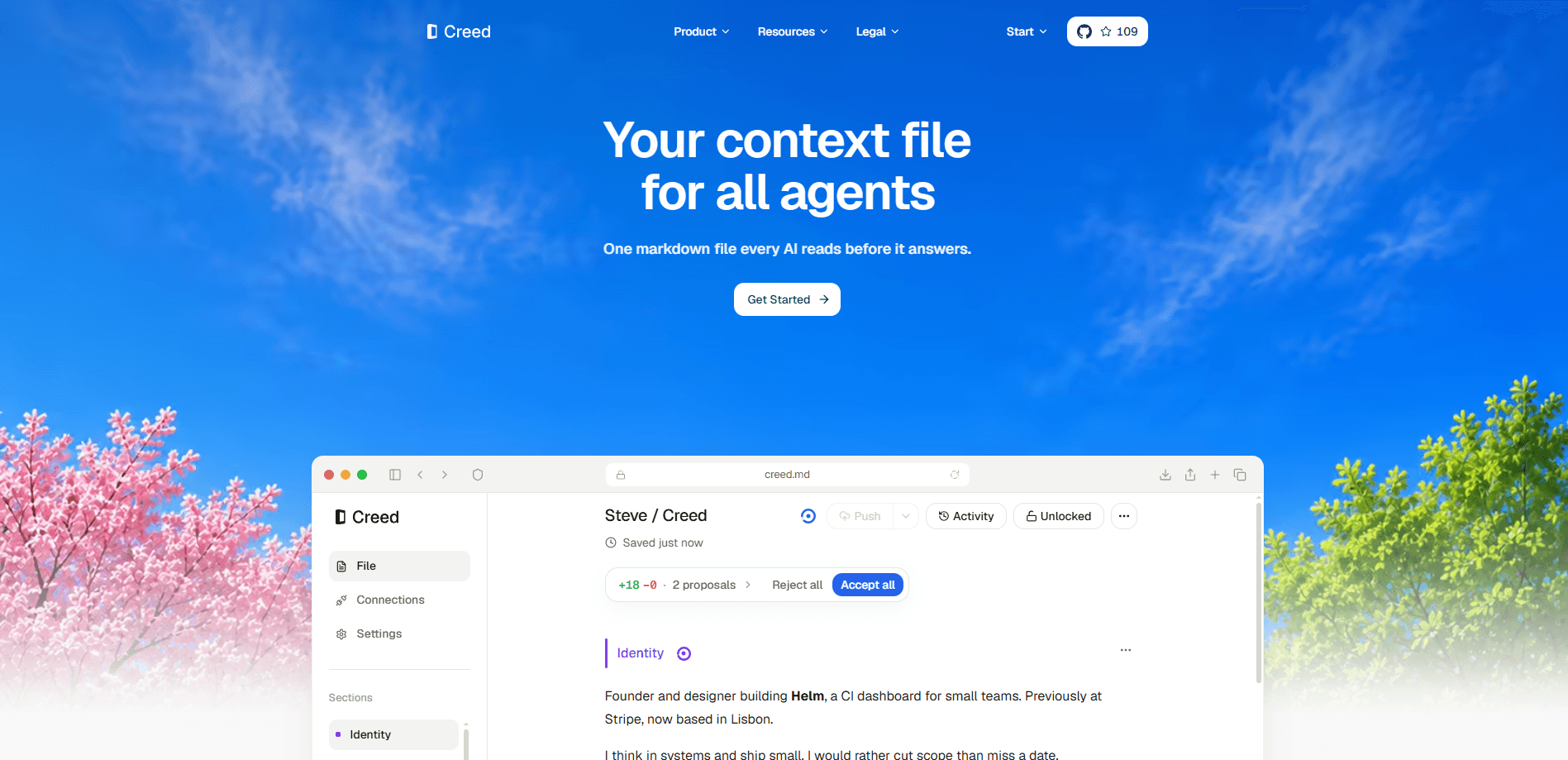
Creed is a Mac app that stores your personal context, the things you'd want every AI agent to know about you, in a single Markdown file you own. Instead of repeating your preferences to each tool, connected agents read that same file over a local MCP connection while the app runs. You write the basics, agents can propose refinements, and you decide what gets accepted. It's built for people who run several AI agents and are tired of restating the same background every time.
About Creed
What Is Creed
Creed treats your personal context as a file, not a setting buried inside one company's account. You write down your identity, your current work, and your working style in plain Markdown. That single file then becomes the shared starting point for any connected AI agent that speaks the protocol, which means you finally stop repeating the same background story to every tool you try.
MCP is the glue here. It's an open standard that lets an agent read external context, and Creed exposes your file through a local MCP connection. That's how a supported agent pulls in your context while the Mac app is running. The catch is that it only works while the app stays open, and only with agents that support a local MCP connection, which rules out any tool that can't speak the protocol. Your file stays plain Markdown, so you can open it and edit it in any other tool whenever you want.
Creed is meant for personal use, not teams. There's no shared workspace, no admin console, and no cloud account to log into. Everything runs on your Mac, with files you own and permissions you set section by section. If you want a shared knowledge base for a group, this isn't it.
Getting Started
- Download Creed for Mac and open the app.
- Write your first context in the Editor. Start with your identity, your current projects, and your working preferences.
- Open the section permissions and decide which parts agents can edit, which need your review, and which stay read-only.
- Connect an agent that supports a local MCP connection, keeping the app running so it can read your file.
- Review any proposals an agent submits, then accept what fits and skip the rest.
Product Information
A quick look at Creed's pricing, supported platforms, and performance.
Best for
The users, tasks, and scenarios where this tool fits best.
Users
- Heavy agent users
- Privacy-minded tinkerers
- Writers and knowledge workers
Tasks
- Storing stable preferences
- Sharing context across agents
- Reviewing agent-proposed changes
Scenarios
- Switching between a chat assistant, a coding agent, and a research tool without repeating your background each time.
- Keeping a private profile of your goals and constraints on your own machine.
- Auditing what an agent wants to change about your context before anything is written.
Key features
One Canonical Markdown File
Creed keeps your context in a single file, written in plain Markdown. That means no lock-in and no proprietary format: you can open it in any editor, back it up, or move it wherever you like. Agents read from the same source, so they can't drift into different versions of your profile over time. The file is the product, and you own it outright.
Local MCP Connection
Connected agents reach your context through a local MCP connection rather than a cloud sync. MCP is a standard that lets an agent pull in outside information, and Creed speaks it so supported tools can read your file while the app is running. Nothing routes through a remote server. The trade-off is that the app has to stay open for the connection to work.
Editor and Views
The Editor is where you write your context in your own words. Views then shows that same context from different angles, so you can spot connections and gaps you'd miss in a flat document. It's a way to look at your own profile before an agent does. Useful when your notes have grown past a quick glance.
Agent Proposals
Agents can suggest changes when something useful comes up, like a preference you clarified or a goal that moved. Each suggestion shows up as a proposal in the Activity view, and you get to decide what actually belongs in your file. This keeps agents contributing without handing them the keys. You stay the editor.
Section Permissions
Permissions work per section, and you can mark a section as needing your review, allow an agent to edit it directly, make it read-only, or hide it from agents entirely. That's how you keep sensitive details private while letting harmless ones stay current. Sections that need review sit in Activity until you approve a change.
Activity Log
The Activity view tracks what's changed in your context over time, so you can see what agents proposed and what you accepted. That history turns your file's changes into something you can actually follow. If you've ever wondered how an assistant ended up with a wrong idea about you, this is where you'd look. It's an audit trail for your own profile.
Pros and cons
Pros
- Context lives in plain Markdown, so there's no format lock-in and you can edit it anywhere.
- One file shared across agents means you stop repeating your background to each tool.
- Section permissions let you keep some details private while others stay open to agents.
- Everything runs locally on your Mac, with no cloud account required.
- Proposals and an activity log give you control over what agents change.
Cons
- It's macOS only, so Windows, Linux, and mobile users are out.
- Agents can only read your context while the Mac app is running, which limits background use.
- There's no shared team workspace, so it won't work as a group knowledge base.
Frequently asked questions
Creed stores your personal context for AI agents in one Markdown file and shares it with connected tools. You write your identity, your current work, and your working style, then let MCP-connected agents read from that single source so you don't repeat yourself.
Related content
Explore related tools, skills, and articles for Creed.
Creed Alternatives

Base Code
Base44 (Wix) · Coding · ProductivityBase Code is a shared cloud development environment from Base44. Teammates describe changes to an existing GitHub codebase in chat, preview them live and send them back as pull requests.

Knocket
Knocket (Tencent RTC team) · Productivity · Business · ChatbotKnocket is a free live chat and contact page tool that lets visitors message you from your website, app, or a shareable link, with every reply handled from Telegram or one inbox.

FloorGen
Vinit Kumar (FloorGen) · Productivity · China AIFloorGen is a browser-based floor plan maker that turns a sentence or a sketch into an editable 2D plan and a 3D walkthrough. Export to PDF, DXF or video, and draw without an account.