

Curipod
Curipod AS · Leaning
Curipod is an AI lesson generator and interactive lesson platform for K-12 teachers. It turns a topic or standard into slide-based lessons with live student responses and instant AI feedback.
About Curipod
What Is Curipod
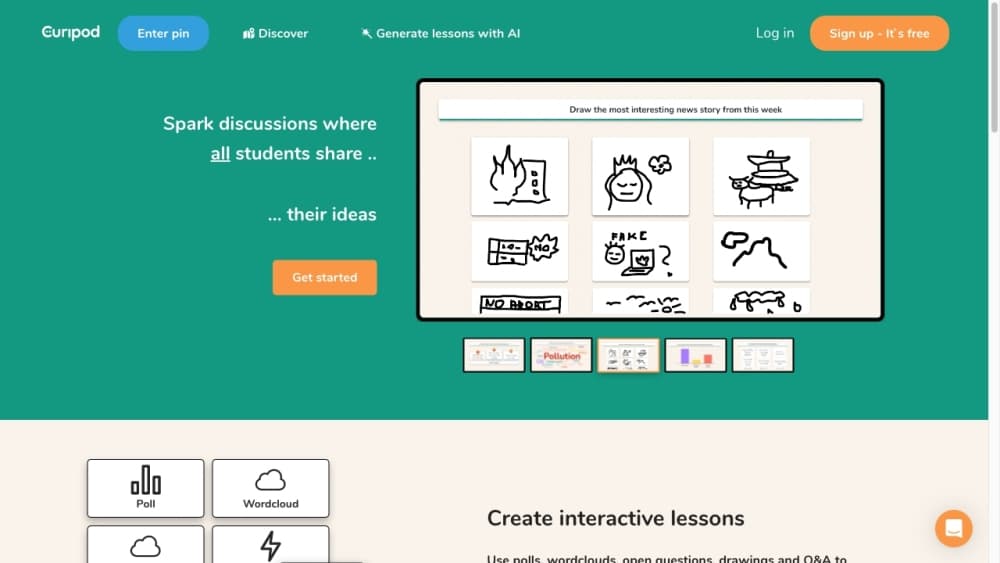
Curipod is a Norwegian classroom tool built around one moment: the lesson itself. A teacher describes a topic, a grade level, or a standard, and the platform assembles a deck with polls, word clouds, drawing tasks, and short writing prompts. Students join with a room code on a laptop, tablet, or phone. No student account, no app install.
The focus is narrow on purpose. Plenty of edtech saves time before the lesson. Curipod goes after the 40 minutes when 30 students sit in front of you and a few have mentally left the room. Answers land on the projector as they arrive, so a quiet class becomes something you can read and react to. The AI feedback feature then writes a short note for each response about what worked and what to fix, which is the part no teacher can do 30 times in one period.
The boundaries are just as clear. Curipod is teacher-led, so it does little for self-paced courses or homework delivery. Students don't keep accounts, which helps privacy and hurts portfolios. School pricing sits behind a quote, so you can't compare plans from the pricing page alone.
Getting Started
- Create a free teacher account with Google, ClassLink, Clever, or email.
- Pick a grade and subject, then type a topic or paste a standard.
- Generate the lesson, then trim slides, swap prompts, and set how much students can write.
- Project the room code. Students join on any device and answer as you advance.
- Read responses live, review the AI feedback, and export the lesson as a PDF for absent students.
Product Information
A quick look at Curipod's pricing, supported platforms, and performance.
Best for
The users, tasks, and scenarios where this tool fits best.
Users
- Classroom teachers in grades 3 to 12
- ELA and writing coaches
- Elementary teachers
- School and district leaders
Tasks
- Turning a standard into a lesson
- Running a quick formative assessment
- Giving every student feedback on a short essay
Scenarios
- A 45 minute period with one projector and 30 students
- Weekly writing practice across a grading period
- Test prep season
Key features
AI Lesson Generator
Type a topic, a learning objective, or a state standard and Curipod builds a full lesson deck in well under a minute. The output mixes explanation slides with polls, open questions, word clouds, drawing tasks, and an exit ticket. You edit anything before class, so the draft is a starting point rather than a finished product.
Live Student Responses
Students join through a room code on any browser and answer as you advance the deck. Answers show up on the projector in real time, which lets you pause on a wrong answer or a surprising one. This is the student response tool part of the product, and it works without logins or downloads.
Instant AI Feedback with Glow and Grow
Every written response gets a short note naming one strength and one next step. Students read it, discuss it, and revise in the same period. Teachers can attach their own rubric and allow longer answers when the task calls for a full paragraph.
Curriculum and Standards Alignment
Lessons can be generated against national and state standards, and the platform ships with alignment to curricula districts already run, including HMH Into Reading and Amplify CKLA. In practice, a Texas teacher gets TEKS and a California teacher gets CCSS without hunting for the right code.
Reports and Growth Insights
After class, responses, reflections, and revisions turn into reports you can sort by student or by skill. That makes classroom engagement visible after the bell, not just during the lesson. Student-level summaries are limited to school and district plans.
Teacher Controls and Privacy
Curipod is built for schools: FERPA, COPPA, SOPPA, and GDPR compliant, with no AI chatbot for students and no student or teacher data used to train models. Teachers can block pasting and third-party help so the writing you see is the writing students produced. Single sign-on through ClassLink, Clever, and Google keeps IT setup short.
Pros and cons
Pros
- A usable lesson appears in under a minute from a topic or standard, which removes most of the blank-page problem on a Sunday night.
- Every student answers, not just the four who raise hands, and the teacher sees the spread immediately.
- AI feedback arrives during class, so students revise while the task is still fresh.
- Alignment with HMH Into Reading, Amplify CKLA, and state test rubrics means the tool fits the curriculum a district already bought.
- Privacy posture is unusually clean for an AI product: no student accounts, no chatbot, no training on student work.
Cons
- The free plan caps live sessions per week, so a teacher with five classes will hit the limit before Friday.
- School pricing requires a quote, which slows down anyone who wants to buy alone with a card.
- Free responses stop at 1,000 characters, so long-form essays get cut short unless the school upgrades.
- Students can't log back in at home to continue a draft, which limits take-home writing and portfolio work.
Frequently asked questions
Curipod turns a topic or standard into an interactive slide lesson, then collects student answers live and returns AI feedback on written responses. Teachers use it for classroom engagement, quick checks for understanding, and writing practice.
Related content
Explore related tools, skills, and articles for Curipod.
Curipod Alternatives

HireKey
HireKey · Voice & Language · Productivity · LeaningHireKey is an AI job search copilot built by a former tech recruiter. It checks role fit, tailors resumes, runs interview practice and tracks every application.

Lune
Retrograde Labs · Productivity · LeaningLune is a research search engine for scientific AI agents. It runs as an MCP server that lets Claude, ChatGPT and Cursor search peer-reviewed computer science papers and cite them.
Coddy
Coddy · Coding · LeaningCoddy is a gamified platform to learn to code through short interactive lessons in 20+ languages, with a browser editor, an AI tutor and free certificates.