
cvsha.com
CVSHA · Leaning · AI Assistant
CVSHA is an AI resume builder that turns your work history into ATS-friendly resumes, cover letters, and a personal brand page, with a free tier and a Pro plan at $10 per month.
About cvsha.com
What Is CVSHA
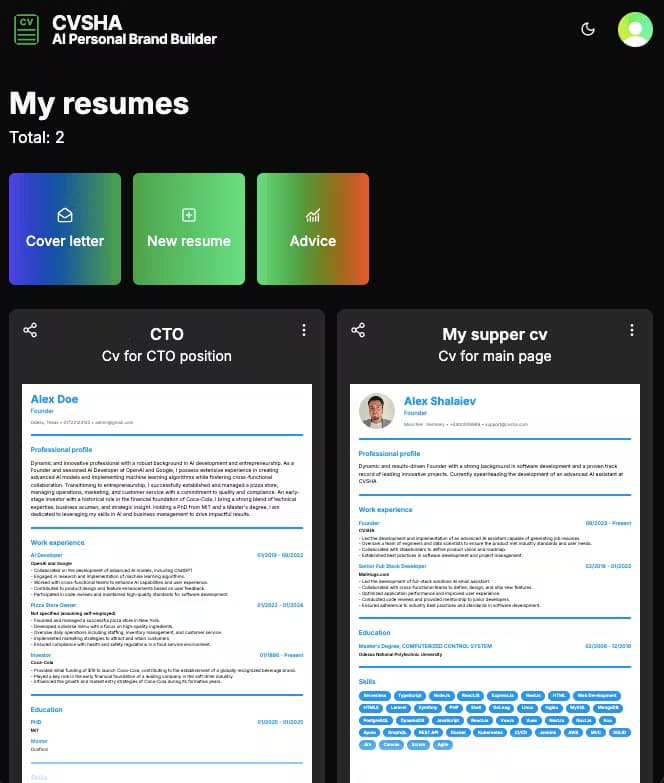
CVSHA is an online resume builder built around AI writing help. You paste your job history, and the tool rewrites dull duties into bullet points that read like achievements, then checks the result against the formatting rules that applicant tracking systems expect. It also generates matching cover letters and, on the roadmap of its own marketing, a personal website.
The platform targets people who need a clean, professional document fast but don't want to wrestle with Word templates. Everything runs in the browser, so there's nothing to install, and you can export as PDF or print a copy.
The main limit is depth. CVSHA is a focused resume tool, not a full career platform with networking, salary data, or interview coaching. If you need those, you'll still run a separate tool. It's also newer and smaller than names like Zety or Resume.io, so its template library and integrations are thinner.
Getting Started
- Create a free account with your email, or sign in with a social login.
- Enter your work history, education, and skills into the guided editor.
- Let the AI rewrite your descriptions, or accept the suggested bullet points one at a time.
- Paste a job posting to tailor the wording and keywords to that specific role.
- Export as PDF, or print the finished resume, and generate a matching cover letter.
Product Information
A quick look at cvsha.com's pricing, supported platforms, and performance.
Best for
The users, tasks, and scenarios where this tool fits best.
Users
- Job seekers
- Career changers
- Students and new grads
- Freelancers and consultants
Tasks
- Rewriting duty lists into achievements
- Formatting a resume for ATS screening
- Writing a matching cover letter
- Building a job-specific resume from an old one
Scenarios
- Applying to a job tonight with a messy old resume
- Batching applications over a weekend
- Cleaning up a resume you've edited for years
Key features
AI Content Generation
CVSHA rewrites your raw duties into concise, results-focused bullet points instead of restating your job description. You can accept each suggestion or edit it before it lands in the document. This is the feature most users come for, since weak phrasing is what gets a resume skipped.
ATS-Friendly Formatting
Every export follows a plain structure that applicant tracking systems can parse. Design-heavy resumes often get mangled or dropped before a human reads them, and CVSHA avoids that trap by keeping the layout machine-readable. You get a file that looks clean to recruiters and scans cleanly for software.
Job-Specific Targeting
You paste a job posting, and the tool suggests wording and keywords that match that role. This matters for job seekers applying to several similar positions, because the right keywords shift from listing to listing. The suggestions are starting points, not a guarantee of a keyword score.
Cover Letter Builder
The same AI that writes your resume drafts a cover letter tied to your target job. It saves the blank-page problem most people hit, and the draft can be edited to sound like you rather than a template. A matching letter is optional in many applications but still helps in competitive fields.
Multiple Format Export
You can download your finished document as a PDF or print it directly from the browser. Different employers want different formats, so having both available avoids a last-minute conversion. TXT is the fallback on the free tier, which is more limited for sharing.
Real-Time Editing and Layout
An interactive editor shows every change as you make it, and the layout system rearranges sections to keep spacing tidy. You can adjust colors, fonts, and layout to match a personal style without touching design software. It's the difference between filling in a rigid form and shaping a document.
Pros and cons
Pros
- AI rewriting turns flat duty lists into achievement-style bullet points with little manual effort.
- ATS-friendly output is the default, not an add-on, so you don't have to second-guess the layout.
- A usable free tier covers one resume and one cover letter with no credit card.
- Job-specific tailoring helps you match keywords for each posting you apply to.
- PDF export, custom styling, and a cover letter builder sit in one place instead of across three tools.
Cons
- The free plan limits you to one resume, TXT-only downloads, and no PDF export, which is thin for active job seekers.
- The Pro plan's headline feature list includes "custom integrations and API access" and a "dedicated account manager," claims that are vague for a $10 product and worth verifying before you buy.
- Template variety and outside integrations are lighter than on larger, longer-established resume platforms.
- There's no interview coaching, salary data, or networking layer, so it won't replace a full career toolkit.
Frequently asked questions
CVSHA builds resumes and cover letters with AI writing help. You enter your work history, and it rewrites and formats your document for applicant tracking systems, then lets you export it as a PDF.
Related content
Explore related tools, skills, and articles for cvsha.com.
cvsha.com Alternatives

HireKey
HireKey · Voice & Language · Productivity · LeaningHireKey is an AI job search copilot built by a former tech recruiter. It checks role fit, tailors resumes, runs interview practice and tracks every application.

Lune
Retrograde Labs · Productivity · LeaningLune is a research search engine for scientific AI agents. It runs as an MCP server that lets Claude, ChatGPT and Cursor search peer-reviewed computer science papers and cite them.
Coddy
Coddy · Coding · LeaningCoddy is a gamified platform to learn to code through short interactive lessons in 20+ languages, with a browser editor, an AI tutor and free certificates.