
DecorAI
Rocket Digital · Image
DecorAI is an AI interior design tool that turns a photo of your room, exterior, or garden into a redesigned space in seconds, with over 20 styles to pick from.
About DecorAI
What Is DecorAI
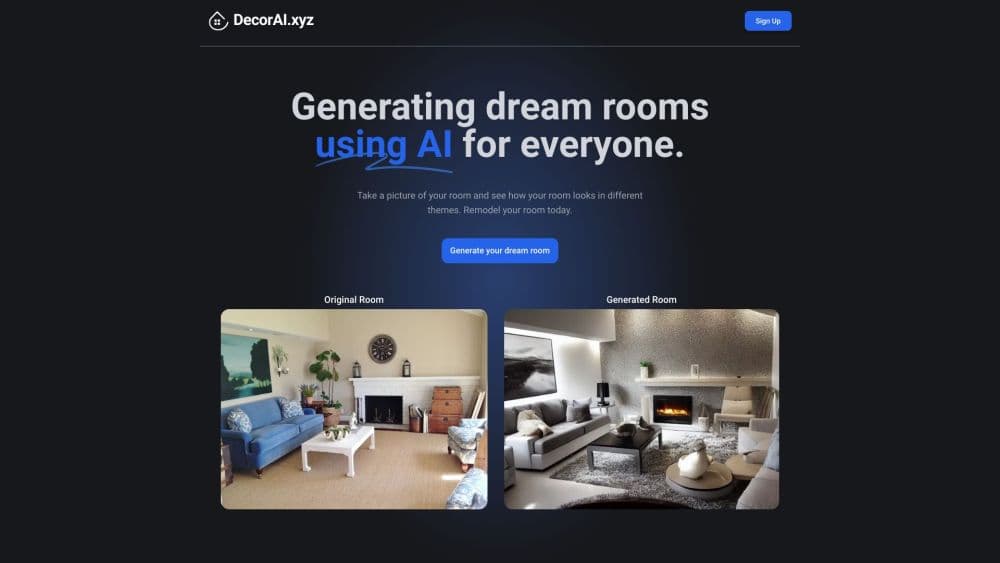
DecorAI is an AI home design app that redesigns a space from a single photo. It works as an AI room design app on the web and on phones: you upload a picture, choose a style, and the AI returns a new version of the same space within seconds. The company also covers exteriors and gardens, so the same account handles a living room makeover and a facade refresh, all driven by AI interior design.
It targets people who want to see a design idea before they commit money to furniture or a contractor. Homeowners plan a renovation, renters test a layout they cannot change, and real estate agents stage a listing with a furnished look. The free tier lets anyone try a virtual room design before paying.
The main limit is control. DecorAI works from what the camera sees, so a cluttered or badly lit photo produces weaker results, and you cannot drag a sofa or set exact dimensions the way a 3D planner lets you. It suggests a look, it does not measure your room.
Prices are low by design. The company puts a single design as low as $0.2, framed against the $500 to $1000 a traditional interior designer charges for one room, and it trains on a dataset of 160 million design samples.
Getting Started
- Open DecorAI in a browser or install the app, then sign in with an email or a social account.
- Upload a photo of the room, exterior, or garden you want to redo.
- Pick a style, such as Modern, Scandinavian, Japandi, Bohemian, or Coastal.
- Generate the design and wait a few seconds for the render.
- Compare the before and after, then save, download, or share the ones you like.
Product Information
A quick look at DecorAI's pricing, supported platforms, and performance.
Best for
The users, tasks, and scenarios where this tool fits best.
Users
- Homeowners planning a renovation
- Renters who cannot remodel
- Real estate agents
- Interior designers and decorators
Tasks
- Redesigning an interior from a photo
- Refreshing a home exterior
- Redesigning a garden or backyard
- Testing multiple design styles
- Producing a visual for a client or listing
Scenarios
- Preparing a property for sale
- Planning a room makeover
- Deciding on paint and finishes
- Exploring a future home
Key features
Photo-to-Design Rendering
This is the core function. Upload a photo of your space, pick a style, and DecorAI returns a redesigned version in seconds that keeps the room's structure while changing the look. It covers interiors, exteriors, and gardens from the same account, so one tool handles a bedroom and a backyard.
20+ Design Styles
The style library spans more than 20 looks, including Modern, Japandi, Scandinavian, Bohemian, Industrial, Coastal, Farmhouse, and Art Deco. You apply a style to any supported space type, so a kitchen and a patio draw from the same catalog. This range is the main reason people use it for brainstorming rather than a single fixed theme.
Interior, Exterior, and Garden Modes
DecorAI is not limited to indoor rooms. The exterior mode restyles facades, entryways, and paint colors to test curb appeal, while the garden mode adds plants, patios, and outdoor furniture. That spread makes it useful for a full property refresh, not just a single room.
Before and After Comparison
Every render comes back as a side-by-side view of the original photo and the new design. You can see exactly what changed, save your favorites, and share them with a partner, a client, or a contractor to get a decision moving.
Style and Preference Control
You steer the result with more than just a preset. You can enter your own style prompt or preference to nudge the AI toward a specific look, then regenerate until it lands close to what you had in mind. It is a lighter form of control than a full 3D planner.
Fast, Low-Cost Renders
An AI design tool that returns a render in seconds, with a single design priced as low as $0.2. Compared with the hours a designer spends on one room, the speed and price let you test many options without a big spend.
Pros and cons
Pros
- Redesigns a room, exterior, or garden from one photo in seconds, with no design skills needed.
- Packs more than 20 styles and applies them across interiors, exteriors, and gardens.
- Low entry price, with designs from around $0.2 each and a free tier to try first.
- Runs on the web and on iOS and Android, so you can work from a phone.
- Before and after views make it easy to compare options and share them for feedback.
Cons
- No precise control over layout or dimensions, so you cannot place furniture to an exact measurement.
- Results depend on photo quality, and cluttered or dim rooms produce weaker renders.
- It is a visualization tool, so it does not produce buildable plans or measurements for a contractor.
- No confirmed public API, which rules out automating renders inside your own systems.
Frequently asked questions
It redesigns a space from a photo using AI. You upload a picture of a room, exterior, or garden, pick a style, and get a new version of the same space within seconds.
Related content
Explore related tools, skills, and articles for DecorAI.
DecorAI Alternatives

Google EmbeddingGemma 2
Google DeepMind · Writing · Image · CodingGoogle EmbeddingGemma 2 is a 740M-parameter open model that turns text, code, images, audio, and video frames into vectors in one 768-dimension space, running on phones and laptops.

Tractionwave
TractionWave · Image · MarketingTractionWave is an AI attention heatmap tool for static ads. Upload a PNG or JPG and it returns predicted attention, ranked hotspots, and fixes before you spend budget.

Imejis.io
Imejis.io · Image · MarketingImejis.io is an AI design studio for agents and marketing teams. Describe an image in plain words, and it writes the copy, builds the layout, reflows it to every size, then exports a finished file.