

Deskrib.Ai
Deskrib.Ai · Productivity
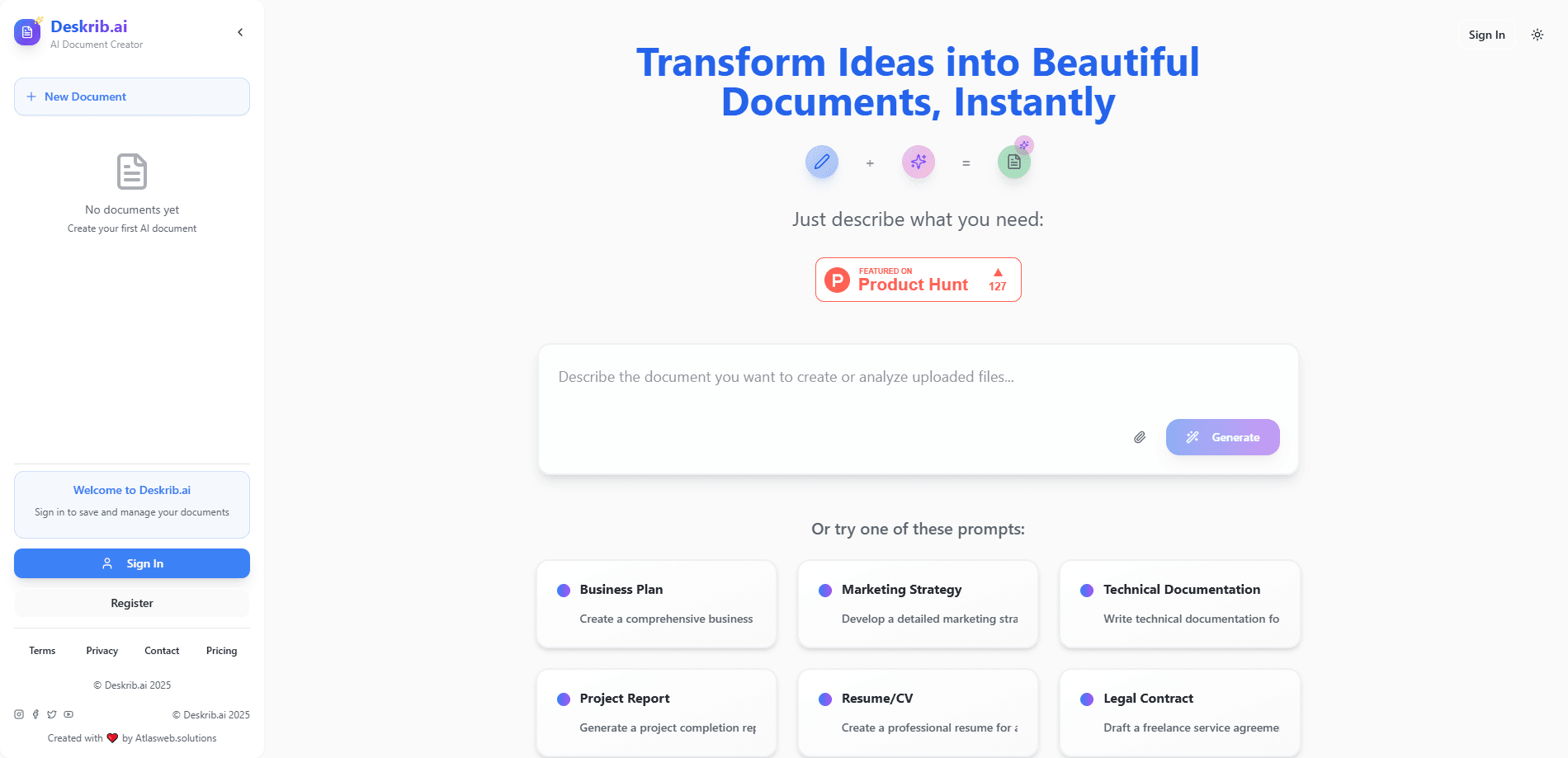
Deskrib.Ai is an AI document maker that turns a short prompt into structured business plans, resumes, and reports, then lets you refine the draft through chat like a chat-based document editor.
About Deskrib.Ai
What Is Deskrib.Ai
Deskrib.Ai is an AI document generator built for people who need a solid first draft fast. You describe what you want, and it produces a structured document with headings, sections, and formatting rather than a wall of loose text. Business plans, resumes, project reports, marketing strategies, and technical documentation all fall inside its range.
The pitch is speed from a blank page. Instead of staring at an empty editor, you get a complete outline within a minute and then shape it. The chat panel sits next to the document, so edits happen in plain sentences like "shorten the executive summary" or "add a financial projections table." The tool also pulls in background research to support claims, which helps when you're writing a market analysis or a product comparison.
The trade-offs are worth knowing before you pay. The generator works best on conventional, template-friendly documents, and the research layer doesn't let you filter sources by type, so academic writers may still check citations by hand. There's no mobile app, and the free plan caps you at one document a day.
Getting Started
- Create an account on the Deskrib.Ai website with an email address.
- Start a new document and either pick a template like Business Plan or Resume/CV, or write your own prompt.
- Let the tool generate the first version, including any tables or charts the document needs.
- Open the chat panel to request changes such as reordering sections, tightening wording, or adding a section.
- Export or share the finished document, which you can print or save as a PDF.
Product Information
A quick look at Deskrib.Ai's pricing, supported platforms, and performance.
Best for
The users, tasks, and scenarios where this tool fits best.
Users
- Founders and small business owners
- Students and job seekers
- Marketers and content leads
Tasks
- Drafting a business plan
- Writing a resume
- Building a project report
- Planning a trip
Scenarios
- Starting a document from nothing
- Revising a long draft under deadline
- Comparing products before a purchase
Key features
Prompt-to-Document Generation
You type what you need, and Deskrib.Ai returns a structured document with headings, body sections, and formatting already in place. Think of it as an AI writing tool and an AI report generator in one panel: it reads the intent behind a prompt and picks a sensible layout, so a business plan comes out with the usual subsections instead of an unstructured block of text. This is the feature most people come for.
Chat-Based Editing
A chat panel sits beside the document and takes instructions in everyday language. Ask it to shorten a section, change the tone, or insert a table, and the draft updates where you're looking. Keeping editing conversational means you don't fight a toolbar to make small changes.
Auto-Research
For documents that lean on facts, the tool runs a search and folds the findings in as supporting content. It's aimed at tasks like product research and market overviews where you'd otherwise open a dozen tabs. The catch: results can't be filtered by source type yet, so you stay responsible for checking quality.
Business and Legal Templates
A set of ready-made prompts covers business plans, marketing strategies, technical documentation, project reports, resumes, and legal contracts. Each template nudges this business plan generator toward the sections that belong in that document. It saves you from describing the structure yourself every time.
PDF Export and Sharing
Finished documents can be printed or saved as a PDF, and a share option lets you send a link instead of a file. The Unlimited plan adds priority processing, so generation queues move faster when you're pushing several documents at once.
Pros and cons
Pros
- Produces a full draft from a short prompt in under a minute.
- Chat editing keeps revisions conversational instead of menu-driven.
- Auto-research adds supporting facts to research-heavy documents.
- Template set covers common business, academic, and legal formats.
- Unlimited plan removes the document cap for around $20 a month.
Cons
- Free plan allows only one document per day, which is tight for testing.
- Research results can't be filtered by source type, so academic citations need manual checking.
- No mobile app, so you're limited to a browser.
- Best results come from conventional documents, less so for unusual or highly custom formats.
Frequently asked questions
It handles business plans, marketing strategies, resumes and CVs, project reports, technical documentation, and legal contracts. It also drafts travel itineraries and product research summaries when you prompt for them.
Related content
Explore related tools, skills, and articles for Deskrib.Ai.
Deskrib.Ai Alternatives

Base Code
Base44 (Wix) · Coding · ProductivityBase Code is a shared cloud development environment from Base44. Teammates describe changes to an existing GitHub codebase in chat, preview them live and send them back as pull requests.

Knocket
Knocket (Tencent RTC team) · Productivity · Business · ChatbotKnocket is a free live chat and contact page tool that lets visitors message you from your website, app, or a shareable link, with every reply handled from Telegram or one inbox.

FloorGen
Vinit Kumar (FloorGen) · Productivity · China AIFloorGen is a browser-based floor plan maker that turns a sentence or a sketch into an editable 2D plan and a 3D walkthrough. Export to PDF, DXF or video, and draw without an account.