

Deta
Deta · Coding
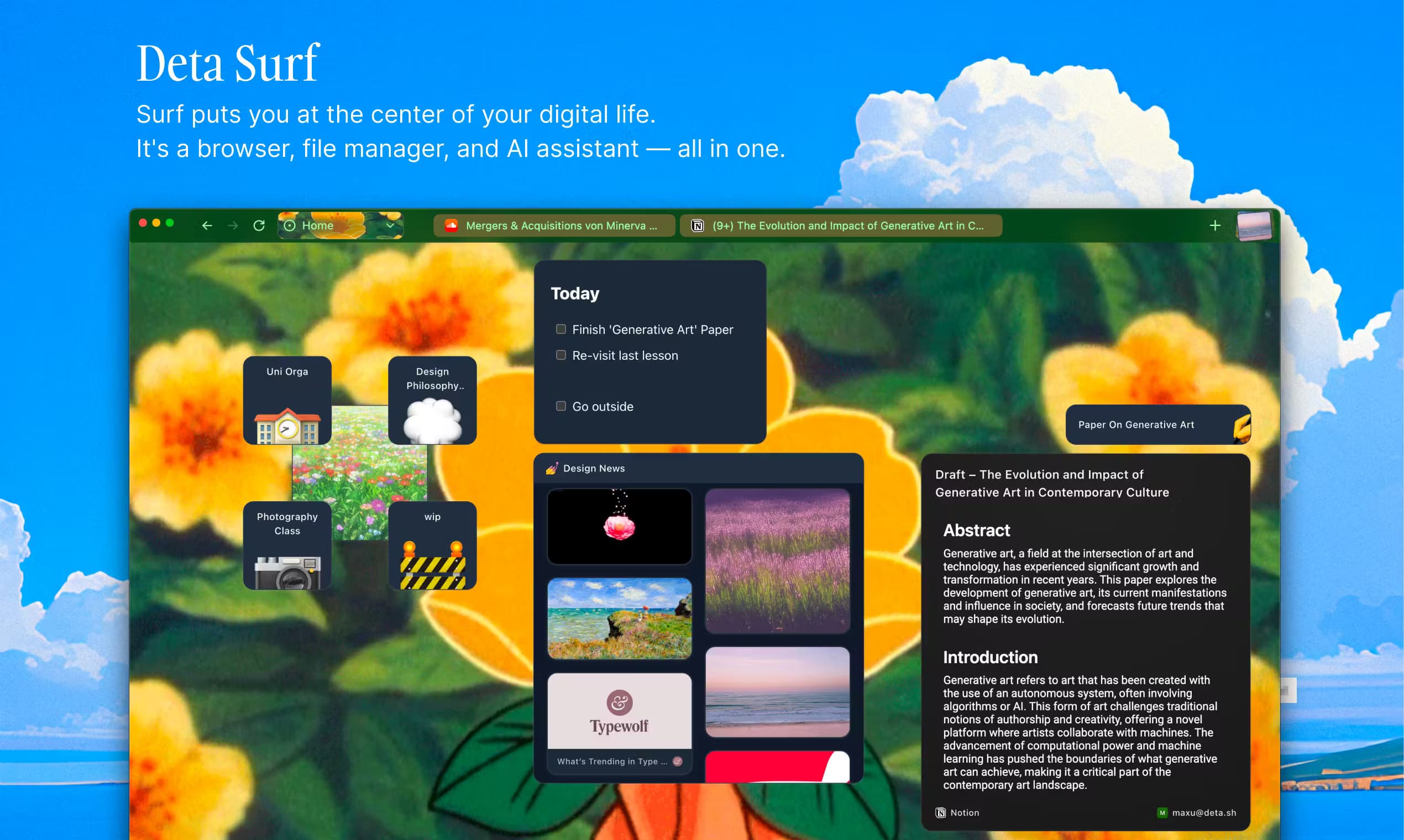
Deta Surf is a free, open-source AI notebook that brings files, PDFs, and web pages together so students and researchers can think in one place.
About Deta
What Is Deta Surf
Deta Surf is a desktop app that works like a notebook with a browser baked in. You drop links, local files, YouTube videos, and PDFs onto a page, then ask questions across all of them at once. Answers land right next to your own writing, so your notes grow as you read.
The company behind it, Deta, built Surf to kill the messy loop most people know too well: search, open ten tabs, scroll, copy, paste into a doc. Surf folds that whole loop into a single window. It's a research notebook for people who read a lot and hate losing their place.
It runs on MacOS, Windows, and Linux. The big catch is that Surf is still in open beta, and you have to bring your own AI model key (or run a local one) to get the assistant features, so setup isn't push-button yet.
Getting Started
- Download Surf for MacOS, Windows, or Linux, then join the open beta.
- Connect an AI model. Use your own API key for a hosted model, or point Surf at a local language model if you'd rather keep everything on your machine.
- Create a notebook and start a page for a class, project, or topic.
- Add sources: paste a link, drag in a PDF, or clip a web page and YouTube video into the page.
- Ask questions about your sources, then keep writing in the same notebook as the answers come in.
Product Information
A quick look at Deta's pricing, supported platforms, and performance.
Best for
The users, tasks, and scenarios where this tool fits best.
Users
- Students
- Researchers
- Writers
Tasks
- Summarizing a stack of sources
- Building class notes
- Pre-writing research
Scenarios
- Cramming for an exam
- Exploring a new interest
- Working offline
Key features
Notebooks that hold the whole web
A Surf notebook is a page you fill with anything relevant to one topic: web links, local files, PDFs, tweets, and YouTube videos. Everything shows up as a card you can reopen. That keeps a project in one place instead of scattered across bookmarks and folders. The point is simple: less scrolling, less copying, less context switching.
Ask questions across many sources at once
The assistant reads every source on the page together, so you can ask one question and get an answer that weighs all of them. That's different from a chatbot with a single document attached. Ask for a summary or a closer read, and Surf pulls the relevant parts out of several files at once.
Generate notes from your media
Surf turns what's on the page into draft notes you can edit. Feed it a video, a long article, or a PDF and it writes a starting point, which saves the slow work of transcribing and summarizing by hand. You keep control of the final text; Surf just gets you past the blank page.
Local-first, open-format storage
Your notebooks live on your own machine. Surf stores them in open formats through a local engine it calls SFFS (Surf Flat File System). Nothing gets locked into a proprietary cloud. Files stay readable and transparent, which matters if you care about owning your data. That local-first design is the product's whole pitch.
Open source and open model choice
Surf is open source under the Apache-2.0 license, so anyone can inspect or build on it. You can plug in a hosted AI model with your own key, or run a local language model for full privacy. That flexibility is unusual for a browser-based tool, and it's a big part of why developers have taken notice.
Explore the web without a chat window
Surf keeps browsing and note-taking in the same view. You open pages in tabs inside the notebook, ask about them, and keep writing, so research and writing don't fight for space. You get context without the usual split between a browser and a doc.
Built for students
Deta ships a student-focused mode with sample notebooks for physics, chemistry, art history, literature, and computer science. It's a ready-made AI study tool if you want to see how to organize a class before building your own setup.
Pros and cons
Pros
- Free and open source under Apache-2.0, so there's no subscription to test it.
- Local-first storage in open formats keeps your data on your own machine.
- Works with your own model key or a local model, giving you privacy control.
- Combines browsing, sources, and writing in one notebook, cutting tab overload.
- Runs on MacOS, Windows, and Linux, so it isn't tied to one platform.
Cons
- Still in open beta, so you should expect bugs and changing features.
- No built-in AI model: you must supply an API key or set up a local model before the assistant works.
- No public API for automation, which limits use in custom pipelines.
- No mobile app, so you're limited to desktop for now.
Frequently asked questions
It's an AI notebook for research. You collect files, PDFs, and web pages on one page, then ask questions across all of them and take notes in the same window.
Related content
Explore related tools, skills, and articles for Deta.
Deta Alternatives

Harness Router
Protocol Lattice · Coding · ProductivityHarness Router picks the next tool inside an AI agent harness you already run, using cached decisions, Jev routing, and optional MCTS. Execution stays with your loop.

VibeDefend by CybeDefend
CybeDefend · Coding · ProductivityVibeDefend adds your business and security rules to Claude Code, Cursor, Windsurf, Copilot and Codex with one command, blocks risky actions, and scans every diff before the commit.

OpenScience
Synthetic Sciences · Coding · ProductivityOpenScience is an open-source AI research workbench from Synthetic Sciences. It reads papers, writes and runs code, queries scientific databases and keeps each result's evidence in one project.