

DevKit
DevKit · Coding · Other
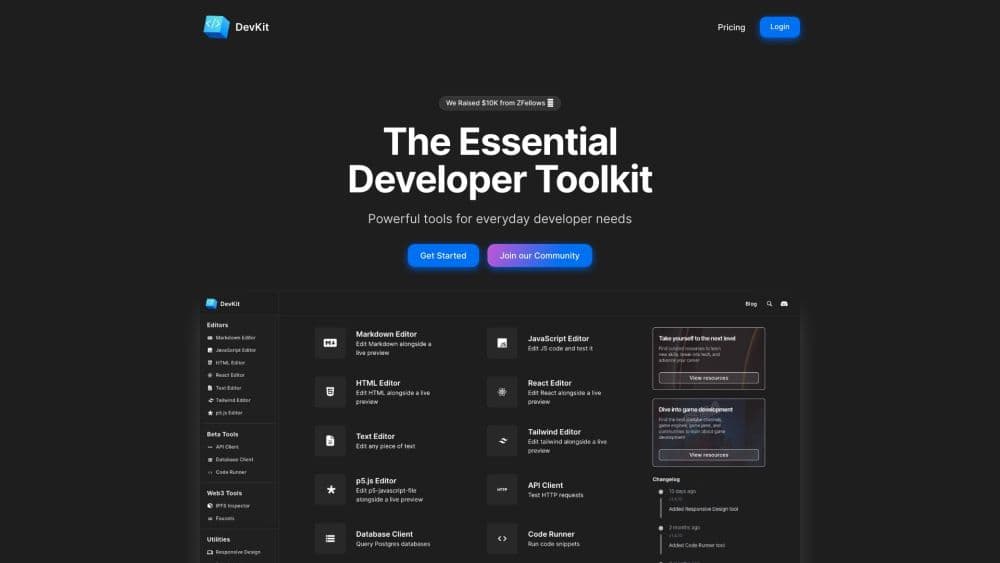
DevKit is an AI developer toolkit that pairs DevGPT chat with 30+ browser tools for API testing, Postgres queries, code runs, editors, and data conversion.
About DevKit
What Is DevKit
DevKit is a browser workspace for developers who keep a dozen tabs open for small jobs. The chat side, called DevGPT, answers coding questions and writes snippets. The tool side holds the utilities you normally hunt down one by one: an API client, a database client, code editors, converters, hashes, diffs, and a code runner.
The pitch is fewer context switches. Instead of pasting JSON into an ad-heavy site and hoping it doesn't log your data, you format it in the same place where you debug an endpoint. DevKit makes money from subscriptions and ads, and its FAQ says that model keeps the tools free of the usual tracking-for-pay arrangement.
The limits matter too. Database work covers Postgres only, with MySQL and SQL Server listed as coming soon. The tool set leans toward everyday web and backend chores, so mobile app builds, cloud infrastructure, and team collaboration sit outside its scope. It runs in a browser, which means no local environment to configure and no offline mode to fall back on.
Getting Started
- Open getdevkit.com and create a free account with email or a social login.
- Pick a starting point: the DevGPT chat box, one of the editors, or a utility from the tool list.
- For API testing, paste an endpoint and let the API client generate the request config, then send it and read the response inline.
- For database work, connect a Postgres instance, describe the result you want in plain English, and edit the generated SQL before you run it.
- Save the output or copy it into your project. Paid plans unlock the higher limits and the full model list.
Product Information
A quick look at DevKit's pricing, supported platforms, and performance.
Best for
The users, tasks, and scenarios where this tool fits best.
Users
- Backend developers
- Indie founders and solo builders
- Students learning to code
- Data-curious product people
Tasks
- Testing a public API endpoint
- Writing a tricky SQL query
- Running a quick snippet
- Cleaning up data
Scenarios
- Debugging an integration at 11pm
- Prototyping an idea before touching the codebase
- Teaching or demoing
Key features
DevGPT Chat With Several Models
The chat interface works like a general AI coding assistant, with a model switcher on top. DevKit advertises access to five or more models, including OpenAI's GPT line, Gemini for long context, and Llama served through Groq for fast replies. Automatic code previews mean a generated component renders next to the answer instead of sitting there as text.
API Client That Writes the Request
Paste a public API endpoint and DevKit drafts the request configuration for you, headers and parameters included. You adjust what looks wrong, send it, and read the response in the same panel. The company says hundreds of public APIs are supported, which cuts the setup time for one-off integration tests.
Postgres Queries in Plain English
Connect a Postgres database, ask a question the way you'd ask a colleague, and DevKit returns SQL plus a result table. You can plot the output instead of exporting it to a spreadsheet. The catch is scope: Postgres works today, MySQL and SQL Server are still listed as coming soon.
Code Runner Across Dozens of Languages
The code runner executes snippets in dozens of languages inside the browser. It's the feature that makes the editors useful for more than markup: write a function, run it, and check the output before it goes anywhere near your repo. Isolation makes it a reasonable place to test a risky regex or a date parsing edge case.
Seven Editors and a p5.js Playground
DevKit ships an online code editor for Markdown, JavaScript, HTML, React, plain text, and Tailwind, plus a p5.js playground. The p5.js editor is the odd one out, aimed at creative coding: generative art, small games, and visual experiments. You can capture screenshots or recordings of the result and share them without extra software.
Thirty Plus Utilities in One Place
The utility shelf covers the small jobs: hash generator, regexp tester, text diff, CSV viewer, URL and date inspectors, responsive design preview, JWT decoding, Base64 and URI encoding, and converters between JSON, YAML, CSV, and TypeScript. Each one is a single page with no recipe language to learn, which is the main dig at CyberChef in DevKit's own FAQ.
Pros and cons
Pros
- One browser tab handles chat, API calls, SQL, and format conversion, so you stop paying for several small subscriptions.
- The free plan covers the tools, which makes it easy to test before committing to a year.
- Postgres plus plain English removes most of the friction from ad hoc queries.
- The p5.js editor and capture tools are genuinely fun, and rare in a productivity suite.
- No install step and no local environment to maintain.
Cons
- Database support stops at Postgres for now, so MySQL and SQL Server users get nothing from that feature.
- The paid plan is billed annually, which is a commitment for a tool you may only use in bursts.
- Model access depends on DevKit's own integrations, so you can't bring your own API keys or pick a model the company hasn't added.
- Team features are thin. There's no shared workspace or query library for a group.
Frequently asked questions
DevKit is a browser based AI developer toolkit from the team at getdevkit.com. It combines DevGPT, a chat assistant with several language models, with 30+ mini tools for API testing, database queries, code execution, editing, and data conversion.
Related content
Explore related tools, skills, and articles for DevKit.
DevKit Alternatives

Udon
Udon · Coding · ProductivityUdon turns an Apple Silicon Mac into a home server you run from a browser, with container controls, file shares, and an optional AI sysadmin.

offstage
offstage cloud · Coding · Productivityoffstage gives AI coding agents and CI jobs a real Mac: a fresh macOS account on Apple silicon, driven over an API and billed by the second.

BotBus
Chengdu Tuyang Tusen Technology Co., Ltd. · Coding · ProductivityBotBus lets you control AI coding agents from your phone and watch: approve commands, start tasks and read results while the code stays on your desktop.