

Docamine
Docamine · Image · Productivity
Docamine is a web app that fills unlabeled PDF and image documents with AI. It spots blank fields, pulls answers from a reference file, and exports a signed copy. The site is offline now.
About Docamine
What Is Docamine
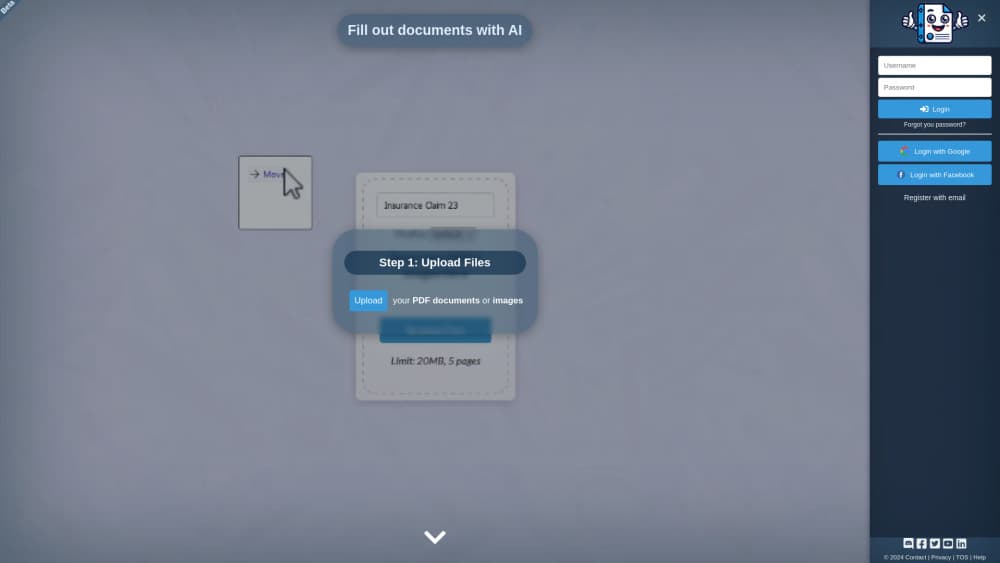
Docamine was a browser based AI form filler for paperwork that has no fillable fields. Most PDFs people actually receive, from clinic intake sheets to rental applications, are flat scans. Clicking into them does nothing. Docamine read the page, guessed where each answer belonged, and turned those spots into editable boxes you could type into.
The pitch was simple: stop retyping your address into the eleventh form this month. You uploaded the document, uploaded something that already held your details, and the tool matched the two. A Docamine review from its Product Hunt launch describes the same loop, plus extras like saved signatures and separate profiles for family members or a small company.
The catch is status. As of late October 2026 the docamine.com domain no longer serves the app. The address resolves to an unrelated page, and no login or pricing screen is reachable. Treat this as documentation of a tool that stopped operating, not a signup guide.
Getting Started
- Open docamine.com in a browser. No install, no extension.
- Upload the blank PDF or a photo of the paper form.
- Upload a reference document that already contains your name, address and ID numbers.
- Check the fields the AI proposes, fix anything it mapped to the wrong line, then download the filled file.
Product Information
A quick look at Docamine's pricing, supported platforms, and performance.
Best for
The users, tasks, and scenarios where this tool fits best.
Users
- People buried in repeated paperwork
- Small office staff
- Families managing several people's documents
Tasks
- Filling out PDF forms that were never given form fields
- Copying details from an ID card or previous application into a new one
- Adding a signature to a batch of consent sheets
- Sorting a pile of mixed documents before a deadline
Scenarios
- Moving season
- New patient intake
- Visa or benefits applications
Key features
Field detection on flat documents
The tool read a page and proposed where answers should go, even when the PDF had no interactive elements at all. That covered scanned paper, photos taken with a phone, and exports from old systems. Each proposal arrived as an editable box, so a wrong guess cost one click to move. If your job is to fill out PDF forms that shipped flat from a government office, this is the part that matters.
Reference uploads instead of retyping
You handed the app a document that already had your details, such as a passport scan or a prior application, and it used that as the source. This is the part that saved real time. Typing an address once per form is annoying. Typing it forty times a year is the reason people look for an AI document filler in the first place.
Reusable form library
Forms you filled before could be reopened and refilled for the next client, which mattered for anyone processing the same template weekly. The saved structure carried over, so only the answers changed. That turned a per document task into a per client task.
Projects for grouping documents
Files could be organized into projects rather than dropped into one flat list. For a small firm, that meant one place per client with every form, signature and reference file inside it. It sounds minor until you're hunting for the right version of a form at 5pm.
Drawn signatures kept on file
You drew a signature once with a mouse or trackpad and reused it on later documents. Signatures stayed attached to the profile you assigned, which kept a spouse's signature off a work contract. Practical for consent slips and internal approvals, less so where a notarized or certificate backed signature is required.
Separate profiles per person
Profiles held distinct sets of personal data, so the same account could fill forms for a parent, a child or a company entity. Switching profiles reset the answers the AI pulled in. That's the difference between a consumer toy and something a two person office can share.
Pros and cons
Pros
- Handles scanned and photographed forms where text extraction tools give up, which is most of the paperwork people actually receive.
- Reference uploads remove the repeated typing that makes form automation worth paying for.
- Saved signatures and profiles fit recurring workflows, like weekly client intake or monthly compliance sheets.
- Credit based pricing meant a light user paid for a few documents instead of a monthly subscription.
- Nothing to install: it ran in a browser tab, so a locked down work laptop was fine.
Cons
- The service is not reachable as of October 2026. The domain now shows an unrelated page, so you can't sign up, log in or recover old documents.
- Field detection still needed a human pass. On a government form, a value placed one row too high can mean a rejected application and a repeat trip.
- Credit costs were only visible inside the app, so budgeting for a team was guesswork before signing up.
- No public API or export into other systems, which capped it at manual, one document at a time use.
Frequently asked questions
It filled out documents that had no fillable fields. You uploaded a blank PDF or a photo, the AI marked likely answer spots, and you reviewed them before downloading the finished file.
Related content
Explore related tools, skills, and articles for Docamine.
Docamine Alternatives

Google EmbeddingGemma 2
Google DeepMind · Writing · Image · CodingGoogle EmbeddingGemma 2 is a 740M-parameter open model that turns text, code, images, audio, and video frames into vectors in one 768-dimension space, running on phones and laptops.

Tractionwave
TractionWave · Image · MarketingTractionWave is an AI attention heatmap tool for static ads. Upload a PNG or JPG and it returns predicted attention, ranked hotspots, and fixes before you spend budget.

Imejis.io
Imejis.io · Image · MarketingImejis.io is an AI design studio for agents and marketing teams. Describe an image in plain words, and it writes the copy, builds the layout, reflows it to every size, then exports a finished file.