
Document.Bot - EU/ Offline AI workspace
Document.Bot · Productivity
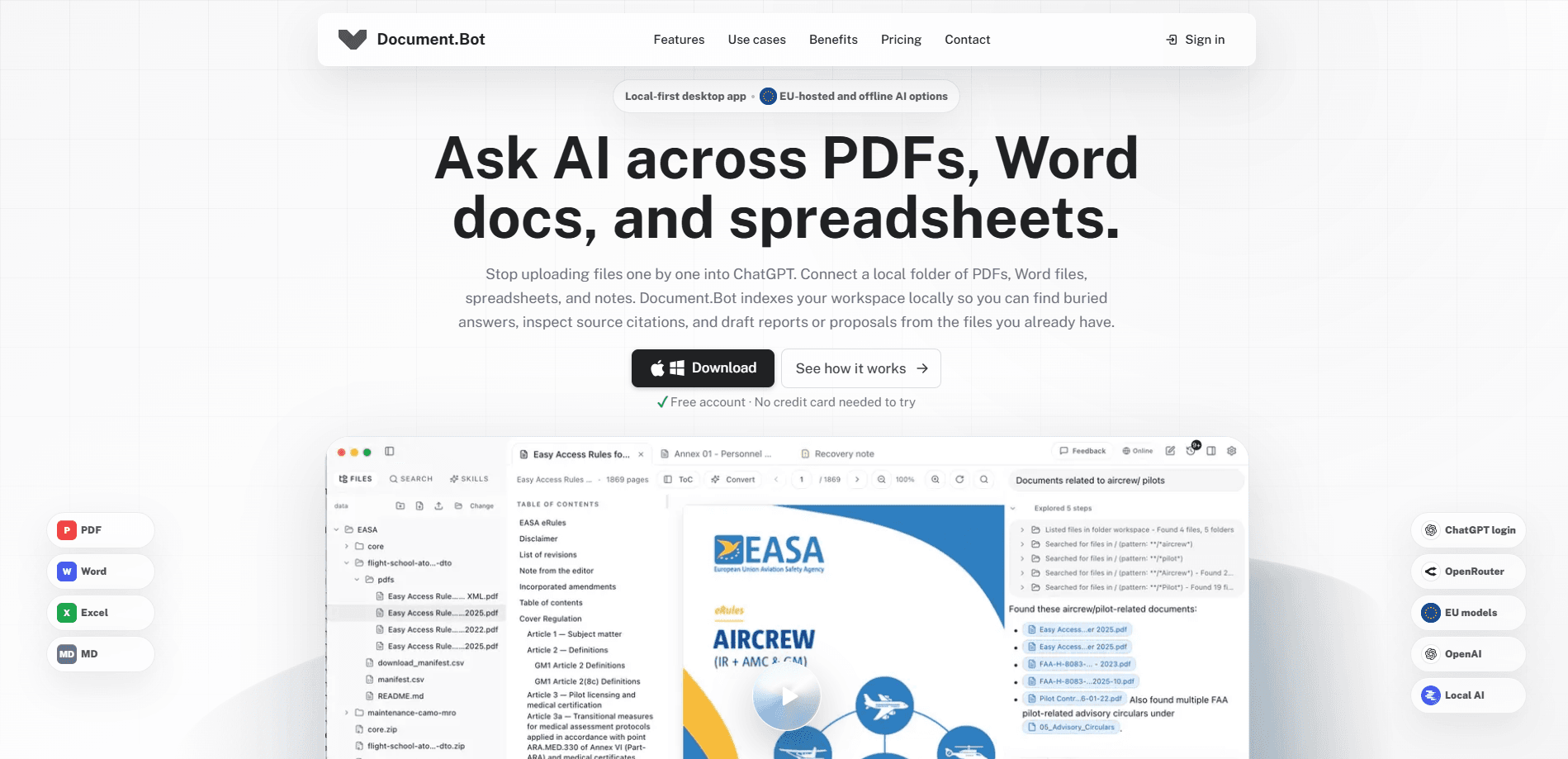
Document.Bot is a desktop AI document workspace that indexes the folders already on your computer, so you can search PDF, Word, Excel, and Markdown files and get answers that point back to the exact page, paragraph, or cell. It's built for people who work with sensitive files and can't upload everything to a chat app. You choose the AI model, from a cloud provider to an EU-hosted option to a fully offline local model, and that choice is the point of the tool.
About Document.Bot - EU/ Offline AI workspace
What Is Document.Bot
Document.Bot is an AI document workspace for searching, reviewing, and drafting around files that stay on your machine. Point it at a normal folder with company documents, source PDFs, registers, notes, and outputs, and it builds a map of what's inside before you ask a single question. The search then runs across PDF, Word, Excel, and Markdown files together rather than one format at a time. That order matters.
The problem it solves is the one that stops most people from using AI on real work files. Sensitive contracts, audit notes, and client records can't go into a generic chat app, and even when they can, the answer rarely tells you where it came from. Document.Bot keeps the files local and returns citations you can open back to the original page, row, or paragraph. No uploads. No mystery answers.
The main limit is scope. This is a desktop tool for folder-based work, not a mobile app, and there's no Google Play build. So what's the catch? The quality of an answer still depends on which AI model you connect, and an offline local model will be slower and less capable than a frontier cloud API. You're trading some raw power for control over where your data goes.
Getting Started
- Download the desktop app from the official site and sign in, or use ChatGPT login if you already have that account and want to route through it.
- Choose your AI provider: a cloud API such as OpenAI or OpenRouter, an EU-hosted provider, or a fully offline local model.
- Open a local folder that holds your documents. Document.Bot analyzes it first, building a workspace map of file types and structure.
- Type
@in the chat to tag folders, PDFs, Word documents, or Excel workbooks, or select specific text, cells, and track changes to attach as evidence. - Ask your question, open the citations it returns to check the source, then draft a report, proposal, or review edit from the evidence you selected.
Product Information
A quick look at Document.Bot - EU/ Offline AI workspace's pricing, supported platforms, and performance.
Best for
The users, tasks, and scenarios where this tool fits best.
Users
- Compliance and legal teams
- Researchers and analysts
- Proposal and bid writers
Tasks
- Finding buried evidence
- Reviewing Word feedback
- Drafting audit notes and reports
Scenarios
- Audits where every claim needs a paper trail
- Client work under privacy rules
- Daily folder-based research
Key features
AI Document Agent
The core agent searches through office files before it answers. It navigates PDF pages and tables of contents, Word sections and track changes, and Excel ranges, then drafts a response. Every step is visible and clickable, so you can review what it opened, searched, and compared before you trust the result. Nothing happens off-screen.
Source Citations You Can Open
Answers come back with citations that link to the original file section, row, paragraph, or page. That matters for audit and compliance work, where an answer without a traceable source is close to useless. You check the source first, then decide whether to use the answer. Trust, then verify.
File Tagging with @
Type @ in the chat to tag folders, PDFs, Word documents, Excel workbooks, and individual evidence items. Nothing gets uploaded. The assistant returns source citations as clickable tags that jump back to the right PDF page, Word paragraph, or Excel cells.
Unified Search Across File Types
Document.Bot analyzes your folders in advance, so you can search across file types by exact keywords or approximate descriptions. That same workspace map helps the assistant find the right source before it answers, instead of guessing from filenames. Narrow queries work better than vague ones.
AI Provider Choice
You pick the model: ChatGPT login, frontier cloud APIs, EU-hosted providers, or local models. This is the feature that makes the tool usable in regulated settings, since the data path changes with your choice. Offline mode is slower, but the files never leave the machine. That trade is the whole point.
Word Review and Track Changes
The assistant inspects Word comments and track changes and proposes reviewable updates with source tags attached. Editors and reviewers can see what changed and why, rather than accepting a rewrite on faith.
Reusable Skills
Skills let you teach the assistant your workflow, including domain knowledge, company procedures, and team-specific review habits. Teams handling repeated review types get more consistent output once a skill is set up.
Pros and cons
Pros
- Files stay local, and you choose whether the AI runs in the cloud, on an EU host, or fully offline.
- Answers carry citations that open back to the exact page, paragraph, or cell.
- Searches PDF, Word, Excel, and Markdown folders together, not one format at a time.
- Free account with no credit card needed to try the desktop app.
- Word track-changes and comment review fits real editing workflows.
Cons
- Desktop only, with no mobile app and no Google Play build, so work is tied to a computer.
- No public pricing on the site, which makes planning harder before you sign up.
- Offline local models are slower and less capable than frontier cloud APIs.
- Getting the best results depends on picking the right provider, which adds setup work.
Frequently asked questions
Yes, there's a free account and the site says no credit card is needed to try it. Beyond that, cost depends on the AI provider you connect, since a cloud API or EU-hosted model bills separately from the app itself.
Related content
Explore related tools, skills, and articles for Document.Bot - EU/ Offline AI workspace.
Document.Bot - EU/ Offline AI workspace Alternatives

Base Code
Base44 (Wix) · Coding · ProductivityBase Code is a shared cloud development environment from Base44. Teammates describe changes to an existing GitHub codebase in chat, preview them live and send them back as pull requests.

Knocket
Knocket (Tencent RTC team) · Productivity · Business · ChatbotKnocket is a free live chat and contact page tool that lets visitors message you from your website, app, or a shareable link, with every reply handled from Telegram or one inbox.

FloorGen
Vinit Kumar (FloorGen) · Productivity · China AIFloorGen is a browser-based floor plan maker that turns a sentence or a sketch into an editable 2D plan and a 3D walkthrough. Export to PDF, DXF or video, and draw without an account.