
DocXter
CloudRedux · Productivity
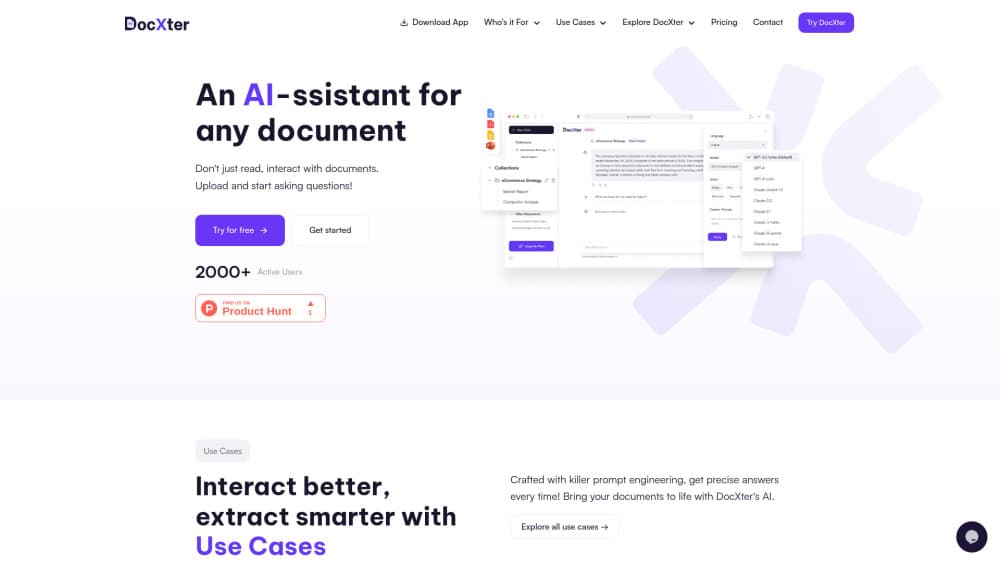
DocXter is an AI document assistant that lets you upload PDFs, DOCX, PPTX and TXT files, then ask questions to get summaries, flagged risks and cross-document comparisons.
About DocXter
What Is DocXter
DocXter is a web app from CloudRedux for AI document analysis. It turns static files into something you can question. Upload a contract, a research paper, a report or a scanned page, and the assistant answers inside the context of that file instead of reaching for general knowledge. That difference matters when a clause or a figure has to be exact.
The product is built around four jobs: pulling answers out of a document, comparing several files at once, running repeatable work through AI agents, and keeping a shared knowledge base for a team. It looks like a chat window, but document Q&A stays tied to the files you added.
The limits are practical. Free accounts get a small daily upload allowance, paid plans are metered in credits, and output quality follows input quality. A blurry scan uploaded without OCR will give you thin answers no matter which model you pick.
Getting Started
- Create an account at chat.docxter.app, or install the web app as a PWA on desktop, iOS, or Android.
- Upload one or more files in DOCX, PDF, PPTX, or TXT format, and tick the OCR box when the source is a scan or a photo.
- Choose an AI model and a use case, or take the recommendation DocXter shows for the task.
- Ask your question in plain language, then adjust tone, language, and custom prompt settings if the first answer needs shaping.
- Save the thread to a collection or workspace so a teammate can continue from the same place.
Product Information
A quick look at DocXter's pricing, supported platforms, and performance.
Best for
The users, tasks, and scenarios where this tool fits best.
Users
- Legal and compliance staff
- Consultants and analysts
- Students and researchers
- Small teams with a shared document library
Tasks
- Contract review and risk spotting
- Literature and report summarization
- Cross-document comparison
- Meeting and proposal preparation
Scenarios
- Due diligence on a stack of PDFs
- Revising for an exam from lecture packs and papers
- Answering an RFP with a fixed deadline
Key features
Multi-document analysis
Most questions about a project span more than one file. If you mainly want to chat with PDF files, this is the feature that carries the product. DocXter lets you upload several documents into the same thread and ask a question that draws on all of them, so a comparison between two contract versions or three quarterly reports happens in one place. Answers cite the source passages, which makes it faster to verify a claim before you repeat it.
AI agents for recurring work
The AI agents are preset assistants with instructions tuned for a domain: legal and compliance, marketing and advertising, research and analysis, sales and outreach. Instead of writing a long prompt every time, you pick the agent and feed it a file. The tradeoff is less flexibility, since an agent follows its own framing of the job.
OCR for scans and images
An OCR document tool matters when the paperwork arrives as a photo or a photocopy. Tick the OCR option during upload and text inside scanned pages becomes searchable, so you can ask about a signed agreement that never existed as a digital file. Handwriting and low-resolution images still cause errors, so spot check names and numbers.
Model selection and bring your own key
DocXter is a document intelligence platform with a model selector rather than a single fixed engine. You can switch between current models depending on whether you need speed, careful reasoning, or a cheaper run, and the app suggests a model for the task you describe. Paid tiers also accept your own OpenAI or Anthropic API key, which helps teams that already have a provider contract.
Response shaping
Answers are not one size fits all. You can set the output language, choose an intent such as formal or elaborate, and add a custom prompt that forces bullet points, headings, or a ban on personal data. This is the difference between a raw summary and something you can paste into a client email without rewriting it.
Shared workspaces and knowledge base
Documents, threads, and notes can be organized into collections and shared with teammates under role-based access. The knowledge base becomes the place where a team's reusable material lives, and document history keeps earlier threads available on paid plans. On the free plan history is limited to three days, which is fine for a quick task and awkward for a long project.
Pros and cons
Pros
- Answers stay anchored to your uploaded files, with source passages you can check.
- Multi-document analysis handles comparisons that would otherwise mean switching between tabs.
- Model choice plus bring-your-own-key support gives teams room to control cost and quality.
- OCR covers scanned contracts and printed notes that other chat tools ignore.
- Workspaces and role-based access make it usable by a team, not just an individual.
Cons
- Credits are the real constraint on paid plans, and heavy multi-document work burns through them quickly.
- Free accounts can upload only one or two documents a day, which is too tight for regular use.
- Supported formats stop at DOCX, PDF, PPTX, and TXT, so spreadsheets and images need a workaround.
- Agent output still needs a human read for legal or financial decisions, and there is no public API for automation.
Frequently asked questions
It reads the documents you upload and answers questions about them in plain language. You can ask for a summary, a risk list, a comparison between files, or an explanation of a dense section, and the answer stays within the material you provided.
Related content
Explore related tools, skills, and articles for DocXter.
DocXter Alternatives

Base Code
Base44 (Wix) · Coding · ProductivityBase Code is a shared cloud development environment from Base44. Teammates describe changes to an existing GitHub codebase in chat, preview them live and send them back as pull requests.

Knocket
Knocket (Tencent RTC team) · Productivity · Business · ChatbotKnocket is a free live chat and contact page tool that lets visitors message you from your website, app, or a shareable link, with every reply handled from Telegram or one inbox.

FloorGen
Vinit Kumar (FloorGen) · Productivity · China AIFloorGen is a browser-based floor plan maker that turns a sentence or a sketch into an editable 2D plan and a 3D walkthrough. Export to PDF, DXF or video, and draw without an account.