

Dot Copilot
Caitun Intelligence Technology (Beijing) Co., Ltd. · Productivity
Dot Copilot is an AI assistant for Android and iPhone that reads what's on your screen, then handles tasks like tracking expenses, translating text, drafting replies and saving to-dos.
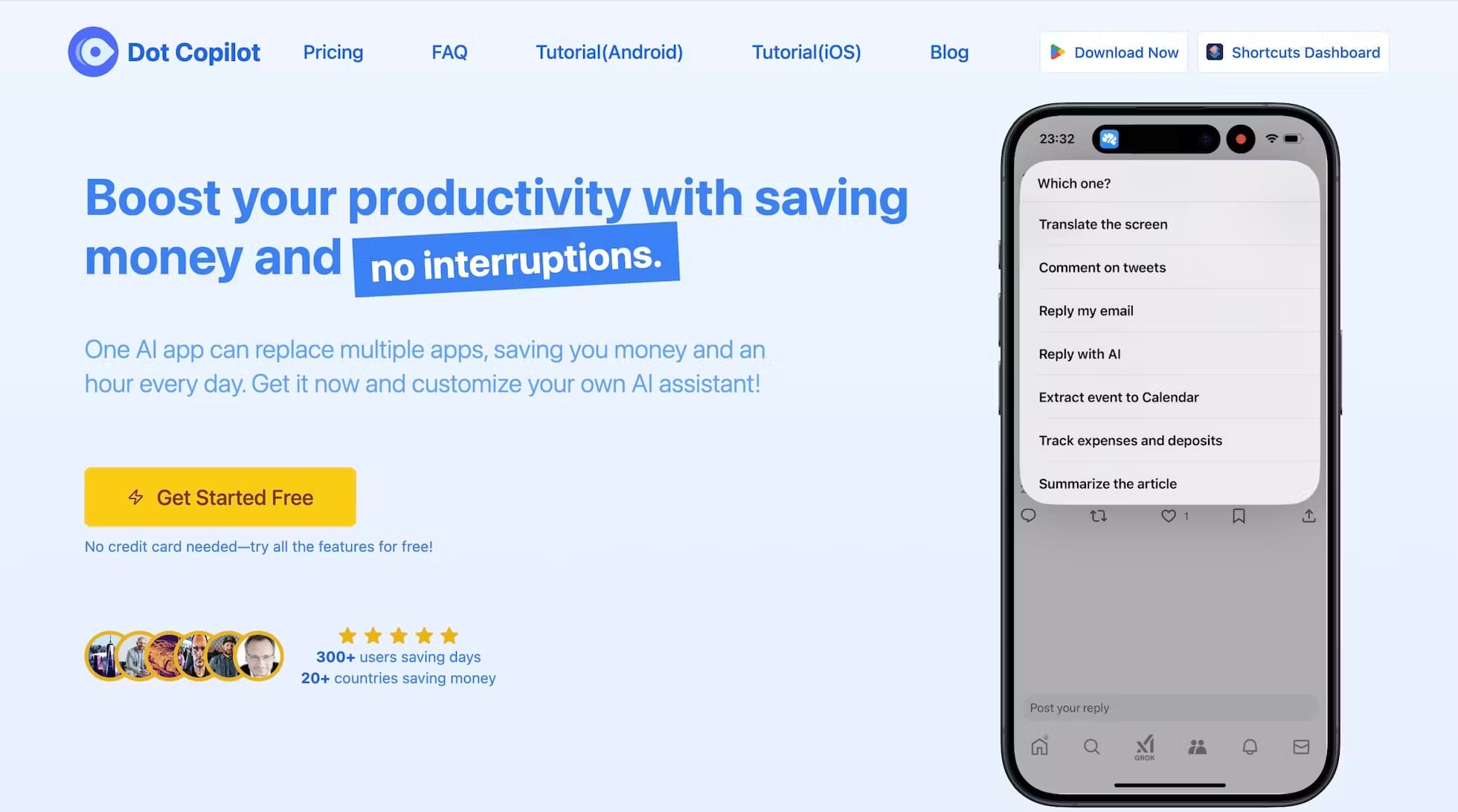
About Dot Copilot
What Is Dot Copilot
Dot Copilot is a mobile AI assistant built by Caitun Intelligence. Instead of opening a separate chat app, you call it up while you're already inside another app, and it reads the screen in front of you. That could be a receipt, a chat with a friend, a web page or a calendar invite. From there it can pull out the useful parts and act on them.
The pitch is one app replacing several. A single tap brings up Dot Copilot inside WhatsApp, Gmail, your banking app or a browser, and you ask it to do the specific thing you'd otherwise do by hand: log an expense, add a meeting, translate a message, or write a comment for a social post. It runs on GPT-4o-mini on the lower plans and GPT-4o on the higher ones.
There are real limits to know about. The free tier is a one-day trial capped at 5 requests, so it's meant for testing, not long-term use. Visual comprehension, the feature that lets the app understand images and screenshots rather than plain text, only shows up on the most expensive plan. And the iPhone version runs through an iOS Shortcut rather than a native App Store app, which changes how you launch it.
Getting Started
- Install Dot Copilot from Google Play on Android, or add the iPhone Shortcut from the official site
- Sign in and grant the screen access the app needs to read on-screen content
- Open any app, tap the Dot Copilot bubble, and pick an action like Translate, Summarize or Track Expense
- Review the result and confirm, so it writes to your calendar, Google Sheets or Reminders correctly
Product Information
A quick look at Dot Copilot's pricing, supported platforms, and performance.
Best for
The users, tasks, and scenarios where this tool fits best.
Users
- People who juggle a lot of messages and apps
- Freelancers and small business owners
- Frequent travelers
- Students
Tasks
- Expense tracking
- Calendar capture
- On-screen translation
- Chat and email replies
- Summarization
- Task management
Scenarios
- A receipt arrives in a messaging app
- A friend sends plans in a group chat
- You're reading a foreign article
- A group chat needs a reply you don't want to overthink
- Your phone is cluttered with screenshots of things to do
Key features
Screen Recognition
The core of Dot Copilot is reading what's displayed on your phone. It scans text and images on screen and works out what you're looking at, whether it's a receipt, a chat thread or a web page. That means you skip the copy-paste step that most AI apps make you do. It's the feature that makes the app feel like it lives inside your other apps rather than beside them.
Expense Tracker With Google Sheets Sync
This is the standout feature for anyone who hates manual bookkeeping. Dot Copilot pulls expense details from a text or a receipt on screen and syncs them straight to Google Sheets. You end up with a running record without typing a single line. The catch is accuracy depends on how clearly the numbers and merchant names are shown on screen.
Calendar and Reminder Capture
When you're reading a message with a date in it, Dot Copilot can extract the schedule details and add them to your Calendar app. It does the same for to-dos, pulling tasks from chats or screenshots and adding them to your Reminders. It turns a conversation into something you'll actually act on, instead of a note you'll forget.
Translation
Dot Copilot translates on-screen text, so a menu, a sign or a message from someone abroad gets translated where it sits. You don't have to screenshot it, paste it somewhere else and wait. For travelers and anyone messaging across languages, it removes the friction that usually kills the habit.
Social Media and Chat Assistance
The app generates comments for Reddit, LinkedIn, X and Facebook, and helps you reply on WhatsApp, Telegram and Line. It reads the message you received and drafts a response based on its tone and content. You stay in control and edit before sending, but the first draft is done. It's built for people who get more messages than they can answer by hand.
Custom Commands
You can build your own actions for tasks the preset buttons don't cover. If you have a repeatable job, like reformatting a specific kind of text or pulling a certain field off a screen, you can set it up once and reuse it. It's the feature that turns a fixed set of tools into something closer to a personal assistant.
Web and Screen Summarization
Point Dot Copilot at a long article or a busy screen and it gives you the summary. It's the same idea as a read-it-later tool, except you never leave the page you're on. If you're skimming a lot of dense text, this is the feature you'll reach for most.
Pros and cons
Pros
- Works inside the apps you already use, so there's no copy-pasting between tools
- Expense tracking syncs to Google Sheets, which replaces a separate bookkeeping app for light use
- The free day and the $9 starter year keep the cost low for trying it out
- Custom commands let you build actions for your own repeatable tasks
- Covers Android and iPhone, with the iPhone version running through a Shortcut
Cons
- The free plan is a single day capped at 5 requests, so it's a trial rather than a free tier you keep
- Visual comprehension, the part that reads images properly, is locked to the $29.9 plan
- The iPhone build is an iOS Shortcut, not a native app, so launching and updating work differently
- No public API, so you can't wire it into your own tools or automations
Frequently asked questions
Dot Copilot is a mobile AI assistant for Android and iPhone that reads your screen and acts on what it finds. It can log expenses to Google Sheets, add events to your calendar, translate on-screen text, draft replies and turn screenshots into to-dos, all from a bubble you call up inside another app.
Related content
Explore related tools, skills, and articles for Dot Copilot.
Dot Copilot Alternatives

Base Code
Base44 (Wix) · Coding · ProductivityBase Code is a shared cloud development environment from Base44. Teammates describe changes to an existing GitHub codebase in chat, preview them live and send them back as pull requests.

Knocket
Knocket (Tencent RTC team) · Productivity · Business · ChatbotKnocket is a free live chat and contact page tool that lets visitors message you from your website, app, or a shareable link, with every reply handled from Telegram or one inbox.

FloorGen
Vinit Kumar (FloorGen) · Productivity · China AIFloorGen is a browser-based floor plan maker that turns a sentence or a sketch into an editable 2D plan and a 3D walkthrough. Export to PDF, DXF or video, and draw without an account.