

Draft
InnoSage · Productivity
Draft is a markdown writing app that turns the useful parts of your AI conversations into notes you actually keep. A companion Chrome extension clips chats from ChatGPT, Claude, Gemini, and DeepSeek, plus regular web pages, straight into your workspace. Everything is stored locally by default, so nothing depends on a server staying online. Think of it as an AI chat organizer bolted onto a clean markdown editor. It suits writers, researchers, and anyone who keeps losing good answers inside temporary chat windows. Want to stop losing them?
About Draft
What Is Draft
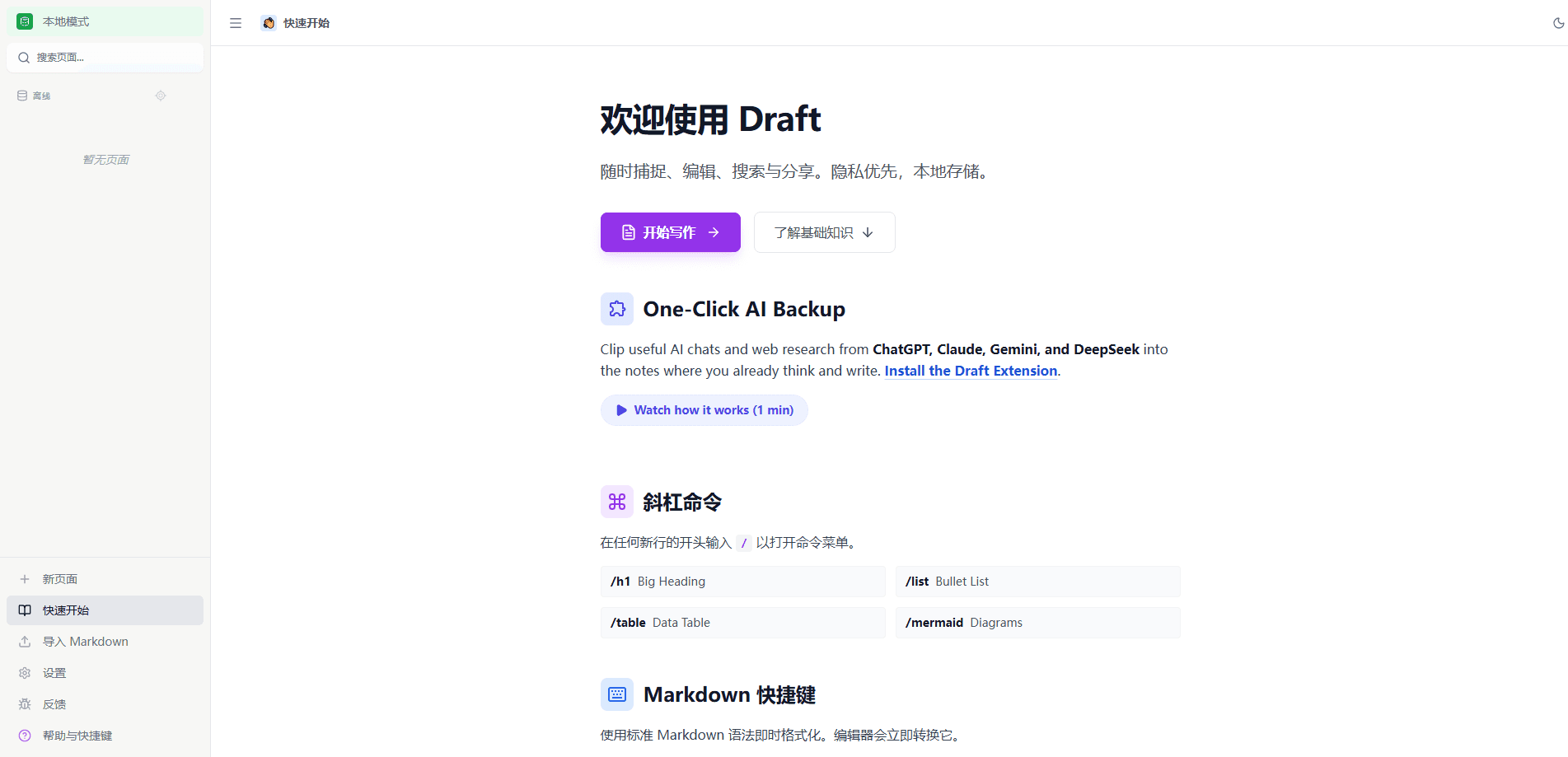
Draft is a local-first writing environment from InnoSage, a small two-person studio. The core idea is simple: AI chats hold a lot of useful thinking, but they live in tabs that disappear. Draft gives you a place to collect that material and keep writing around it.
The product has two halves. There's the markdown editor itself, with slash commands, tables, and Mermaid diagrams. Then there's the Chrome extension that lets you clip AI conversations and web pages. Captured pages keep their structure, styling, and images through a high-fidelity archive format. Draft builds a page outline automatically, so you can jump around long transcripts.
The catch is that capture quality varies by provider. Draft publishes a provider-by-provider support page, and some content types are still marked as under review. It also isn't a collaboration tool. There's a read-only share link, but no live multi-user editing, and syncing is handled through local folder storage or backup snapshots rather than a hosted team workspace.
Getting Started
- Open Draft in your browser and create your first page. The workspace runs without an account for local use.
- Install the Draft extension for Chrome so you can capture AI chats and web pages in one click.
- Pick where your pages live in Settings: browser storage, a local folder on your disk, or a synced backup.
- Write with markdown shortcuts and slash commands, or capture a conversation and edit it in place.
- Share a read-only link, or export the page as PDF, Word, or Markdown when you're done.
Product Information
A quick look at Draft's pricing, supported platforms, and performance.
Best for
The users, tasks, and scenarios where this tool fits best.
Users
- Writers
- Researchers
- Students
Tasks
- Clipping AI chats
- Drafting articles
- Building a personal research library
Scenarios
- You solved a tricky problem in a chat and want to keep the reasoning, not just the final answer.
- You're comparing answers across several AI tools and want them side by side in one document.
- You're writing long-form content and need a lightweight tool that doesn't lock your files into a proprietary format.
Key features
One-Click AI Chat Capture
The extension saves supported AI conversations into your Draft workspace with a single click, no manual copy and paste. It works with ChatGPT, Gemini, Claude, and DeepSeek. It's built to keep multi-turn threads, code blocks, tables, and math together rather than flattening them into plain text, which matters a great deal when the value of a chat sits in its details rather than its tidy summary. Support isn't identical across every provider, and Draft publishes the current per-platform status on its site, listing what's verified and what's still marked as under review.
High-Fidelity Webpage Capture
Instead of grabbing extracted text, Draft can archive a supported page in an MHTML format that keeps structure, styling, and images. The result reads closer to the original page than a text scrape. That helps when visual layout carries meaning, or when you expect the source to change later. Captures stay available for offline reference. A saved page doesn't depend on the original staying online.
Local-First Storage You Control
You choose where pages live through the Settings menu. Browser storage is instant and offline but tied to that device. This is local-first notes in practice. A local folder makes your pages real files on your disk, so you're not locked into Draft's own store. A separate backup snapshot option keeps copies for recovery and migration without changing where you actually write. Not a typical setup for a writing app. Know this before you commit.
Markdown Editor with Slash Commands
The editor takes standard markdown, so # makes a heading and text goes bold the moment you type it. On top of that, a command menu opens when you start a new line with /. You get /h1, /list, /table, and even /mermaid for diagrams. That's the whole point. You type fast in markdown, then drop in structured blocks without leaving the keyboard.
Automatic Page Outlines
Long AI conversations and research pages can run to thousands of words, which makes finding one specific answer a genuine chore. Draft builds an outline, or table of contents, for supported captured pages so you can jump straight to the section you need. It's the kind of thing you don't appreciate until you're scrolling through a 40-turn debugging session looking for one fix.
Least-Privilege Browser Permissions
Draft is careful about what it asks for. At install, it needs only the activeTab permission and doesn't request global tab access. The more powerful page-capture permission is requested only when you explicitly click to capture. Decline it, and the capture simply stops. No broken half-import. For anyone uneasy about extension permissions, that design is the point.
Sharing and Multi-Format Export
The share button creates a read-only public link when you need to send work to someone. From the more menu you can export a page as PDF, Word, or Markdown. The markdown export is the one to note, since it means your content can leave Draft in a format that other tools read without complaint or a painful conversion step.
Pros and cons
Pros
- Captures AI chats from ChatGPT, Gemini, Claude, and DeepSeek in one click, keeping code, tables, and math intact.
- Local-first storage means your pages can live as real files on your own disk, with no lock-in.
- Permissions are minimal up front, and the heavier page-capture permission is only requested when you act.
- Markdown editing with slash commands and Mermaid diagrams covers both fast typing and structured blocks.
- Export to Markdown, PDF, or Word moves your content out cleanly whenever you want.
Cons
- Capture reliability differs by provider and content type, and some items are still listed as under review.
- There's no live collaboration. Sharing is read-only, so teams can't co-edit a page.
- The workspace is browser-based, which limits offline writing to what your storage setup allows.
- No public API means you can't wire Draft into an automated pipeline.
Frequently asked questions
Draft is a markdown writing app that collects useful AI conversations and web pages into one workspace. Its Chrome extension clips chats from ChatGPT, Gemini, Claude, and DeepSeek, plus regular pages, and you edit everything in a local-first editor.
Related content
Explore related tools, skills, and articles for Draft.
Draft Alternatives

Base Code
Base44 (Wix) · Coding · ProductivityBase Code is a shared cloud development environment from Base44. Teammates describe changes to an existing GitHub codebase in chat, preview them live and send them back as pull requests.

Knocket
Knocket (Tencent RTC team) · Productivity · Business · ChatbotKnocket is a free live chat and contact page tool that lets visitors message you from your website, app, or a shareable link, with every reply handled from Telegram or one inbox.

FloorGen
Vinit Kumar (FloorGen) · Productivity · China AIFloorGen is a browser-based floor plan maker that turns a sentence or a sketch into an editable 2D plan and a 3D walkthrough. Export to PDF, DXF or video, and draw without an account.