

Offline AI Art Generator in a Whiteboard - DrawingPics
DrawingPics · Image
DrawingPics is a Mac app that turns sketches into images while you draw, running fully offline on Apple Silicon. It costs $9.90 once and needs no account.
About Offline AI Art Generator in a Whiteboard - DrawingPics
What Is DrawingPics
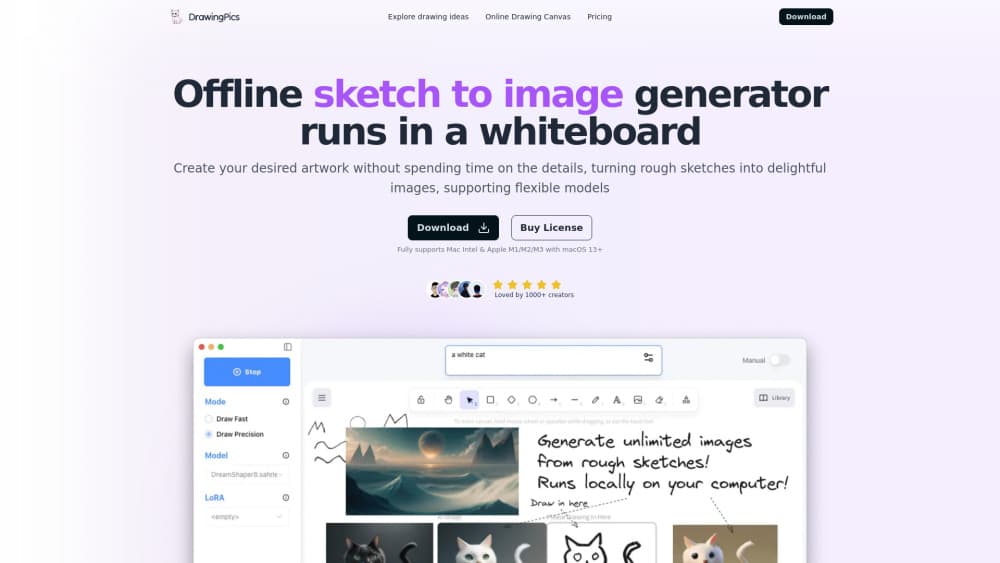
DrawingPics is an AI art app for Mac built for people who think with a pencil instead of a prompt box. You draw on the left half of a whiteboard canvas, and the sketch to image loop closes on the right, updating with each stroke you make.
The app runs a Stable Diffusion model locally, converted to Core ML so it can use Apple's Neural Engine. Nothing gets sent to a server after the first model download, which is the main reason artists use it for client work and unpublished concepts.
The catch is narrow hardware support. DrawingPics needs an M-series Mac on macOS 13 or newer, and the developer says there are no near-term plans for Windows or Intel machines.
Getting Started
- Download the .dmg from drawing.pics and move the app into your Applications folder.
- Open it once with a network connection so it can fetch its model files.
- Start the free trial, then paste a license key if you decide to buy.
- Pick a style, type a short prompt, and start sketching on the left side of the canvas.
- Export the frame you like, or redraw the same sketch to push it closer to what you had in mind.
Product Information
A quick look at Offline AI Art Generator in a Whiteboard - DrawingPics's pricing, supported platforms, and performance.
Best for
The users, tasks, and scenarios where this tool fits best.
Users
- Concept artists
- Illustrators who hate prompt engineering
- Privacy-conscious freelancers
- Hobbyists on a budget
Tasks
- Character design passes
- Environment blocking
- Style exploration
- Storyboard frames
Scenarios
- Working on a plane or in a cafe with no usable Wi-Fi
- Pitching a concept live
- Teaching drawing fundamentals
Key features
Live Preview While You Draw
The canvas is split down the middle. Sketches go on the left, and a rendered image appears on the right without a generate button. Every stroke triggers a new frame, so you judge changes at drawing speed rather than waiting in a queue.
Style Presets for Different Looks
A built-in picker switches between anime, photorealistic, oil painting, and sci-fi. The developer adds styles as they finish tuning them, and each one is a converted model rather than a text tag. That keeps the look consistent across a session.
Sketch Fidelity and Prompt Strength
Two controls do most of the work. One sets how closely the image follows your lines, the other sets how much weight the text prompt carries. A dedicated draw precision mode tightens the result when you need the output to match a specific outline.
Your Own Models and LoRAs
You can drop safetensors files and LoRAs into the app's model folder, and they show up in the picker on the next launch. That opens the door to community checkpoints tuned for a particular illustration style, which is the closest thing to a Stable Diffusion for Mac workflow without a terminal.
Built for Apple Silicon
Version 2 was rewritten as a native app with Core ML, so the heavy work lands on the Neural Engine. According to the developer, a 512x512 image takes about 3 seconds on a 16GB M1 MacBook Air. Fan noise stays low on M-series laptops, which matters during long sessions.
One License, No Account
There's no sign-up, no seat management, and no monthly bill. A Personal license covers one Mac and a Family / Studio license covers three, both with lifetime updates. The app stores crash logs and anonymous usage counts, but your sketches stay on disk.
Pros and cons
Pros
- Real time image generation makes iteration feel like drawing, not submitting a form.
- The offline design removes upload limits and keeps unpublished work on your own drive.
- $9.90 once for a single Mac is cheap next to a year of subscription credits.
- Local model and LoRA support gives you a path to custom styles without extra tools.
Cons
- Apple Silicon only, so Intel Macs and every Windows machine are locked out.
- First launch needs a model download, and a flaky connection can stall setup until you switch to a mirror URL.
- There's no batch queue, which makes it a poor fit for producing fifty variations in one run.
- Commercial use depends on the license of whichever model you load, and the app can't settle that for you.
Frequently asked questions
Yes, after the initial model download. The app runs the model on your Mac and doesn't send sketches or prompts to a server. It does report crash logs and anonymous usage statistics.
Related content
Explore related tools, skills, and articles for Offline AI Art Generator in a Whiteboard - DrawingPics.
Offline AI Art Generator in a Whiteboard - DrawingPics Alternatives

Google EmbeddingGemma 2
Google DeepMind · Writing · Image · CodingGoogle EmbeddingGemma 2 is a 740M-parameter open model that turns text, code, images, audio, and video frames into vectors in one 768-dimension space, running on phones and laptops.

Tractionwave
TractionWave · Image · MarketingTractionWave is an AI attention heatmap tool for static ads. Upload a PNG or JPG and it returns predicted attention, ranked hotspots, and fixes before you spend budget.

Imejis.io
Imejis.io · Image · MarketingImejis.io is an AI design studio for agents and marketing teams. Describe an image in plain words, and it writes the copy, builds the layout, reflows it to every size, then exports a finished file.