
Drawings Alive AI: Doodle Art
Optimistic Invent, LLC · Image
Drawings Alive is an AI app for kids' drawings. It turns sketches into illustrations, six-second animations, and 3D models you can view in AR. Plans start at $5 a month on iOS and Android.
About Drawings Alive AI: Doodle Art
What Is Drawings Alive
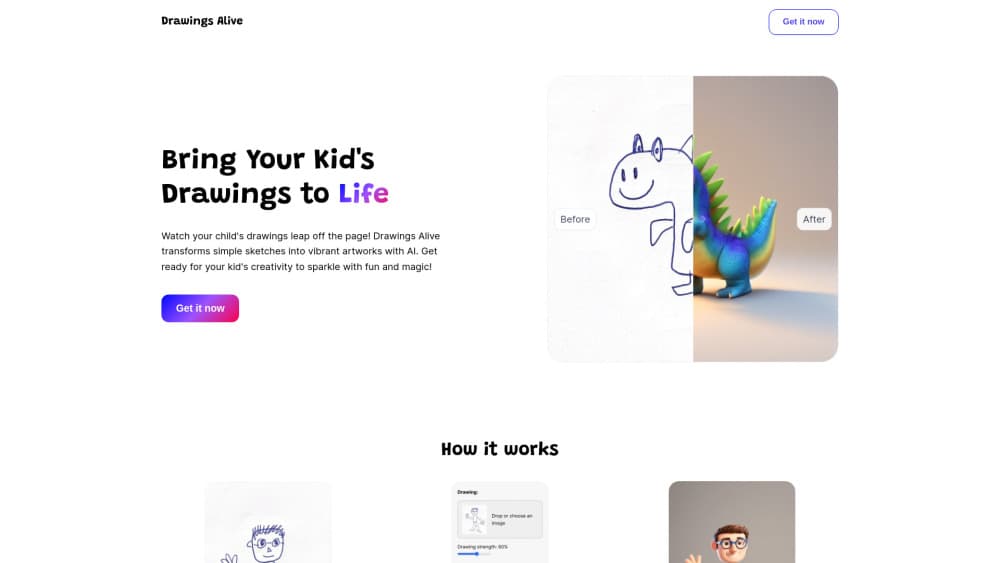
Drawings Alive is an AI drawing app for kids from Optimistic Invent, LLC. It redraws children's sketches as finished artwork, and the flow takes about a minute. A parent snaps a photo of a doodle or draws inside the app, types a sentence about what the picture shows, then picks a style. The AI returns a polished version of the same drawing, usually in under a minute.
The product targets families, not professional designers. Most kids drawing AI tools stop at one still image, and this one adds motion and a 3D file. There are no ads, the style list leans cute, and every result can be saved, printed, or shared. Teachers use it for class projects, storybook pages, and art displays, while parents use it to keep a record of drawings that would otherwise sit in a drawer.
Three limits matter before you pay. The sketch needs some clarity, since a loose scribble gives weak results unless you describe it in detail. Generation runs on a monthly quota rather than unlimited use. AI art for kids usually means a single filtered picture, so the monthly cap on videos and 3D models is the number to check before choosing a plan. The pricing page lists three paid plans and no free tier, so testing costs money.
Getting Started
- Install the app on iOS 15.1 or later, or on Android 7.0 or later.
- Create an account and choose a plan. Access opens as soon as payment clears.
- Draw on the in-app canvas or upload a photo of a drawing as a JPG or PNG.
- Type a short description of the picture and pick a style.
- Save the image, the six-second video, or the 3D model in .glb or .usdz format.
Product Information
A quick look at Drawings Alive AI: Doodle Art's pricing, supported platforms, and performance.
Best for
The users, tasks, and scenarios where this tool fits best.
Users
- Parents of children aged four to ten
- Primary school teachers
- Families who keep a visual record
- Adults who doodle
Tasks
- Turning a paper doodle into a poster or greeting card
- Making a short animation for a birthday or a school presentation
- Building a 3D model you can place in the room
- Filling a storybook page with one consistent character
Scenarios
- A rainy afternoon at home when you need an activity that ends with something to show.
- A school art project where the original drawing has to stay on paper but the class needs a digital version.
- A gift for grandparents who live far away, printed from a drawing they have never seen in person.
Key features
Sketch to Finished Artwork
The core tool takes a photo of a drawing and redraws it with full color, shading, and background detail. Characters keep their shape and pose, so a child still recognizes their own dinosaur or house. A short description box sits next to the upload, and filling it in raises the odds that the AI reads the drawing the way the child meant it. It is the quickest way to turn drawings into art without redrawing anything by hand.
Seven Styles From One Drawing
Cartoon, realistic, 3D, painting, plush toy, toy bricks, and block game are all available for the same sketch. The last three are aimed at young children and produce a soft toy or building-brick look. Running one drawing through several styles is the fastest way to find which one lands, and each attempt uses one image from the monthly quota.
Drawing to Six-Second Video
The video tool animates a drawing for six seconds. Characters move, dance, or walk across the frame, and the result plays like a short loop rather than a full scene. Six seconds is enough for a birthday message or a social post, and short enough that the app can produce it with one tap.
3D Models and AR Placement
Drawings can be converted into 3D models and exported as .glb or .usdz. Point the phone camera at a desk, a floor, or the garden and the model appears in that space, and you can walk around it for a different angle. This is the feature that separates Drawings Alive from the many sketch-to-image apps, and few 3D drawing app rivals offer it on a phone. The AR view needs iOS 12 or Android 7.0 at minimum.
Draw in the App or Upload a Photo
You don't need paper. The in-app canvas lets a child draw with a finger and send the result straight to the generator, which removes the photo step and the lighting problems that come with it. On its own, the canvas works as a plain doodle art app for days when nobody wants to wait for a render. Uploads accept JPG and PNG only, so a HEIC photo from an iPhone has to be converted first.
Family-Friendly Output Rights
Every generated picture belongs to the account holder, and the company grants a commercial license along with ownership, which covers printed gifts, classroom materials, and small local sales. The app carries no ads, and payments run through Stripe, so card details never sit on the company's servers.
Pros and cons
Pros
- Results arrive in under a minute, which keeps a child's attention on the screen.
- One app covers still images, short animations, and 3D models, so you don't stitch three tools together.
- You own the output and get a commercial license, which matters for prints and gifts.
- The style list is built around children's taste, and the app stays ad-free.
Cons
- No free tier appears on the pricing page, so you pay before you find out whether the AI reads your child's drawing well.
- The entry plan caps you at 50 images, 1 video, and 1 3D model a month, which an enthusiastic child can use up in a weekend.
- Abstract or very messy drawings need a detailed description to produce anything usable.
- Refunds stop once generation starts, and uploads only take JPG or PNG.
Frequently asked questions
It takes a child's drawing and returns a finished picture in a chosen style, a six-second animation, or a 3D model. The drawing stays recognizable, so the appeal is seeing your own sketch finished rather than a random image.
Related content
Explore related tools, skills, and articles for Drawings Alive AI: Doodle Art.
Drawings Alive AI: Doodle Art Alternatives

Google EmbeddingGemma 2
Google DeepMind · Writing · Image · CodingGoogle EmbeddingGemma 2 is a 740M-parameter open model that turns text, code, images, audio, and video frames into vectors in one 768-dimension space, running on phones and laptops.

Tractionwave
TractionWave · Image · MarketingTractionWave is an AI attention heatmap tool for static ads. Upload a PNG or JPG and it returns predicted attention, ranked hotspots, and fixes before you spend budget.

Imejis.io
Imejis.io · Image · MarketingImejis.io is an AI design studio for agents and marketing teams. Describe an image in plain words, and it writes the copy, builds the layout, reflows it to every size, then exports a finished file.