

DreamFace
NewPort LLC · Image · Video · China AI
DreamFace is an AI avatar generator and photo animation app for web, iOS, and Android. Upload a portrait, add a script or a track, and it turns the still into a talking, singing, or dancing video.
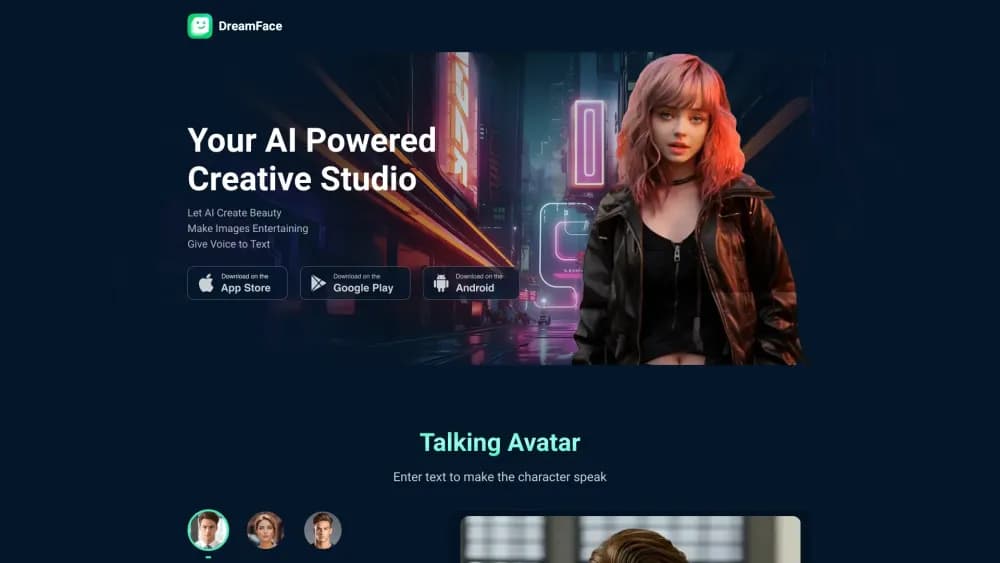
About DreamFace
What Is DreamFace
DreamFace is an AI avatar generator and video studio built around one trick that it does well: taking a still photo and making it move. You hand it a portrait, choose a voice or a song, and the app returns a short clip where the face speaks with the right mouth shapes, blinks, and shifts its head. Hair and shoulders move a little too. From there the same account opens up avatar video, image to video, face swap, and a stack of one-tap effects.
It comes from NewPort LLC and runs on the web, on iPhone, and on Android, with one login across all three. The pitch is speed. Most clips land in about a minute, which suits people making content for TikTok, Reels, and Shorts rather than for broadcast.
The limits show up the same way. Output quality tracks your source photo, so a soft, badly lit snapshot produces a soft, badly lit avatar. Long form isn't the point either: a talking photo template is a few dozen seconds of movement, not a filmed interview. Commercial use is allowed on the official tool pages, but third-party licensing terms for songs and celebrity likeness are on you.
Getting Started
- Sign up at dreamfaceapp.com, or install the DreamFace app from the App Store or Google Play. The same account works on every platform, and projects sync between them.
- Upload a photo or a short video. Pick a template from the template library, or open the Avatar Video tool if you want to write your own script.
- Add the words. Type a script, paste text, upload an audio file, or record your own voice. Voice options cover male, female, child, and character voices, and you can clone a voice on paid plans.
- Generate and review. A talking avatar usually renders in under a minute. Check the mouth sync and the edges of the face before you export.
- Export or share. Download the file and post it, or hand the clip to an editor if you need captions and cuts.
Product Information
A quick look at DreamFace's pricing, supported platforms, and performance.
Best for
The users, tasks, and scenarios where this tool fits best.
Users
- Social media creators
- People making personal greetings
- Small businesses and marketers
- Developers building apps
Tasks
- Animating a single portrait
- Getting a photo to sing
- Swapping faces in a video
- Making pet and animal clips
- Producing quick product and ad clips
Scenarios
- Keeping a daily posting habit
- Turning family archives into video
- Trying effects before a paid campaign
Key features
Talking Photo and Avatar Video
This is the feature everything else is built around. Upload a portrait, type a script or upload audio, and DreamFace renders a clip with lip sync, blinking, and natural head motion. Voice options include male, female, child, and character tones, plus text to speech in many languages and voice cloning on paid plans. The Avatar Video tool goes further with full body movement through Dream Avatar 3.0, so the character can gesture and shift weight instead of just talking from the neck up.
AI Video and Image Generation
Beyond photo animation, the app doubles as an AI video generator: it ships text to video and image to video tools. Describe a scene in plain language and the I Want agent builds a multi shot clip with consistent characters, or start from a still and let the model add motion. Separate image tools cover text to image, AI filters that restyle a photo into anime or action figure looks, and a growing set of model backed generators the company keeps adding.
Face Swap and Template Effects
Face swap works on both photos and video: your face follows the movement and expression of the source clip, and blending tracks skin tone and lighting. The template library is the other half of this, with hundreds of ready made scenes for dance, hugs, kisses, baby podcasts, and news style intros. Templates are the fastest path for people who don't want to write anything.
Talking Pets and Creative Fun Tools
The talking pet video templates turn a dog, cat, or animal photo into a character that speaks or sings, with mouth movement mapped to the animal's face. It's entertainment first, and that's why so many DreamFace clips travel on short video feeds. The same category holds the kiss and hug effects, which pair two photos into a single scene.
Photo Enhance and Background Remover
Photo Enhance sharpens and restores detail in old or low resolution images, and it pairs with colorization for vintage portraits. Background Remover cuts a subject out in one pass so you can drop it onto a new scene or into a template. Both are small utilities next to the video tools, but they decide whether a source photo is good enough for animation in the first place.
DreamAPI for Developers
DreamAPI publishes three production endpoints: lip sync, which turns text or audio into a talking head video, DreamAct for motion driven avatar animation, and AI voice for generation and cloning. Pricing runs on credits, there are 100+ pre-built avatars, and the company quotes sub five second generation and a 99.9% uptime target. Official use cases list social apps, e learning, ecommerce ads, and AI assistants that need a face.
Pros and cons
Pros
- One clear strength: photo to talking video takes a single upload, a script, and about a minute.
- The cross platform account is genuinely useful, since a project started on a phone opens on the web.
- Template library is deep, which covers the days you have no idea what to make.
- A free tier plus a cheap weekly plan means you can test the output quality before committing to a year.
- DreamAPI gives developers the same lip sync and voice stack without building the model pipeline.
Cons
- Watermark, standard definition, and a daily cap sit on the free plan, so anything public needs a paid subscription.
- Credits burn faster than expected on long clips, and Premium is priced per week rather than per month.
- Results track the input photo. Blurry or side lit portraits produce soft edges and stiff expressions.
- Everything is a short clip. There is no timeline editor, so longer projects need another tool for cuts and captions.
Frequently asked questions
DreamFace animates photos. This talking photo app takes a portrait plus a script or an audio track and returns a short video where the face talks, sings, or dances. The same app covers avatar video, face swap, image to video, and a set of photo enhancement tools.
Related content
Explore related tools, skills, and articles for DreamFace.
DreamFace Alternatives

Google EmbeddingGemma 2
Google DeepMind · Writing · Image · CodingGoogle EmbeddingGemma 2 is a 740M-parameter open model that turns text, code, images, audio, and video frames into vectors in one 768-dimension space, running on phones and laptops.

Tractionwave
TractionWave · Image · MarketingTractionWave is an AI attention heatmap tool for static ads. Upload a PNG or JPG and it returns predicted attention, ranked hotspots, and fixes before you spend budget.

Imejis.io
Imejis.io · Image · MarketingImejis.io is an AI design studio for agents and marketing teams. Describe an image in plain words, and it writes the copy, builds the layout, reflows it to every size, then exports a finished file.