

Dreamwave
Dreamwave · Image
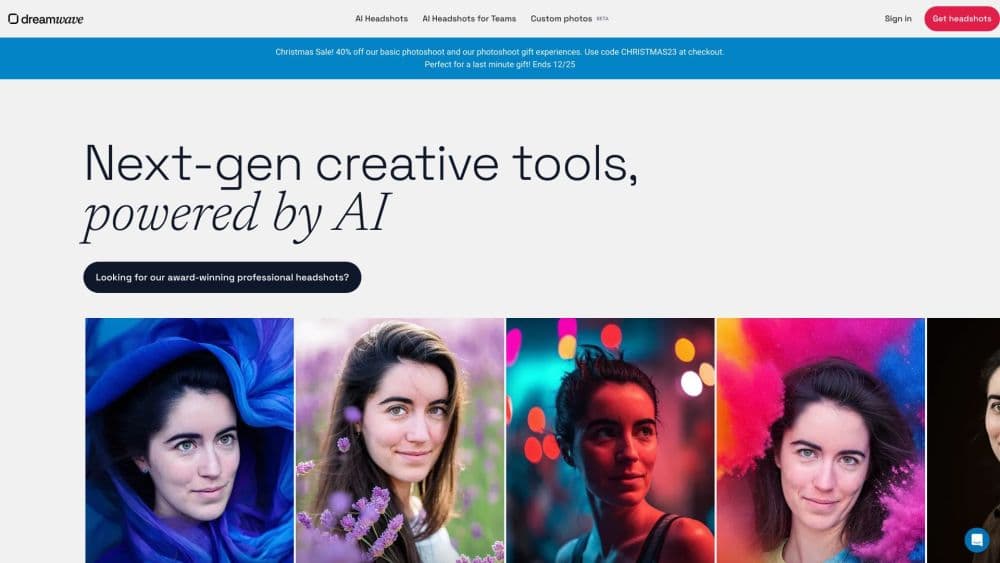
Dreamwave is an AI headshot generator that turns one selfie into studio-grade professional portraits for individuals, growing teams and live events.
About Dreamwave
What Is Dreamwave
Dreamwave is a professional AI headshot generator and AI portrait generator built for anyone who needs a polished portrait without booking a studio. You upload a single clear selfie, and the platform builds a private model of your face to generate a gallery of headshots in different outfits, backgrounds and poses. The company says it has produced more than 25 million portraits to date, and counts Fortune 500 companies, hospitals and government agencies among its customers.
The service breaks into three products. Personal headshots cover one person. Corporate headshots restyle a whole roster, and the platform can sync new hires from an HR system so directories stay current. An event photobooth delivers studio-grade headshots to conference attendees as a live giveaway.
The biggest limitation is control over the output. A photoshoot runs on specialized hardware rather than a normal computer, so each run is custom-made and the company does not offer refunds once the job starts. Uploads also need to follow the guidelines, and a blurred, filtered or heavily cropped selfie leads to weaker results. There is no public API, so teams that want headshots piped into their own tools are out of luck.
Getting Started
- Open dreamwave.ai and choose the headshot product that fits: personal, company or event.
- Upload one clear, well-lit, unfiltered selfie where you like how you look, at full smartphone resolution.
- Pick a clothing style through a free-form prompt or a multiple-choice menu, then start the photoshoot and wait for your gallery, which the company says takes about two hours.
- Filter the results by style and background, and keep every photo the AI generates.
- Edit outfits, swap backgrounds and retouch details with text prompts, or delete your data when you are finished.
Product Information
A quick look at Dreamwave's pricing, supported platforms, and performance.
Best for
The users, tasks, and scenarios where this tool fits best.
Users
- Job seekers and professionals
- HR and people teams
- Startups and small businesses
- Conference and event organizers
Tasks
- Creating LinkedIn and resume photos
- Refreshing a company directory
- Editing a finished shoot
- Capturing event leads
Scenarios
- A new hire joins and their profile photo is already outdated
- A distributed team spread over several cities
- Pressing deadline before a launch
- A conference booth that needs to draw a crowd
Key features
Studio-Grade Headshots From One Selfie
You upload a single clear photo and the platform returns a full gallery of portraits. The company says its engine builds a detailed model of your face and then renders it in many scenes, so you get variety without a second shoot. Expect a mix of stronger and weaker frames, since AI photography is still a young technology.
Outfit and Background Changes
Every photoshoot stays editable after delivery. You can swap an outfit or drop in a new background with a text prompt, and teams can apply one backdrop across a whole roster at once. That removes the manual editing step most people associate with a photoshoot.
Magic Eraser and Retouching
A built-in touch-up tool removes distractions and polishes small details, and the company also offers a pro retouching team for changes that need a human eye. It means you can fix a stray detail without opening Photoshop.
Unlimited Styles and a Full Gallery
Dreamwave does not cap you at one or two looks. It generates all the professional styles it can for your shoot, and once the gallery arrives you filter it by style and background. You keep every photo the AI produces rather than buying them in packs.
Native HRIS Sync
For companies, Dreamwave connects to Workday, ADP, Rippling, Gusto and BambooHR out of the box. When a new hire is added upstream, the headshot flows to chat, directory and identity apps automatically, so nobody uploads a photo by hand.
Print-Ready 4K Assets
Company shoots export 4K images sized for badging hardware such as HID and Lenel. That means security cards carry a proper portrait instead of a grainy webcam selfie, and the same file works for a lobby screen or a directory.
Export Anywhere
Dreamwave pricing stays straightforward: a personal shoot and a company shoot both sit in the same $49 to $59 per person band, and there is no separate subscription to track. Company plans fold in HRIS sync, 4K badging assets and per-person redo rights, while individual buyers pay once for a gallery they keep outright.
Privacy First Data Handling
The company says it never sells your photos and never trains its AI models on them, not even anonymously. Data is encrypted and stays in the US, and personal data is deleted by default within 30 days of no use unless you ask for a custom policy.
Pros and cons
Pros
- One selfie is all it takes, so anyone can get professional headshots without scheduling a photographer or a studio.
- Each photoshoot stays editable, letting you swap outfits, change backgrounds and retouch details after the gallery lands.
- The privacy terms are unusually firm: no selling your photos, no training on them, encrypted and US-resident data.
- Company plans add HRIS sync and 4K badging assets, which is more than most consumer headshot apps offer.
- The company reports more than 2,000 five-star reviews and a 4.96 out of 5 rating, and direct customers include large enterprises.
Cons
- Paid plans run $49 to $59 per person, which is high for a single personal headshot compared with some cheaper apps.
- There is no refund once a photoshoot starts, and uploads that ignore the guidelines are not covered either.
- There is no public API, so you cannot pull headshots into your own systems or automate outside the HRIS connectors.
- Output quality varies within a gallery, so you spend time picking the frames that hold up rather than keeping them all.
- The free generator opens only a few spots a day and they fill within minutes, so a free run is hard to catch.
Frequently asked questions
Dreamwave is an AI headshot generator. You upload one selfie and it creates a gallery of professional portraits in different outfits, backgrounds and poses, with editing tools to refine the results afterward.
Related content
Explore related tools, skills, and articles for Dreamwave.
Dreamwave Alternatives

Google EmbeddingGemma 2
Google DeepMind · Writing · Image · CodingGoogle EmbeddingGemma 2 is a 740M-parameter open model that turns text, code, images, audio, and video frames into vectors in one 768-dimension space, running on phones and laptops.

Tractionwave
TractionWave · Image · MarketingTractionWave is an AI attention heatmap tool for static ads. Upload a PNG or JPG and it returns predicted attention, ranked hotspots, and fixes before you spend budget.

Imejis.io
Imejis.io · Image · MarketingImejis.io is an AI design studio for agents and marketing teams. Describe an image in plain words, and it writes the copy, builds the layout, reflows it to every size, then exports a finished file.