

Duegooder
Due Gooder Inc. · Productivity
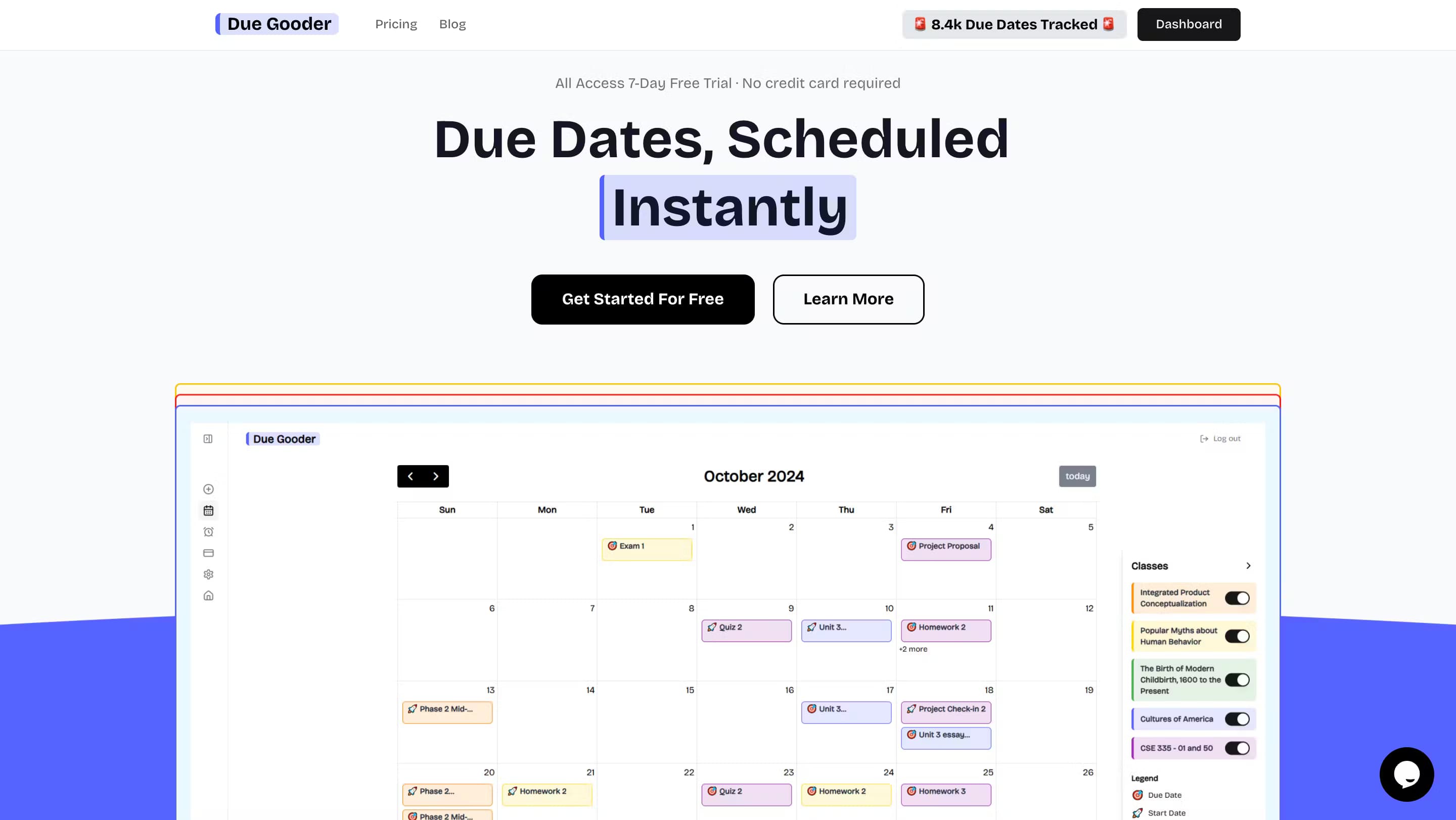
Due Gooder is an AI study planner for college students. It reads your syllabus or LMS, builds one color-coded calendar, and adds AI lecture notes, flashcards, and practice tests built from your own class material.
About Duegooder
What Is Due Gooder
Due Gooder is a study-planning and AI-tutoring app for college students. You upload a PDF syllabus or connect your school's learning management system, and the app pulls out every assignment, exam, and class meeting into a single schedule. From there it keeps pushing you forward with morning to-do lists and deadline reminders.
The problem it solves is the weekly scramble of checking three platforms to find out what's due. Instead of remembering five logins, you get one calendar that already knows your courses.
The main limits are scope and platform. Everything runs on iOS (iPhone, iPad) and the web app, with no Android build, and the AI features lean on what you feed them. Record a lecture or upload slides and it works well. Skip that and you're mostly left with a smart calendar.
Getting Started
- Sign up with email at app.duegooder.com or download the iOS app. No Apple, Google, or Microsoft account is required.
- Upload a syllabus PDF or link your LMS (Blackboard, D2L, or Moodle). The app detects assignments, exams, and class times.
- Review the generated schedule and connect Google Calendar so deadlines and class alerts sync to your phone.
- Use the study tools as the term goes: record lectures for AI notes, build flashcards from slides, or spin up a practice test.
- Check the morning summary or a Home Screen widget to see what's due today and next.
Product Information
A quick look at Duegooder's pricing, supported platforms, and performance.
Best for
The users, tasks, and scenarios where this tool fits best.
Users
- College students juggling four or more courses
- Students who miss assignments because they forget to check the LMS
- Visual planners who think in calendars
Tasks
- Building a full semester schedule from a syllabus
- Turning a lecture into study notes
- Exam prep from your own slides
- Finding a file you saved weeks ago
Scenarios
- The first week of a new term, when syllabi land all at once
- Midterm season, when several deadlines stack up
- The 30 minutes before class
Key features
Syllabus and LMS Import
Upload a syllabus PDF or connect Blackboard, D2L, or Moodle, and Due Gooder pulls out every assignment, exam, and class meeting. It's the feature that sets up everything else, because a term you type in by hand is a term you'll stop maintaining.
One Color-Coded Calendar
Assignments, exams, and class times from every course land on a single schedule, each course coded by color. Google Calendar sync carries deadlines and reminders to your phone, so the plan lives where you already look.
Daily To-Do Lists and Alerts
A personalized list arrives each morning, and the app flags when a due date changes or a new one appears. Reminders fire at the intensity you pick, plus a heads-up 30 minutes before class starts.
Home Screen Widgets
Widgets show what's due today and what's next without opening the app. It's a small thing that matters when the whole point is staying ahead of deadlines you'd otherwise forget.
AI Lecture Notes
Record a lecture and Due Gooder returns chapter-marked audio with AI written notes. It turns a class you sat through into something you can actually review later, without stitching together a recording and a separate notes app.
Flashcards and Practice Tests
The app builds flashcard decks and practice tests from your own slides and readings, so review is tied to your actual course. You're not drilling a generic deck; you're testing what your professor assigned.
Locker Storage With AI Search
Every file you save goes into the Locker, and AI search finds it across everything, whether it's a slide, a reading, or a note. It trades five folders you can't remember for one search box.
Duey, the AI Study Assistant
Duey knows your classes and schedule and answers questions about them. Ask what's due this week or what a reading covered, and it answers against your own course context instead of general web knowledge.
Pros and cons
Pros
- Syllabus import saves hours of manual deadline entry
- Google Calendar sync keeps everything in one familiar place
- AI notes, flashcards, and tests all work from your own material
- Free tier covers the core calendar and reminders
- Works with Blackboard, D2L, and Moodle, not just one LMS
Cons
- No Android app, which rules it out for Android-only students
- AI features only shine when you record lectures or upload materials
- Subscription splits into Pro and AI Pro, so the right pick isn't obvious at a glance
Frequently asked questions
Yes, there's a free tier. You can import syllabi, build the calendar, and get reminders at no cost. AI features like lecture notes and flashcard generation sit behind the Pro and AI Pro subscriptions.
Related content
Explore related tools, skills, and articles for Duegooder.
Duegooder Alternatives

Base Code
Base44 (Wix) · Coding · ProductivityBase Code is a shared cloud development environment from Base44. Teammates describe changes to an existing GitHub codebase in chat, preview them live and send them back as pull requests.

Knocket
Knocket (Tencent RTC team) · Productivity · Business · ChatbotKnocket is a free live chat and contact page tool that lets visitors message you from your website, app, or a shareable link, with every reply handled from Telegram or one inbox.

FloorGen
Vinit Kumar (FloorGen) · Productivity · China AIFloorGen is a browser-based floor plan maker that turns a sentence or a sketch into an editable 2D plan and a 3D walkthrough. Export to PDF, DXF or video, and draw without an account.