

EasyFill.ai
EasyFill.ai · Productivity
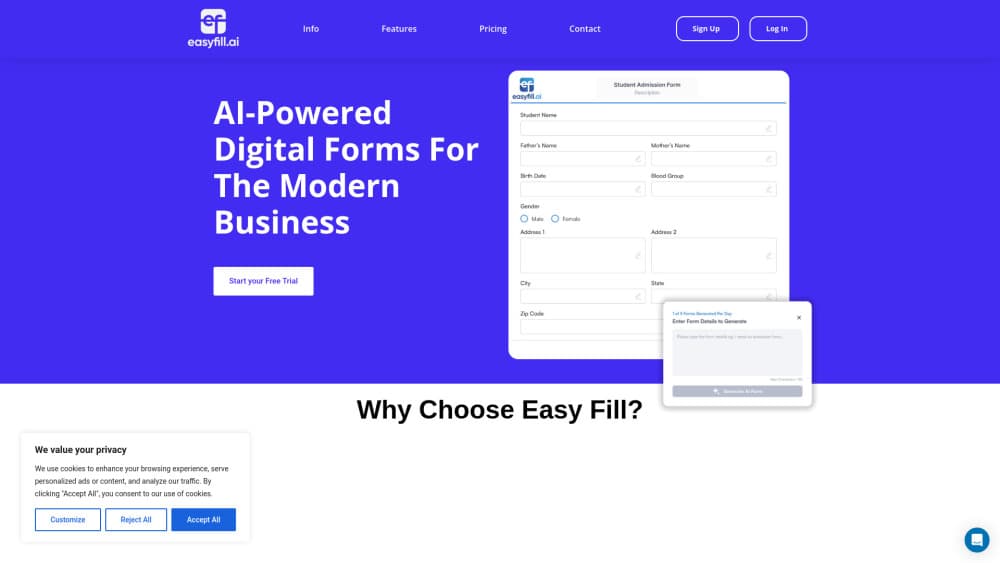
EasyFill.ai is an online form builder that turns PDFs and templates into fillable web forms with e-signatures, client profiles and spreadsheet exports.
About EasyFill.ai
What Is EasyFill.ai
EasyFill.ai is a form builder for small business teams that already run on paperwork. You upload a PDF or pick a form template, check where the answer fields landed, then publish a link or embed the form on your site. The result is a fillable PDF your clients recognize, except they complete it in a browser instead of printing it.
The product bundles three jobs that usually live in separate tools: building the form, collecting a signature, and keeping track of who sent what. Client profiles sit next to the forms, so an enrollment packet and the family behind it stay connected. Team members get access based on what they handle.
The limits are worth knowing before you pay. There's no free plan, billing runs annually, and the PDF field mapping is a starting point rather than a finished job. Scanned documents and dense packets need a page by page review.
Getting Started
- Create an account at easyfill.ai and open the workspace.
- Upload your PDF or start from a template for enrollment, intake, requests or events.
- Review the mapped fields, change field types, and resize or reposition anything that sits outside the page.
- Test the form with a sample answer before you share it.
- Publish, then send the sharing link or paste the embed code into your website.
Product Information
A quick look at EasyFill.ai's pricing, supported platforms, and performance.
Best for
The users, tasks, and scenarios where this tool fits best.
Users
- Childcare centers and preschools
- Small professional practices
- Nonprofit program coordinators
Tasks
- Converting an existing PDF into a fillable form
- Collecting signatures on consent and agreement pages
- Exporting responses to a spreadsheet
Scenarios
- Replacing a print and scan loop at the front desk
- Onboarding a new client across several documents
- Running a seasonal event signup
Key features
PDF to Fillable Form Mapping
Upload a PDF and EasyFill.ai scans the pages for answer areas, then drops matching fields onto the document. This AI-assisted PDF mapping decides whether the product saves you time, since a clean digital PDF maps well and a scan needs manual repair.
Field Types That Match the Answer
Text, email, phone, date, dropdown, checkbox, radio and signature fields are all available, plus a circle field for PDFs that ask people to mark an option. Choosing the right type cuts bad data at the source, because an email field rejects a phone number before it reaches your inbox.
Template Library for Common Paperwork
Templates cover childcare enrollment, client intake, business requests and events. Each one is a starting draft you can rewrite, so you're editing questions instead of building a form from an empty page.
Client Profiles and Related Contacts
Forms connect to a client record, and you can group related people under the same profile. When a family enrolls two children or a company sends three employees, the responses stay linked instead of arriving as unrelated submissions.
Share by Link or Website Embed
Every published form gets a sharing link and an embed option. You can put it behind a button on your site or send it directly, and the current link stays the one to use after you publish changes.
Response Search and Spreadsheet Export
Submissions can be searched and opened one by one, and exported as a spreadsheet when you need to sort or filter outside the app. Availability depends on the form and your plan, so check the export option on the tier you pick.
Pros and cons
Pros
- Keeps the layout of a document your clients already recognize, which lowers the number of questions you get about how to fill it in.
- Puts forms, signatures and client records in one place instead of three subscriptions.
- The Android app handles form management and responses away from a desk, useful for staff who work across rooms.
- Nonprofit and startup programs cut the price for organizations that qualify.
Cons
- No free plan. The cheapest option is $185 per year, which is a real commitment for someone who needs one form twice a year.
- Automatic PDF mapping misses fields on scanned or crowded pages, so expect manual cleanup before the first publish.
- No public API, which rules it out if you need form data pushed into a CRM or internal system automatically.
Frequently asked questions
It builds online forms from your PDFs or templates, collects the answers, captures signatures and stores responses with client profiles. Think of it as a paper form that moved into a browser.
Related content
Explore related tools, skills, and articles for EasyFill.ai.
EasyFill.ai Alternatives

Base Code
Base44 (Wix) · Coding · ProductivityBase Code is a shared cloud development environment from Base44. Teammates describe changes to an existing GitHub codebase in chat, preview them live and send them back as pull requests.

Knocket
Knocket (Tencent RTC team) · Productivity · Business · ChatbotKnocket is a free live chat and contact page tool that lets visitors message you from your website, app, or a shareable link, with every reply handled from Telegram or one inbox.

FloorGen
Vinit Kumar (FloorGen) · Productivity · China AIFloorGen is a browser-based floor plan maker that turns a sentence or a sketch into an editable 2D plan and a 3D walkthrough. Export to PDF, DXF or video, and draw without an account.