

Eden
WithEden · Image · Marketing
Eden is a free Chrome extension that reads any webpage and turns a single emoji click into an AI-written comment, so you can react to posts fast.
About Eden
What Is Eden
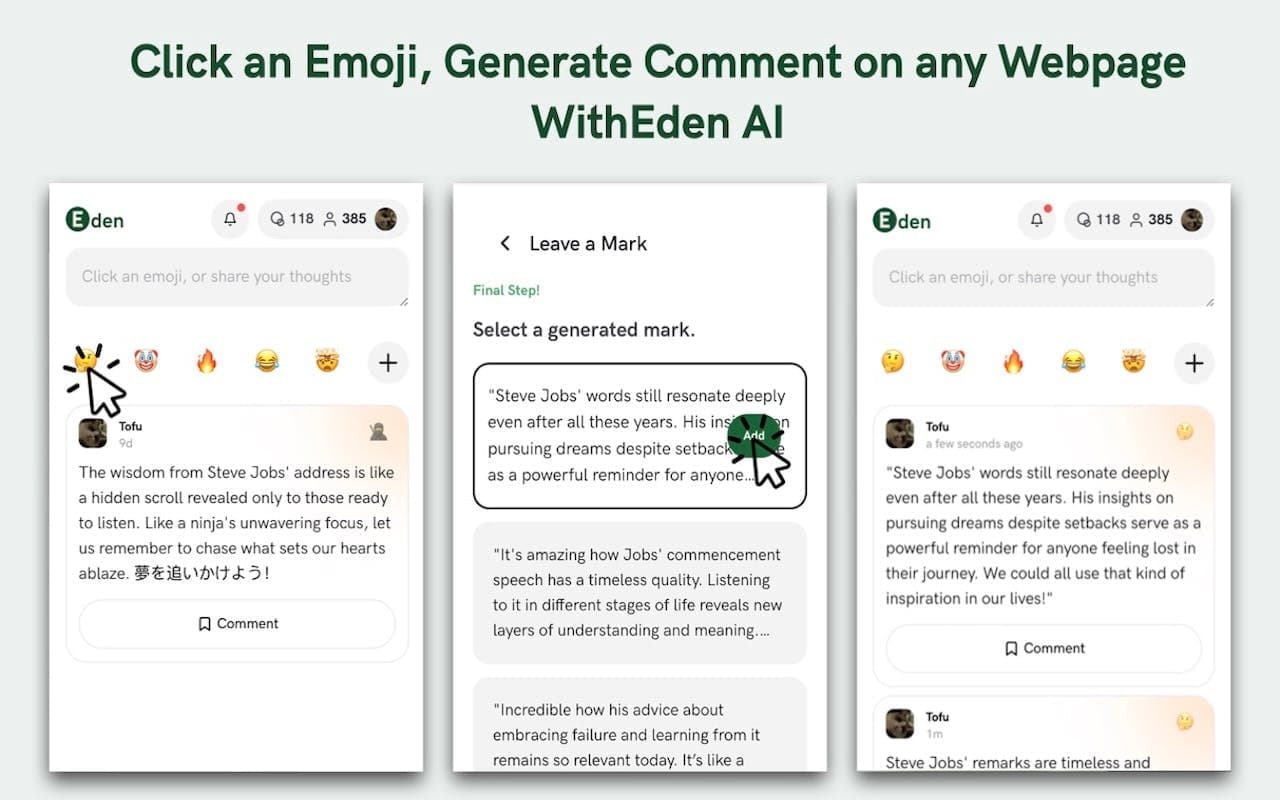
Eden is a Chrome extension that generates emoji comments for any page you're reading. You pick an emoji that matches your mood, and the AI reads the page content, then writes a comment or reply that fits both the topic and the tone of that emoji. The promise is simple: react to something in one click instead of staring at a blank comment box. No typing required.
It's built for people who comment a lot and don't always want to type. Community managers, casual social users, and anyone who wants to chime in on a thread can lean on it to skip the blank-page pause. The emoji isn't decoration either. It's the input. A tears-of-joy emoji gets you a different comment than a heart or a fire emoji, because that's the reaction you're signaling. Think of it as an AI emoji comment generator rather than a chatbot you have to prompt.
The honest limits matter here. Eden writes text, so what you get is only as good as what the AI reads on the page. Pages that hide their content behind a login, a paywall, or heavy JavaScript give it less to work with, and the result can feel generic. It also lives only in Chrome, so Firefox, Safari, and mobile browsers are out. And since it's a small free tool, don't expect team seats, integrations, or an API.
Getting Started
- Open the Chrome Web Store and add Eden to your browser, then pin the icon to your toolbar.
- Visit a page with a comment section, a social feed, or a forum thread you want to reply to.
- Click the Eden icon and pick an emoji that matches how you feel about the content.
- Let the extension read the page and draft a comment, then edit the wording or send it as is.
- Save the replies you like as templates if you want faster reuse later.
Product Information
A quick look at Eden's pricing, supported platforms, and performance.
Best for
The users, tasks, and scenarios where this tool fits best.
Users
- Community managers
- Casual social users
- Content creators and influencers
Tasks
- Writing emoji-rich comments
- Drafting social replies
- Generating reactions to articles
Scenarios
- Replying to a busy feed during a launch or event
- Jumping into a forum thread you're only half following
- Keeping an emoji-forward tone on brand posts
Key features
One-Click Emoji Commenting
The core move is picking an emoji instead of writing prose. Eden takes that emoji as your intent and builds a comment around it, so a fire emoji and a crying emoji lead to different drafts. It's the feature that makes the rest of the tool feel fast, since the comment box never sits empty. That's the whole point.
Context-Aware Generation
Eden reads the page you're on before it writes. That means the comment it suggests is tied to the article, post, or thread in front of you rather than pulled from a generic pool. When the page loads its text normally, the drafts land closer to the topic. When content is hidden, they get vaguer. It's the difference between a comment that fits and one that could sit under any post.
Tone and Style Options
You can steer the tone of the generated text to match the moment. A playful register. A measured one. This matters because a comment that'd be fine on a meme post reads wrong under a serious article. Adjusting tone is how you keep the output from sounding off.
Emoji Insertion
The tool sprinkles emojis into the comment naturally instead of dumping them at the end. For social platforms where emoji carry a lot of the emotional weight, that placement is part of why the replies read as human rather than pasted in. It's also where the AI comment generator earns its keep on feeds built around quick reactions.
Right-Click and Toolbar Access
You can kick off a generation from the toolbar icon or a right-click on the page, so you don't have to break your flow to find a menu. It keeps the whole action inside whatever tab you're already working in. Simple as that.
Comment Templates
Replies you use often can be saved as templates and reused. If you post in the same kind of thread repeatedly, this cuts the setup time on each new comment to almost nothing.
Pros and cons
Pros
- Free to install and use, with no paywall or subscription tier in the way.
- Turns a single emoji into a full comment, which removes the blank-page hesitation.
- Reads page context, so drafts usually relate to the actual content, which helps with social media engagement.
- Works from the toolbar or a right-click, keeping it out of your way.
- Lets you save templates for replies you send often.
Cons
- Chrome only, so Firefox, Safari, and mobile browsers can't use it.
- Output quality drops on pages that hide their text behind logins or scripts, leaving you with generic drafts.
- No API or team features, which rules it out for anything beyond personal commenting.
- Generated comments still need a personal edit, or they can read as formulaic.
Frequently asked questions
Eden is a Chrome extension that generates comments and replies for webpages and social posts. You choose an emoji, and the AI writes a comment that reflects the page content and the mood of that emoji.
Related content
Explore related tools, skills, and articles for Eden.
Eden Alternatives

Google EmbeddingGemma 2
Google DeepMind · Writing · Image · CodingGoogle EmbeddingGemma 2 is a 740M-parameter open model that turns text, code, images, audio, and video frames into vectors in one 768-dimension space, running on phones and laptops.

Tractionwave
TractionWave · Image · MarketingTractionWave is an AI attention heatmap tool for static ads. Upload a PNG or JPG and it returns predicted attention, ranked hotspots, and fixes before you spend budget.

Imejis.io
Imejis.io · Image · MarketingImejis.io is an AI design studio for agents and marketing teams. Describe an image in plain words, and it writes the copy, builds the layout, reflows it to every size, then exports a finished file.