
EdrawMax Online
Wondershare (EdrawSoft) · Productivity
EdrawMax Online is a browser-based AI diagram maker from Wondershare. Prompts turn into flowcharts, org charts, and 280+ other diagram types, and Visio files open without a desktop install.
About EdrawMax Online
What Is EdrawMax Online
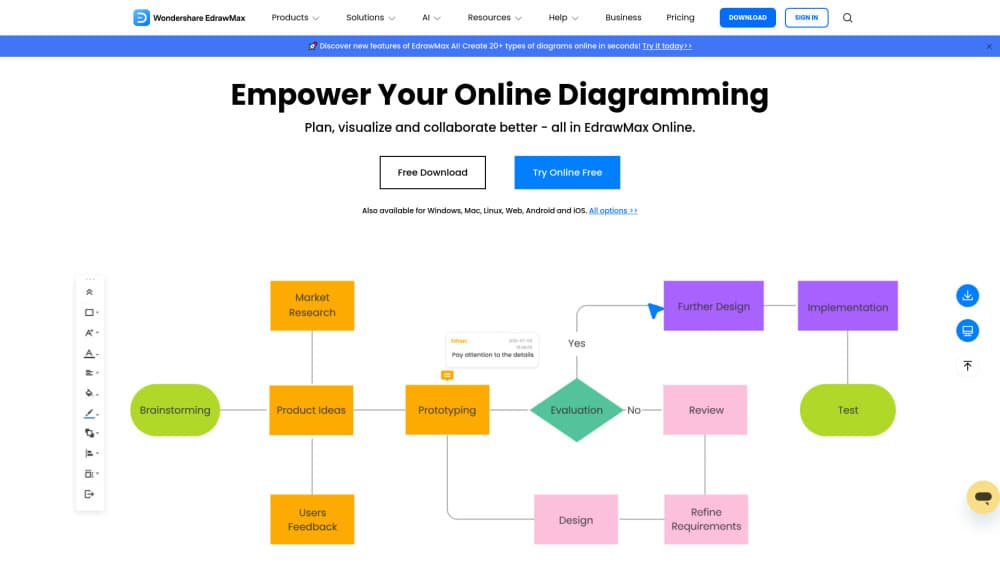
EdrawMax Online is the web version of EdrawMax, Wondershare's diagramming product and a well known flowchart maker. You open a tab, pick a blank canvas or a template, and draw flowcharts, org charts, network maps, floor plans, UML, electrical schematics, and 280+ other diagram types in the same editor. The AI side takes a sentence and returns a first draft you can rearrange. The company lists 1,500+ built-in templates and 26,000+ symbols, plus a community library of roughly 10,000 templates on the free plan.
The problem it solves is the middle ground between a whiteboard and Visio. A whiteboard sketch isn't presentable in a client deck, and Visio costs money and time to learn. As online diagram software it sits in between: professional looking output, no install, and a learning curve that mostly comes down to dragging shapes and connecting lines. Teams that already keep .vsdx files can import them and keep working instead of redrawing from scratch.
Three limits matter before you subscribe. The free plan is tight: 500 AI tokens a month (about 5 diagrams), 100MB of storage, a 60-shape cap on general diagrams, two pages per file, and exports that carry a watermark. A paid plan unlocks the premium features on the web only, so the Windows, macOS, Linux, Android, and iOS apps stay on a free trial even after you pay. Everything runs in the cloud, which means a stable connection is part of the deal.
Getting Started
- Sign up at edrawmax.com/online with an email address or a Google account. The free plan starts immediately, no card needed.
- Choose a starting point: a blank canvas, one of the built-in diagram templates, or the AI prompt box where you describe the diagram you want.
- Edit on the canvas. Drag shapes from the symbol panel, connect them with auto-routing lines, apply a theme, and adjust text, colors, and page size.
- Invite people if the file is shared work. Co-editing and comments happen in the same browser window, without a file handoff.
- Export or present. PNG, JPG, PDF, Word, Excel, PPT, SVG, and Visio output are all in the export menu, and slides can be played straight from the canvas on paid plans.
Product Information
A quick look at EdrawMax Online's pricing, supported platforms, and performance.
Best for
The users, tasks, and scenarios where this tool fits best.
Users
- Students and teachers
- Product managers and analysts
- IT and network admins
- Small teams without Visio licenses
Tasks
- Turning a written process into a first-draft flowchart
- Converting an old Visio file
- Building an org chart from a team list
- Turning a finished diagram into slides
Scenarios
- A client call where a diagram has to appear on screen in two minutes
- A remote design session
- Writing technical documentation
Key features
Prompt to diagram
Type what you need in plain language and the AI builds a starting diagram with shapes, labels, and connectors in place. It handles flowcharts, mind maps, org charts, and several other common layouts. Every generation spends AI tokens, so a free account gets roughly five tries a month before you buy more.
280+ diagram types in one editor
Flowcharts, UML, BPMN, ER diagrams, network topologies, floor plans, electrical schematics, and org charts all live in the same workspace. Switching type means switching a template or a symbol library, not opening a second app. For anyone whose week moves between process mapping and architecture work, that keeps files and styling consistent.
Template and symbol library
The built-in library carries 1,500+ templates and 26,000+ symbols, and the community adds about 10,000 more diagrams you can open and adapt. Free accounts reach the first two built-in templates, while paid plans unlock the whole set. Starting from a template usually beats a blank canvas for anything with a standard structure, like a swimlane or a rack diagram.
Visio and CAD compatibility
Visio (.vsdx) and CAD files import into the canvas, and Visio, SVG, and CAD work comes out again on export. Free accounts get five trial imports before the limit stops them. The import acts as a conversion step rather than native Visio editing, so check complex files after they load.
Real-time collaboration on an infinite canvas
Multiple people edit the same diagram at once, with comments and a share link that controls who sees the file. The canvas grows as the diagram grows, so large system maps don't hit a page edge. Team review happens inside the document instead of in a thread of screenshots.
Export and presentation options
Output covers PNG, JPG, PDF, Word, Excel, PPT, SVG, and Visio, with watermark-free printing on paid plans. Diagrams can also be turned into a slide sequence that plays from the canvas. That range means one file can serve a ticket, a deck, and a printed handout without redrawing anything.
Pros and cons
Pros
- Runs entirely in a browser, so a Chromebook or a locked-down work laptop works as well as a desktop.
- 280+ diagram types in one place cuts the number of tools a team pays for.
- Visio import keeps years of existing drawings usable.
- The free plan lets you test the editor and AI output before spending anything.
- Co-editing and comments are included, which removes the export-email-merge loop.
Cons
- The free plan is narrow: 500 AI tokens a month, a 60-shape cap, two pages, and watermarked exports. Fine for a trial, painful for weekly work.
- A web subscription doesn't unlock the desktop and mobile apps, so cross-platform use needs a separate license.
- Cloud only means no work when the connection drops, and large files load slower than a local app.
- AI tokens run out mid-project on the Basic plan, and extra tokens are sold separately.
Frequently asked questions
Yes, there's a permanent free plan. It includes 500 AI tokens a month, 100MB of cloud storage, a 60-shape limit on general diagrams, two pages per file, and watermarked exports. It's enough to judge whether the editor suits you.
Related content
Explore related tools, skills, and articles for EdrawMax Online.
EdrawMax Online Alternatives

Base Code
Base44 (Wix) · Coding · ProductivityBase Code is a shared cloud development environment from Base44. Teammates describe changes to an existing GitHub codebase in chat, preview them live and send them back as pull requests.

Knocket
Knocket (Tencent RTC team) · Productivity · Business · ChatbotKnocket is a free live chat and contact page tool that lets visitors message you from your website, app, or a shareable link, with every reply handled from Telegram or one inbox.

FloorGen
Vinit Kumar (FloorGen) · Productivity · China AIFloorGen is a browser-based floor plan maker that turns a sentence or a sketch into an editable 2D plan and a 3D walkthrough. Export to PDF, DXF or video, and draw without an account.