

Edubrain
Edubrain · Leaning
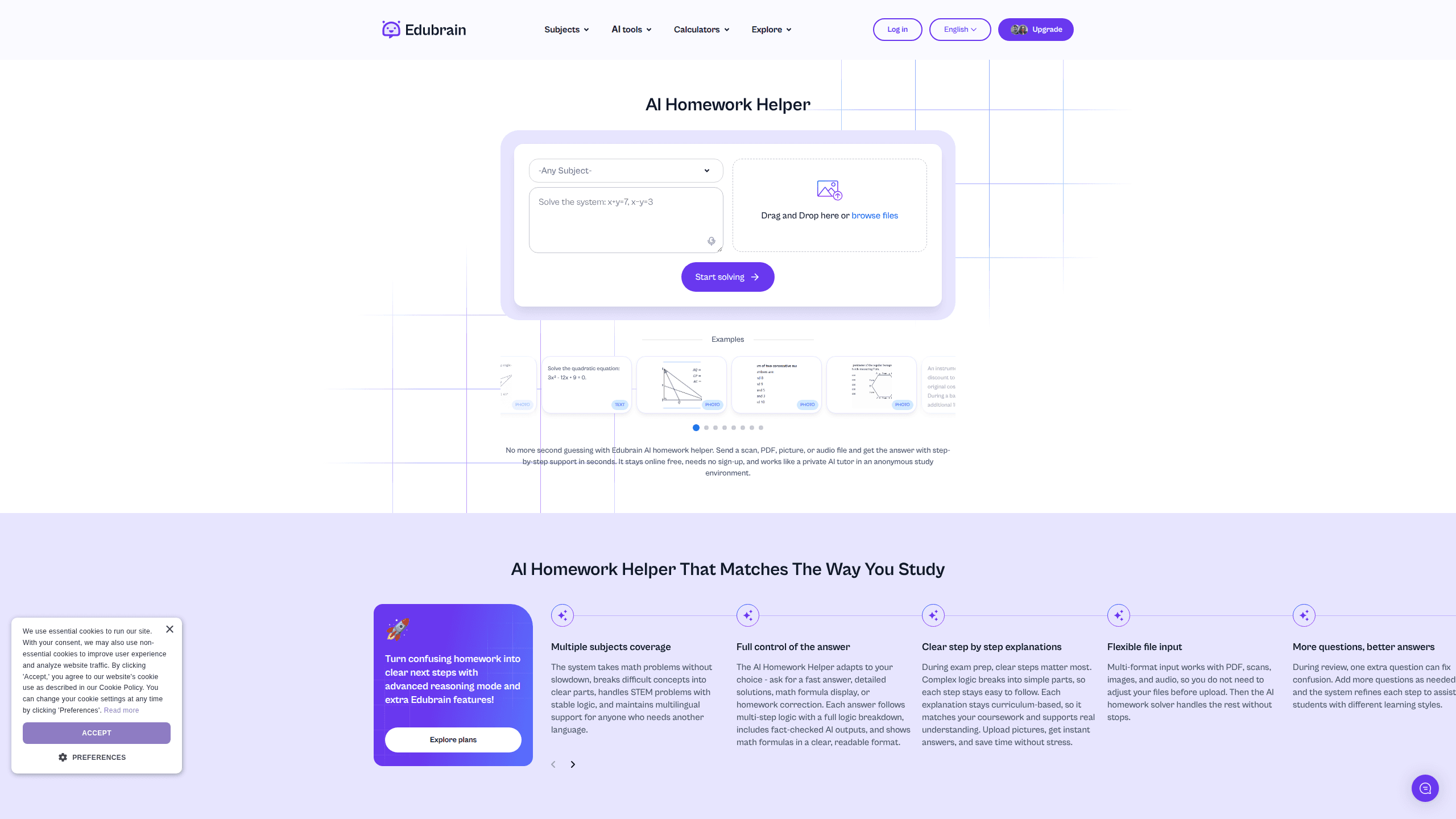
Edubrain is a free AI homework helper that answers questions from a photo, PDF, document, or audio recording and walks you through the solution step by step. It runs in the browser with no sign-up and covers dozens of subjects from algebra to nursing. Free homework help here includes unlimited attempts, and there's no paywall to start. Students who want an ad-free setup and advanced reasoning can move to the $3.99/week AI-Plus tier.
About Edubrain
What Is Edubrain
Edubrain is an online study tool built around a single promise: you should be able to get unstuck without creating an account first. Drop in a scan of a textbook page, a PDF of last night's worksheet, or a recording of a lecture, and the AI reads the problem and returns an answer with the reasoning spelled out. Think of it as a homework scanner that explains itself. The subject list runs long, from Algebra and Organic Chemistry to Nursing, Law, and Python, so it's less a math solver and more a general homework helper for whatever course you're stuck on.
The reason it matters is friction. Most AI study apps ask for an email, cap you at a few free messages, then push a subscription. Edubrain skips the account step entirely and keeps the core tools free. That's why a lot of people reach for it in the middle of a study session rather than after a lengthy setup. It reads like a private AI tutor you don't have to introduce yourself to.
The limits are worth knowing up front. The free AI mode takes one file per request. Files top out at 32MB, and the text box caps at 10,000 characters. Why the ceilings? Because the AI path has to stay fast and free. Strange formats like video or spreadsheets aren't supported by it at all. When a task outgrows those ceilings, Edubrain nudges you toward its paid expert help, where a human takes over. That's a real boundary, not a hidden one, and the site tells you before you hit it.
Getting Started
- Open edubrain.ai in your browser. No account, email, or download is required for the free AI tools.
- Pick your subject from the dropdown, or leave it on "Any Subject" if you're not sure where the question fits.
- Type your question into the box (at least five characters) or drag in a file: txt, pdf, doc, png, jpeg, or jpg up to 32MB. For spoken problems, hit record and read the question aloud.
- Choose how you want the answer, a fast result or a detailed, step-by-step walkthrough with formulas shown.
- Read the solution, then download it or share it through the link Edubrain generates for each result.
Product Information
A quick look at Edubrain's pricing, supported platforms, and performance.
Best for
The users, tasks, and scenarios where this tool fits best.
Users
- Middle and high school students
- College students in STEM-heavy courses
- Adult learners and career switchers
- Non-native English speakers
Tasks
- Solving a scanned or photographed problem
- Turning a PDF worksheet into worked solutions
- Checking your own attempt
- Generating study material
- Research setup
Scenarios
- Late-night homework with nobody to ask
- Working through a lecture recording
- Exam revision the week before
- Practicing a weak topic
Key features
Photo, PDF, and Audio Problem Intake
Edubrain reads problems the way you actually encounter them, on paper, in a file, or out loud. You can snap a photo of a textbook page, upload a PDF or Word document, or record yourself reading the question. That flexibility matters for math. Typing equations by hand introduces errors and eats time. Audio capture has a 25MB ceiling and is built for spoken or dictated problems rather than written ones.
Step-by-Step Solutions on Request
You control the depth of the answer. Ask for a fast result when you just need to check something, or request a detailed walkthrough with the reasoning and formulas shown when you're trying to learn the method. This is the difference between an answer key and a tutor. Pick per question. Edubrain doesn't lock you into one mode.
Wide Subject Coverage
The subject picker spans roughly 70 areas, from Algebra, Calculus, and Discrete Mathematics to Anatomy, Microbiology, Criminal Law, and Spanish. It isn't a math-only solver dressed up with a long menu. The list reaches into nursing, business, engineering, and the humanities. For students juggling courses across departments, one tool covers the whole workload instead of three.
Built-In Study Tools
Beyond answering questions, Edubrain ships a set of tools for turning material into something you can revise from. The flashcard maker, notes generator, and PowerPoint and diagram generators all take your input and produce study assets. They live behind the same interface. That means no juggling separate apps for solving and revising. The AI-Plus plan runs them without ads.
Ad-Free AI-Plus Tier
The paid tier, at $3.99 per week, removes ads and unlocks advanced reasoning across the answer generator, research assistant, and presentation tools. It also gives discounted access to human expert help. Nothing about the free plan expires. So the upgrade buys comfort and harder reasoning, not access to the basics. Cancel anytime; Edubrain emails you two days before renewal.
Human Expert Help
When a task exceeds the AI's limits, a single file per request or a 32MB file, Edubrain offers a paid human service covering presentations, homework help, STEM support, writing, and editing. Pricing starts from $3.99 and scales with the job. It's the escape hatch for the cases where automated answers aren't enough, like a long research paper or a presentation you want genuinely hand-built. On the AI side, Edubrain pricing stays simple: free, or one weekly fee.
No Sign-Up, Anonymous Use
There's no account wall on the free tools. You open the site and start working. That keeps your study session private by default and removes the marketing-email problem that comes with most freemium apps. Results come with a share link if you want to send them on, but nothing forces you to identify yourself to use the tool.
Pros and cons
Pros
- Free plan needs no account and includes unlimited attempts per tool, so you can practice without hitting a paywall.
- Accepts photos, PDFs, Word docs, and audio, which covers how homework actually arrives.
- Roughly 70 subjects span STEM and humanities instead of math alone.
- Step-by-step mode explains the method, not just the answer, which helps on tests.
- AI-Plus at $3.99/week is cheap for ad-free access and advanced reasoning.
Cons
- The AI path takes one file per request, so multi-page assignments need splitting, which slows down long problem sets.
- The 10,000-character text limit and 32MB file ceiling push larger jobs toward paid expert help, and that costs more.
- Unsupported formats like spreadsheets or video can't be processed by the AI, so those tasks are blocked from the free route.
- Answers still need checking on sensitive topics; the site itself says to recheck facts, and that's on you.
Frequently asked questions
Yes. The Free plan costs $0 and includes unlimited attempts per homework tool, file upload, and downloads. You can use the answer generator, slides, and flashcards without paying. The paid AI-Plus tier at $3.99/week removes ads and adds advanced reasoning, but it isn't required to get started.
Related content
Explore related tools, skills, and articles for Edubrain.
Edubrain Alternatives

Kaggle AI
Google · Coding · LeaningKaggle AI is a community platform where people build, test, and compare machine learning models against shared data. It combines data science competitions, tens of thousands of public datasets, and free cloud notebooks with GPU and TPU access, so anyone with a browser can train a model without buying hardware. Google owns the platform, and joining costs nothing.

Bunch
Bunch AI · Leaning · BusinessBunch is an AI leadership coaching app that turns a few spare minutes a day into real management practice. It hands you one short, personalized tip each day, tracks how you respond, and lets you compare notes with peers inside private groups. The pitch is simple: you lead better by practicing a little, often, instead of sitting through a weekend seminar. Think of it as a leadership training app you actually open.

AI Mock Interview
SQLPad · Coding · LeaningAI Mock Interview is a practice tool built into SQLPad that simulates real job interviews and gives you instant feedback on both what you say and how you say it. You pick a role template or upload a job description, answer questions out loud in real time, and then review a transcript with notes on structure, clarity, and grammar. It's aimed at data professionals prepping for SQL, Python, data engineering, machine learning, and system design roles, and it works entirely in the browser. No install needed.