

Elder Care Check
Elder Care Check · AI Assistant · AI Detection
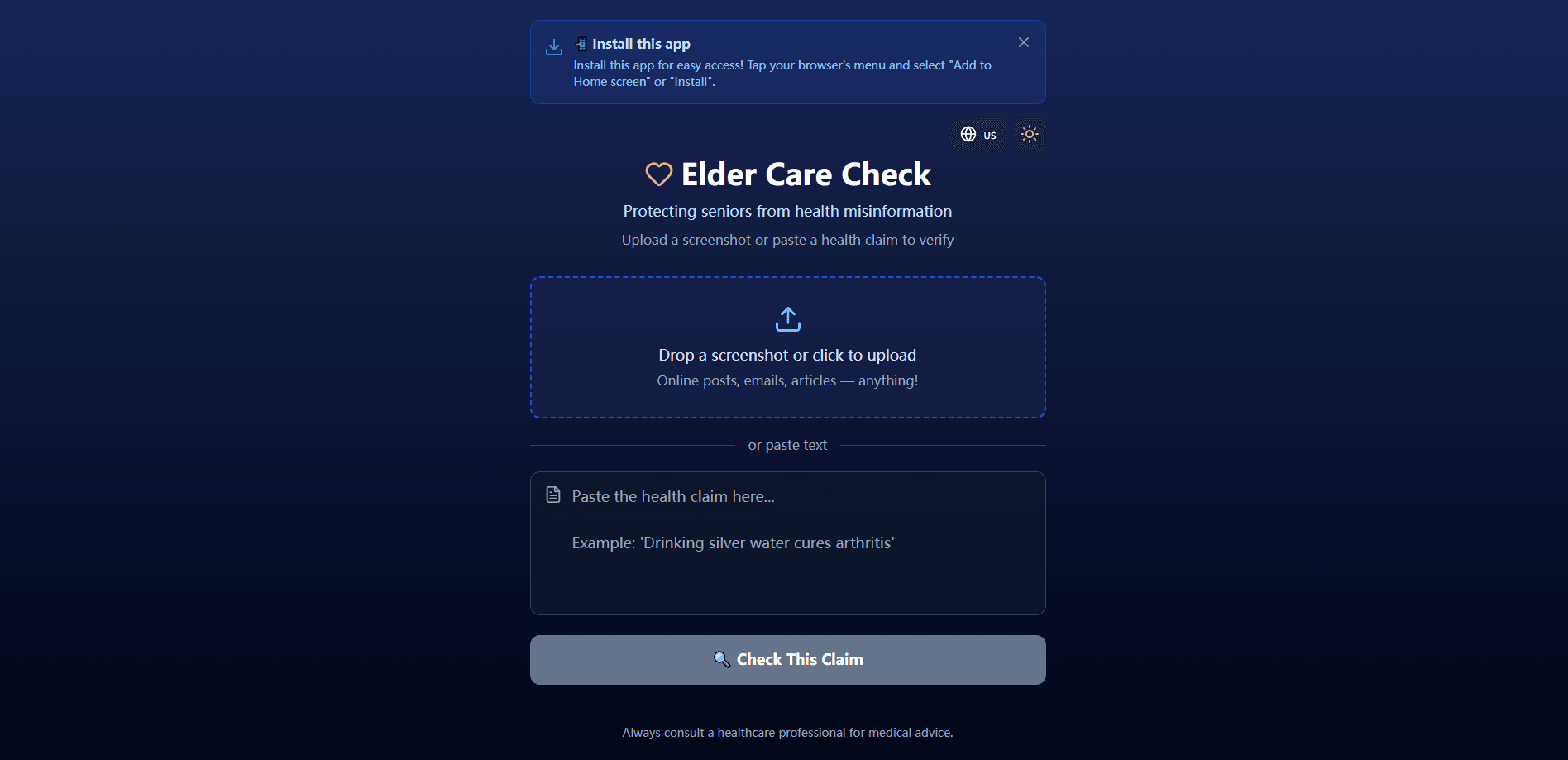
Elder Care Check is a free web app that helps older adults and their families verify health claims they run into online. You upload a screenshot or paste the text of a suspicious tip, and the tool breaks it down into a plain verdict, a short explanation, and a list of trusted sources. It runs in the browser, installs like a mobile app, and keeps its interface simple on purpose, since the people it's built for may not be comfortable with complicated software.
About Elder Care Check
What Is Elder Care Check
Elder Care Check is an AI health claim checker aimed at one specific problem: seniors getting fooled by health misinformation shared in messaging apps, social feeds, and forwarded posts. A relative sends a claim like "drinking silver water cures arthritis." There's no easy way to tell whether it's real, exaggerated, or flat-out false. That's the gap this tool fills.
The app keeps the workflow to a single step. You give it the claim, either as a screenshot or as typed text, and it returns a verdict with supporting evidence and sources you can look at. There's no account to set up, no long form to fill in, and no medical jargon to wade through. Want to fact-check health claims you keep seeing? You just drop them in. That's the whole idea.
Let's be clear about its limits. Elder Care Check isn't a doctor and won't diagnose anything. It checks whether a claim lines up with reliable public health information, and it points you toward trusted sources. It says so right on the results screen, where it tells users to consult a healthcare professional for real medical advice. Treat it as a first filter, not a replacement for a physician.
Getting Started
- Open Elder Care Check in your phone or computer browser. No sign-up is required.
- Upload a screenshot of the post or message you're unsure about, or paste the health claim as text.
- Tap the "Check This Claim" button and wait for the analysis to run.
- Read the verdict, the short explanation, and the linked trusted sources.
- Use "Check another" to verify the next claim, or hand the phone to a family member to review the result together.
Product Information
A quick look at Elder Care Check's pricing, supported platforms, and performance.
Best for
The users, tasks, and scenarios where this tool fits best.
Users
- Seniors who get health tips forwarded through messaging apps
- Adult children and caregivers
- Anyone with a low tolerance for complicated tools
Tasks
- Verifying viral health claims
- Screening forwarded messages
- Quick second opinions on remedies
Scenarios
- A parent forwards a message about a supposed cancer cure
- Reading a social post about a supplement that "replaces blood pressure medication"
- Deciding whether to share a health tip with a family group
Key features
Screenshot and Text Claim Checking
You can submit a claim two ways. Upload a screenshot and the app reads the text out of the image, or paste the wording directly. The screenshot path matters because it's how most seniors actually meet these claims, as images in chat apps rather than clean copyable text. Either route gets you to the same verdict screen. As a health claim checker, this beats typing a long forwarded message by hand.
Plain-Language Verdicts With Evidence
Instead of a dense medical write-up, Elder Care Check returns a simple verdict, a short explanation, and an evidence summary. The wording aims at people without a clinical background. A result reads more like "this claim is misleading and here's why" than a research abstract. Each result also includes links to trusted sources, so you can read further.
Installable App, No Download Store Needed
The tool works as a browser app and can be installed straight to a phone's home screen, so it opens like a native app without a trip to the App Store or Google Play. On iPhone, you add it through the Share menu; on Android and desktop browsers, you use the browser's install option. That keeps the barrier to entry low for users who find app stores confusing.
No Account, No Setup
There's nothing to register for. You open the page, submit a claim, and get a result. No email. No password. For the target audience, skipping account creation removes a real friction point, since passwords and verification steps are exactly where less technical users drop off.
Multi-Language Interface
The app ships with more than one language, including English and Spanish, and adapts its labels and prompts to the selected language. That matters for households where English isn't the first language, letting a caregiver and a parent use the same tool in the language they're most comfortable with.
Family-Friendly Check Flow
The results screen is built for a shared screen. A caregiver can sit with a parent, walk through the verdict, and use "Check another" to keep going. Two people, one phone. It turns fact-checking into something you do together rather than a solo research task.
Pros and cons
Pros
- Free to use. No subscription, no account required.
- Handles screenshots directly, matching how seniors usually receive health claims.
- Gives plain verdicts plus cited sources instead of an overwhelming medical text.
- Installs to the phone home screen without an app store download.
- Available in multiple languages, with a simple one-button workflow.
Cons
- There's no public API, so developers can't build it into other tools.
- It's web-only, and there's no listing on Google Play, so users who expect to find it in a store may be confused.
- Verdicts depend on the underlying model and public sources, so it's a starting point rather than a medical authority.
Frequently asked questions
It checks a health claim you give it, either as a screenshot or pasted text, and returns a verdict with an explanation and trusted sources. It's built to help seniors spot health misinformation they see online. Anyone can check a health claim here in seconds.
Related content
Explore related tools, skills, and articles for Elder Care Check.
Elder Care Check Alternatives

Iplan AI
Iplan AI · Productivity · AI AssistantIplan AI is an AI travel planner that turns a few trip details into a full day-by-day itinerary in seconds. You answer questions about your destination, interests, budget, and travel companions, and the tool builds a plan you can edit, share, and carry with you on any device. It targets travelers who want a solid draft without spending hours in spreadsheets and browser tabs. Think of it as an itinerary generator that does the tedious part for you.

Screenhelp
Screenhelp · Productivity · AI AssistantScreenhelp is an AI screen assistant that turns a single keyboard shortcut into real-time help. You press Ctrl+Shift+Space, it captures what's on your screen, and it streams an answer into a private panel in about two seconds. Think of it as an AI screenshot helper you trigger on demand. It runs on Mac, Windows, and the web, starts free with 30 answers a month, and stays invisible during screen sharing on Zoom, Teams, and Google Meet.

Rainbow
Rainbow · AI AssistantRainbow is an AI weather forecast app built around short-term precipitation nowcasting. Its engine pushes min-by-min rain and snow predictions up to four hours ahead, blending live satellite and radar feeds into hyperlocal forecasts. The app adds live rain radar, a seven-day outlook, precipitation alerts, home-screen widgets, and a hurricane tracker, and it runs on both Android and iOS with a free tier plus paid upgrades.