

Elvin
Elvin · Productivity
Elvin was a proactive AI assistant built for professionals drowning in email, chat, and calendar threads. Instead of waiting for a prompt, it monitored your connected accounts, spotted what needed doing, and drafted the work product, whether that was an email, an agenda, or a status update, before you asked. You reviewed the draft and approved it. That was the whole loop. The team behind it has since shut the product down, so this page covers what Elvin did, who it was for, and what its closure means if you were considering it.
About Elvin
What Is Elvin
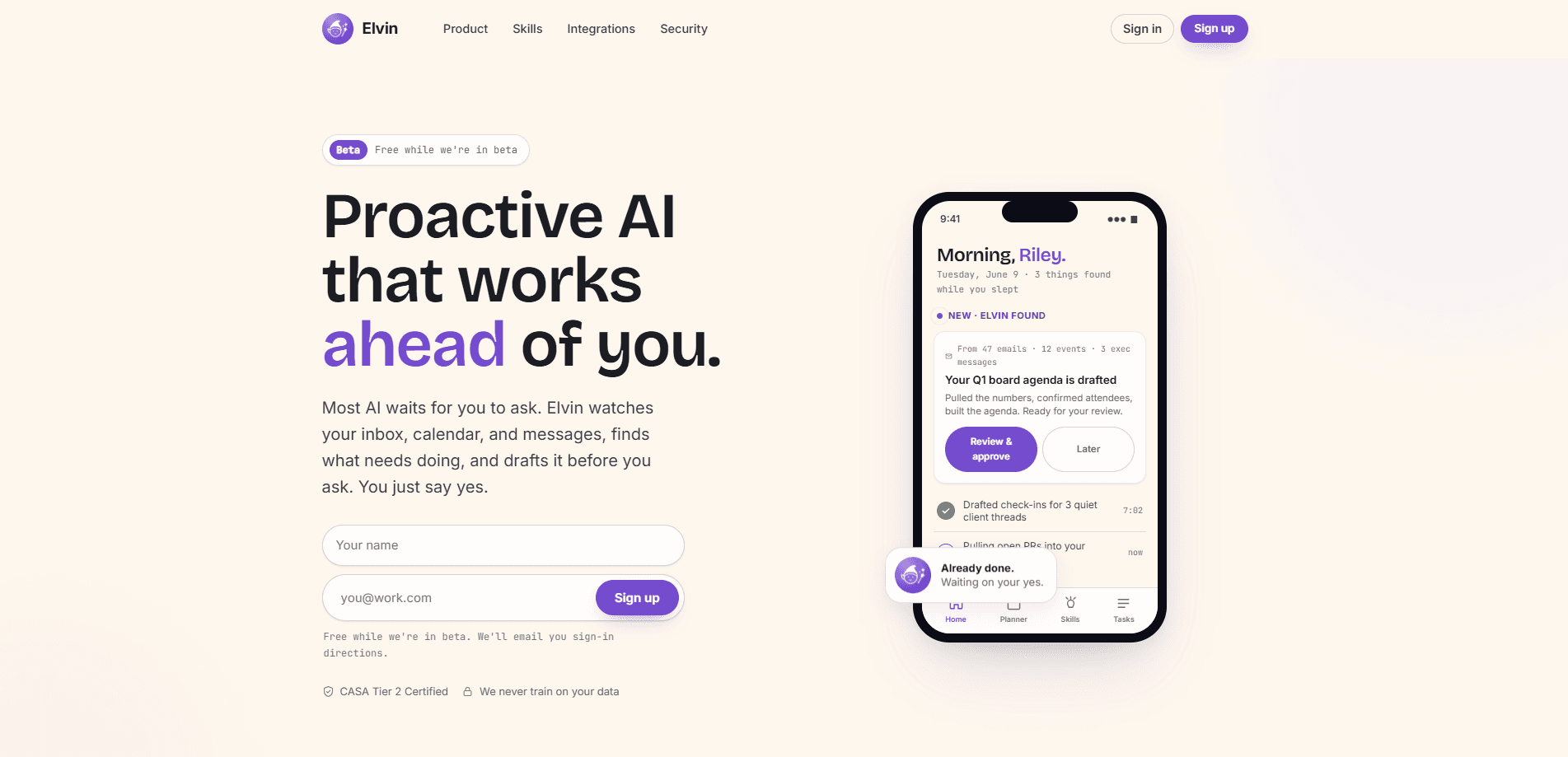
Elvin was an AI work assistant that ran ahead of you rather than behind you. Most AI email assistants wait for a question and then hand back a checklist of things you still have to do yourself. Elvin flipped that. It connected to your inbox, calendar, and messaging apps, quietly read what was incoming, and drafted finished deliverables such as a board agenda, a client follow-up, or a Monday status update while you were asleep. You woke up to something ready to approve, not a to-do list.
The idea was to kill the mental overhead of tracking open loops. Professionals juggle hundreds of messages a day. Reading them is only half the cost. The harder part is remembering what you owe and to whom. Elvin tried to absorb that load, learn your preferences from a single instruction, and act as an AI drafting tool that produced output in your own style.
The catch is that the product is no longer available. The homepage now states that Elvin has been shut down, so anyone arriving today can't sign up or connect an account. So why write about it? Because the idea behind it's still worth understanding. The rest of this page is a record of what it offered while it was live, which is still useful if you're evaluating similar proactive assistants.
Getting Started
- Connect your accounts, which the site said took about a minute with nothing to configure and no prompts to perfect.
- Let Elvin read across your inbox, calendar, and messages to build a picture of what's pending.
- Tell it your preferences once, such as keeping follow-ups under three sentences or skipping the sign-off.
- Review the drafts it prepared on your home screen and approve the ones you wanted sent.
Product Information
A quick look at Elvin's pricing, supported platforms, and performance.
Best for
The users, tasks, and scenarios where this tool fits best.
Users
- Busy professionals
- Founders and operators
- Teams wary of heavy setup
Tasks
- Drafting follow-ups
- Meeting prep
- Status reporting
Scenarios
- Starting the day with a short list of finished drafts waiting for approval instead of a backlog of open loops.
- Noticing an overdue invoice or an unanswered client thread that would otherwise sit untouched.
- Preparing for a recurring leadership or board meeting that draws on last quarter's numbers and input from several people.
Key features
Proactive Drafting, Not Prompt Waiting
Elvin's core promise was that you never had to ask. It watched your inbox, calendar, and messages, decided what needed doing, and produced a finished draft, then waited for a yes. That's a different interaction model from a chatbot that returns instructions. The value was in the deliverable, not the suggestion. It sounds simple. In practice, it meant the assistant had to be right about what you wanted, and right often enough that you stopped checking.
Multi-Source Context
The assistant read across email, calendar events, and messages to understand a task before writing. A board agenda, for example, came from reviewing a batch of emails, several calendar events, and a few notes from an exec team. That's a lot of scattered context. Assembling it by hand is exactly the chore it aimed to remove from your day.
Learns Your Preferences From One Instruction
Tell it once to keep follow-ups short or skip the sign-off, and the site claimed later drafts came out that way without repeating yourself. This was meant to make output feel like yours rather than generically AI-written. Whether the learning held up across contexts is the kind of detail only a live trial would show.
Approval-Based Actions
Elvin drafted first and acted only after you approved. Nothing went out on its own. For a tool that reads your most sensitive accounts, that gate matters, because it keeps you in control of anything that leaves your inbox. Trust is the whole game here.
Security and Data Commitments
The site listed CASA Tier 2 certification and a stated commitment never to train on your data. Those two claims target the main objection to handing an assistant your inbox and calendar. They're worth weighing against the fact that any such tool still needs broad access to your accounts to work.
Built by an Experienced Team
The product was built by people who worked on teams behind Google Play, Slack, and SmartThings, according to the site. That background is a signal about execution and approach rather than a guarantee, but it's the kind of credential that shapes expectations for how polished the assistant would feel.
Pros and cons
Pros
- Prepared finished drafts rather than handing you a list of tasks to do.
- Read across email, calendar, and messages to build task context automatically.
- Learns stated preferences from a single instruction, per the site's claims.
- Approval-based flow kept you in control of anything sent from your accounts.
- CASA Tier 2 certification and a no-training-on-your-data commitment addressed the main privacy worry.
Cons
- The product has been shut down, so you can't sign up or use it today.
- It needed broad access to your inbox, calendar, and messages, which is a real trust decision.
- Being in beta meant pricing and stability were never settled, and the shutdown confirms that risk.
Frequently asked questions
It was a proactive AI assistant for professionals. It monitored your inbox, calendar, and messages, then drafted finished work products like emails, agendas, and status updates for you to approve. The point was to handle the follow-ups you owed before you had to think about them.
Related content
Explore related tools, skills, and articles for Elvin.
Elvin Alternatives

Base Code
Base44 (Wix) · Coding · ProductivityBase Code is a shared cloud development environment from Base44. Teammates describe changes to an existing GitHub codebase in chat, preview them live and send them back as pull requests.

Knocket
Knocket (Tencent RTC team) · Productivity · Business · ChatbotKnocket is a free live chat and contact page tool that lets visitors message you from your website, app, or a shareable link, with every reply handled from Telegram or one inbox.

FloorGen
Vinit Kumar (FloorGen) · Productivity · China AIFloorGen is a browser-based floor plan maker that turns a sentence or a sketch into an editable 2D plan and a 3D walkthrough. Export to PDF, DXF or video, and draw without an account.