

Ember - Compteur de calories
Shentees · Leaning · AI Assistant
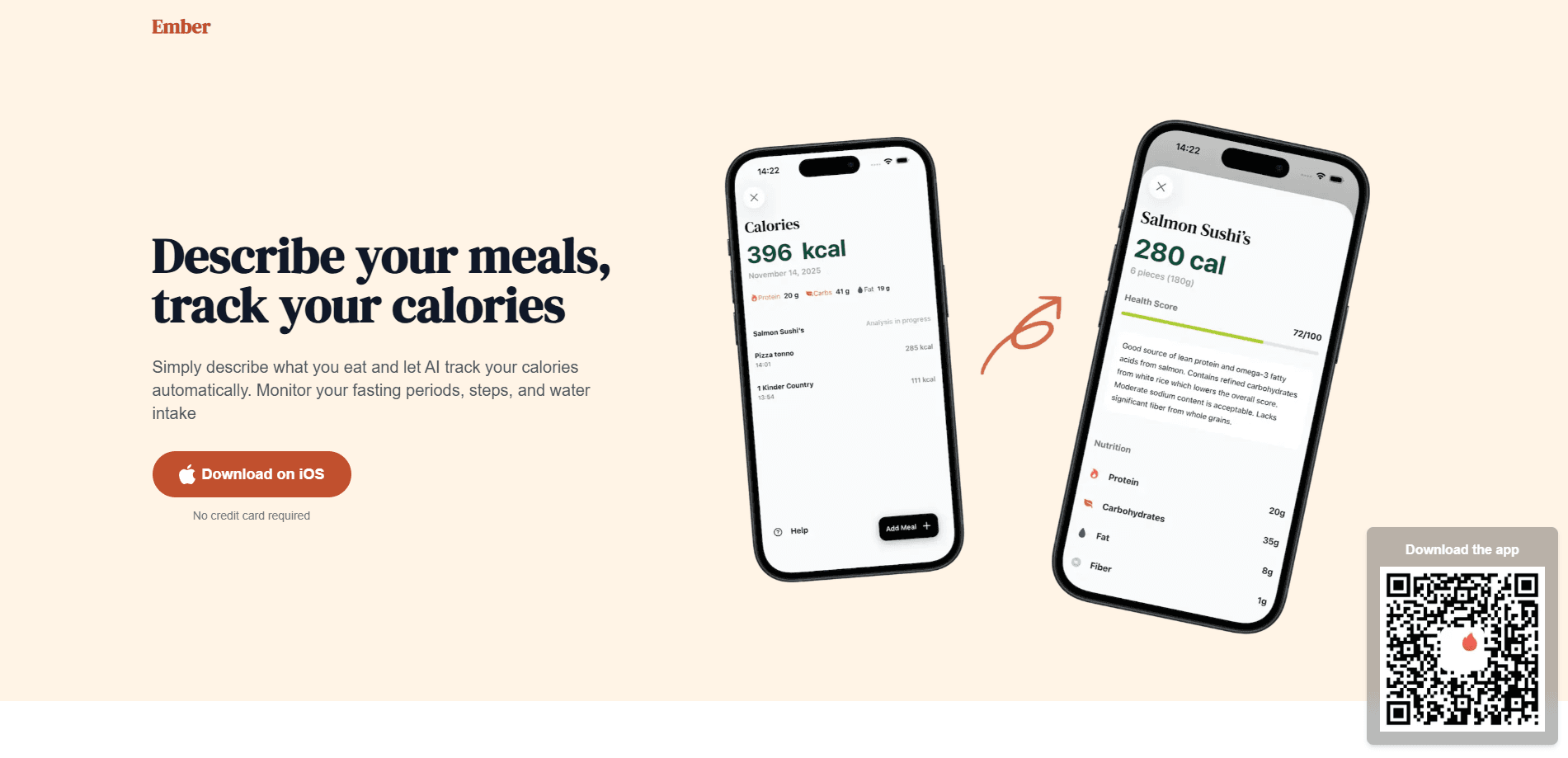
Ember is an AI calorie counter app for people who want to lose weight but hate logging every meal by hand. Snap a photo of your plate or type a quick description of what you ate, and it estimates the calories and macros in seconds. Alongside meal tracking, it works as a macro tracker too, keeping weight, water, steps, and workouts in one view so you can follow your daily calorie target at your own pace.
About Ember - Compteur de calories
What Is Ember
Ember is a mobile calorie tracking app built around a simple idea: the reason most people quit food diaries isn't laziness, it's friction. Searching food databases and weighing portions turns a two-minute task into a ten-minute chore. So the habit dies within a week. Ember skips the database entirely. You show it your meal or describe it, and AI estimates the calories and macros for you.
The app sits in the same space as photo-based food trackers, but it leans on conversation rather than scanning. No barcode. No saved-foods library. That makes it a decent fit for anyone who cooks at home, eats out a lot, or simply can't be bothered to build a personal library of saved foods. Setup takes under two minutes, and the free tier is genuinely usable rather than a locked demo.
Still, an estimate is an estimate. AI photo and text logging is fast, not lab-accurate. It works best when you correct the portion sizes it guesses. Need clinical precision? Weigh your food. For everyday weight loss, speed usually matters more than the decimals.
Getting Started
- Download Ember from the App Store or Google Play, then open the app and create your account.
- Set your weight goal and daily calorie target during onboarding so the app knows what you're working toward.
- Photograph a meal or describe it in a sentence, then adjust the estimated foods, servings, calories, and macros before saving.
- Log weight, water, steps, and workouts as you go to keep all your progress markers in one place.
- Check the daily view to see what's left in your calorie budget and stay on track.
Product Information
A quick look at Ember - Compteur de calories's pricing, supported platforms, and performance.
Best for
The users, tasks, and scenarios where this tool fits best.
Users
- People who want to lose weight without obsessing over food databases
- Home cooks and frequent diners
- Beginners who've bounced off other trackers
Tasks
- Logging a meal in seconds
- Watching macros alongside calories
- Tracking weight, water, steps, and workouts together
Scenarios
- Busy weekdays when you grab lunch out
- Home cooking where recipes vary
- Building a consistent tracking habit
Key features
Photo and Text Meal Logging
The core of Ember is its AI food logging. Point your camera at a meal and the app identifies the foods and estimates calories and macros, or type something like "chicken salad with olive oil" and it breaks that into items with portions. You can edit every guess before it saves. That matters, because AI portion estimates drift when a plate is hard to read. Compared with barcode scanning, this covers exactly the meals barcodes can't: restaurant plates, home cooking, and anything without a label.
Macro Tracking Beyond Calories
Ember tracks protein, carbs, and fat next to your calorie total, so you're not just counting energy. That matters if you're trying to hold onto muscle while losing fat, or if you find that a calorie number alone doesn't explain why you feel hungry. Small numbers, real decisions. You set the targets once, and each logged meal updates the running figures.
Weight, Water, and Step Tracking
The app gathers your progress markers in one place. Weight tracking shows your trend toward your goal at whatever pace you choose, water tracking keeps hydration visible through the day, and step tracking turns daily movement into a small win you can see. None of these are novel on their own. But keeping them beside your food log means one daily check-in instead of four.
Workout and Activity Logging
Ember lets you log sports and workouts so your efforts sit alongside your nutrition data. Train a few times a week? Recording it here keeps exercise and intake in the same picture. That makes it easier to see when a heavier training day lines up with a hungrier one.
Goal Setting and Daily Pacing
During setup you tell Ember your weight goal and daily calorie target. The app then frames your progress around reaching it at your own pace rather than a crash timeline. The daily view shows calories, macros, hydration, and steps together, so you always know what's left before your next meal.
Pros and cons
Pros
- Photo and text logging removes the database search that makes most food diaries tedious.
- Estimates cover restaurant meals and home cooking that barcode scanners can't handle.
- The free tier is usable, and you can start without a credit card.
- Weight, water, steps, and workouts live in one dashboard instead of separate apps.
- Setup takes about two minutes, so trying the habit costs little.
Cons
- AI portions are estimates, and accuracy drops when a photo is unclear or a dish is mixed, so you'll want to correct the numbers.
- Full features and unlimited logging depend on a paid subscription, so the free tier has limits.
- No public API means you can't pipe Ember's data into your own dashboards or tools.
- The app centers on weight loss, so it offers less for anyone tracking for medical reasons.
Frequently asked questions
Ember is an AI calorie counter that estimates the calories and macros in your meals from a photo or a written description, then tracks them against a daily target. It also logs weight, water, steps, and workouts so your progress sits in one place.
Related content
Explore related tools, skills, and articles for Ember - Compteur de calories.
Ember - Compteur de calories Alternatives

Kaggle AI
Google · Coding · LeaningKaggle AI is a community platform where people build, test, and compare machine learning models against shared data. It combines data science competitions, tens of thousands of public datasets, and free cloud notebooks with GPU and TPU access, so anyone with a browser can train a model without buying hardware. Google owns the platform, and joining costs nothing.

Bunch
Bunch AI · Leaning · BusinessBunch is an AI leadership coaching app that turns a few spare minutes a day into real management practice. It hands you one short, personalized tip each day, tracks how you respond, and lets you compare notes with peers inside private groups. The pitch is simple: you lead better by practicing a little, often, instead of sitting through a weekend seminar. Think of it as a leadership training app you actually open.

AI Mock Interview
SQLPad · Coding · LeaningAI Mock Interview is a practice tool built into SQLPad that simulates real job interviews and gives you instant feedback on both what you say and how you say it. You pick a role template or upload a job description, answer questions out loud in real time, and then review a transcript with notes on structure, clarity, and grammar. It's aimed at data professionals prepping for SQL, Python, data engineering, machine learning, and system design roles, and it works entirely in the browser. No install needed.