

emoji.is
Jesse Sibley · Image
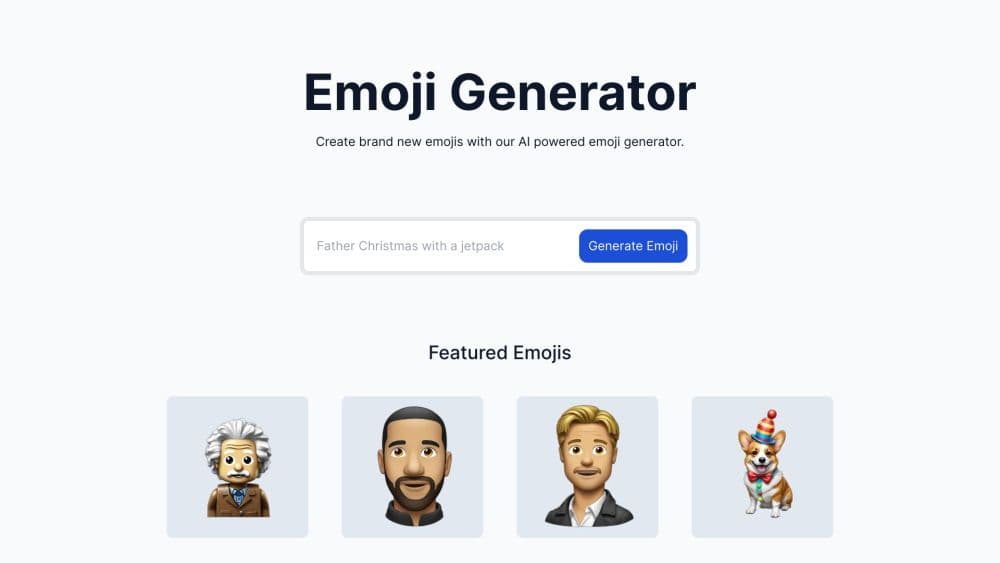
emoji.is is a free browser tool that turns a short text prompt into a custom emoji image in seconds, aimed at people who want a personal reaction icon without opening a design app.
About emoji.is
What Is emoji.is
emoji.is is a small AI emoji generator that takes a written prompt and returns a sticker style image you can drop into a chat. There's no editor, no layer panel, and no template library to scroll through. You describe the emoji you want, press generate, and get a picture back.
The idea showed up on Product Hunt in October 2023, where it ranked 12th for the day with 251 points and now holds a 4.7 rating from six reviews. The makers built the first version in a single day, which explains both the appeal and the rough edges.
That origin story shapes the product. It's a lightweight answer to a real annoyance: every custom emoji request turns into a design ticket, and most people just want one weird little face for their group chat. A custom emoji generator that runs on a text box is closer to how people actually work.
The catch is what you get. Output arrives as a generated image rather than a native Unicode character, so it behaves like a sticker and needs an upload slot on whatever platform you use. Fine control is thin too. If the result is 80% right, you regenerate with a new prompt instead of nudging the edges.
Getting Started
- Open emoji.is in a browser and type a description, such as "a sleepy cat holding a mug."
- Press generate and wait a few seconds for the image.
- Check the result and rewrite the prompt if the emoji missed, since small wording changes shift the output a lot.
- Save the image with a right click, or add it to Slack or Discord through those apps' custom emoji upload screens.
Product Information
A quick look at emoji.is's pricing, supported platforms, and performance.
Best for
The users, tasks, and scenarios where this tool fits best.
Users
- Community moderators
- Casual chatters
- Streamers and creators
Tasks
- Filling an empty custom emoji slot
- Illustrating a short social caption
- Roughing out emoji ideas
Scenarios
- Setting up a new group chat
- Building a brand mascot set
- Late night idea chasing
Key features
Text to Emoji Generation
The whole tool rests on a single input. You write a description of the emoji you want, the AI emoji maker draws it, and the image lands in the browser window within seconds. Prompt wording carries most of the weight, so adding color, mood, or an object usually changes the result more than repeating the same words.
Browser Only, Nothing to Install
emoji.is runs in a tab on Windows, macOS, Linux, and mobile browsers. There's no desktop client, no keyboard extension, and no account requirement mentioned on the tool's public profile, so trying it costs nothing beyond a page load.
Zero Cost to Use
The tool has been free since launch and was listed as a free product when it appeared on Product Hunt. That matters for casual users, who can generate a few ideas without weighing a subscription.
Mood and Style Prompts
Because output follows your description, you can steer the look. Treat it as an emoji maker that takes direction: name a mood ("grumpy," "sparkly"), an art style ("flat sticker," "pixel art"), or a combination of two objects. Short prompts with one clear idea tend to work better than long paragraphs with conflicting directions.
Drop-In Sticker Output
Results come back as image files rather than Unicode characters, so making your own emoji ends at a file you own. That makes them ready for Slack and Discord custom emoji slots, which accept uploaded images, and it also means they work as chat stickers in apps that support them.
Pros and cons
Pros
- No sign-up friction: the tool opens in a browser and produces a result from a one-line prompt.
- Fast turnaround: a few seconds between typing and seeing the emoji.
- Free to use: no credits, no trial timer, and no paywall reported on the product listing.
- Low skill floor: nobody needs design software experience to get something usable, which puts the whole job of making your own emoji within reach of anyone who can describe it.
Cons
- No download button: reviewers on Product Hunt asked for one, and saving the image means right clicking until the feature ships.
- No face upload: you can't turn a photo of a person into an emoji, which rules out the most requested use case for team and family emoji sets.
- Results need retries: vague prompts produce mismatched images, so budget two or three attempts per idea.
- Manual platform setup: every emoji has to be uploaded to Slack or Discord by hand, with no batch export.
Frequently asked questions
emoji.is turns a typed description into a custom emoji image using AI. You write something like "a sad frog in a hoodie," hit generate, and get a sticker style picture back in seconds.
Related content
Explore related tools, skills, and articles for emoji.is.
emoji.is Alternatives

Google EmbeddingGemma 2
Google DeepMind · Writing · Image · CodingGoogle EmbeddingGemma 2 is a 740M-parameter open model that turns text, code, images, audio, and video frames into vectors in one 768-dimension space, running on phones and laptops.

Tractionwave
TractionWave · Image · MarketingTractionWave is an AI attention heatmap tool for static ads. Upload a PNG or JPG and it returns predicted attention, ranked hotspots, and fixes before you spend budget.

Imejis.io
Imejis.io · Image · MarketingImejis.io is an AI design studio for agents and marketing teams. Describe an image in plain words, and it writes the copy, builds the layout, reflows it to every size, then exports a finished file.