

Encord
Encord · Image · Coding
Encord is a multimodal AI data platform that helps teams label, curate, and evaluate training data, covering video, LiDAR, audio, and text in one workflow.
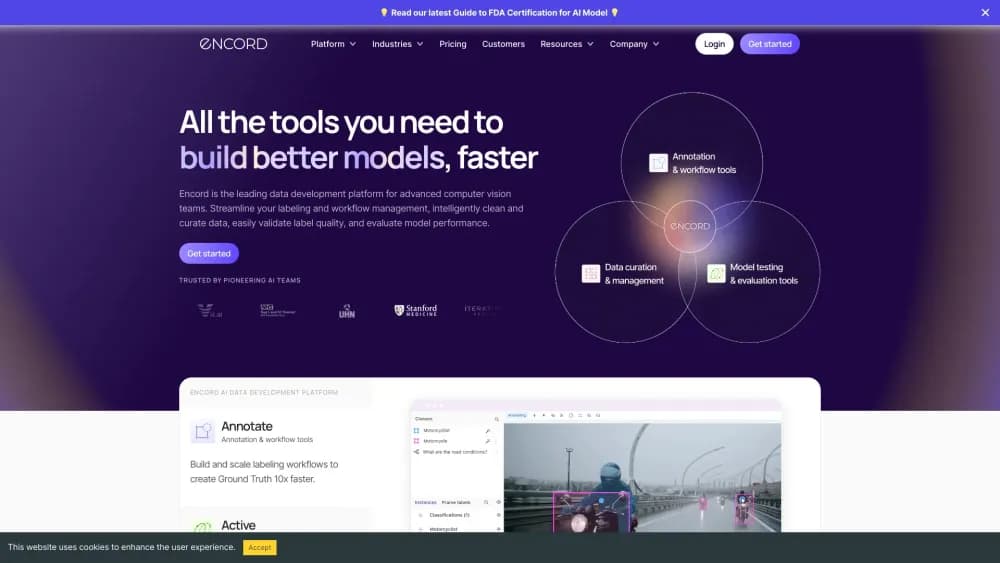
About Encord
What Is Encord
Encord is the data layer that sits between raw data and a working AI model. Instead of stitching together a labeling vendor, a spreadsheet of quality checks, and a separate evaluation script, a team runs all of it in one place. You bring the data, Encord handles annotation, quality control, and the feedback loop that tells you where a model still gets things wrong.
The problem it addresses is practical. Most projects stall on data, not on architecture. Labels drift, edge cases hide in the tail, and no one can tell which errors matter. Encord tries to close that gap by keeping labeling, curation, and evaluation connected, so the same dataset that trains a model also stays readable when you audit it later.
Its limits are worth stating early. Encord is built for teams with a real labeling pipeline, not for a single person tagging a folder of photos. Pricing is quoted to you rather than published as a fixed number, and the platform leans on a Python SDK and cloud storage, so basic scripting helps. If you only need a few hundred images labeled once, a lighter tool will feel less heavy.
Getting Started
- Book a demo or start from the self-serve Starter plan, then connect your cloud storage so Encord can see your files.
- Import and register your data through the SDK, then organize it into datasets.
- Set up an ontology and workflow, choosing which labels, reviewers, and quality checks apply.
- Annotate or run AI-assisted labeling in the browser, with reviewers catching mistakes as they come in.
- Export labels or model metrics, or route failures back into the next round of training.
Product Information
A quick look at Encord's pricing, supported platforms, and performance.
Best for
The users, tasks, and scenarios where this tool fits best.
Users
- ML and data engineers
- Annotation and quality leads
- Computer vision teams
- Healthcare and defense teams
Tasks
- Labeling multimodal data
- Curation and edge case search
- Model evaluation
- RLHF and post-training alignment
Scenarios
- A robotics team building perception
- A hospital training a surgical model
- A media company cleaning up captions
Key features
Multimodal Annotation in One Tool
Encord labels image, video, 3D and LiDAR, audio, text, DICOM, and NIfTI data without moving between products. A single workflow can combine sensor types, which is what physical AI and multimodal models actually need. Video annotation is native rather than bolted on, so frame-level tracking holds up on long clips.
Label Lineage and Quality Controls
Every label carries its history. Encord records who touched it, when, and what changed, and it folds consensus scoring, review stages, and annotator training into the same pipeline. When a dataset grows to millions of items, that lineage is the difference between trusting the labels and re-checking them by hand.
Embedding-Based Curation
The platform builds embeddings of your data and lets you search and filter by meaning. Duplicates, outliers, and rare edge cases rise to the surface instead of hiding in the tail. Model-in-the-loop curation pulls the samples your model handles worst straight into the next labeling batch, which focuses labeling budget where it changes the outcome.
Model Evaluation and Analytics
Label validation, model plots, and error detection run against your live dataset. You compare models, track custom metrics, and spot the classes where performance drops. The point is to answer a specific question: where does this model fail, and which data would fix it.
Post-Training Alignment
For teams doing RLHF or rubric-based scoring, Encord orchestrates pairwise comparison and evaluation workflows. Human feedback is captured in the same place as the training data, so alignment runs don't drift into a separate spreadsheet and a lost afternoon.
Data Agents and Automation
Data agents take over repetitive pipeline work, from running model predictions to sorting results and flagging items that need a human. AI-assisted labeling, including Segment Anything Model 2, speeds up the first pass, and interpolation carries labels across frames so annotators fill in gaps instead of tagging every keyframe.
Python SDK and Cloud Integration
Encord ships an API and Python SDK for registering data, importing labels, and exporting results, so pipelines stay scriptable. It connects to your own cloud storage and offers cloud, VPC, and on-prem deployments. Your data stays in your environment, which is the requirement most enterprise teams start with.
Pros and cons
Pros
- As an AI data annotation platform, it covers a wide range of data types, so a computer vision team and a language team can share one setup.
- Label lineage and consensus workflows keep quality rules inside the pipeline, which cuts the manual spot-checking a large dataset would otherwise demand.
- Embedding-based curation and model-in-the-loop search point labeling at the samples that matter, so budget goes to edge cases instead of easy data.
- The Python SDK and cloud integrations mean imports, exports, and metrics are scriptable, which fits teams that already automate their pipelines.
- Cloud, VPC, and on-prem choices give healthcare, defense, and other sensitive teams a deployment path that keeps data in-house.
- A free Starter tier lets a small team test image and video annotation before committing to a paid plan.
Cons
- Pricing isn't published as a fixed number, so you can't compare cost against a competitor until you talk to sales.
- It's built for teams running a production labeling pipeline, which is more overhead than a solo user labeling a small image set needs.
- Getting the most out of it leans on the Python SDK and stored data in the cloud, so teams without scripting experience face a steeper start.
- Higher data volumes and add-on data types tie into plan limits, so costs can climb as a project scales past the included tier.
Frequently asked questions
Encord is used to prepare and manage AI training data. Teams label images, video, audio, and 3D data, curate the dataset to find edge cases, and evaluate how well a model performs, all inside one platform.
Related content
Explore related tools, skills, and articles for Encord.
Encord Alternatives

Google EmbeddingGemma 2
Google DeepMind · Writing · Image · CodingGoogle EmbeddingGemma 2 is a 740M-parameter open model that turns text, code, images, audio, and video frames into vectors in one 768-dimension space, running on phones and laptops.

Tractionwave
TractionWave · Image · MarketingTractionWave is an AI attention heatmap tool for static ads. Upload a PNG or JPG and it returns predicted attention, ranked hotspots, and fixes before you spend budget.

Imejis.io
Imejis.io · Image · MarketingImejis.io is an AI design studio for agents and marketing teams. Describe an image in plain words, and it writes the copy, builds the layout, reflows it to every size, then exports a finished file.