

EQUO
EQUO · Business
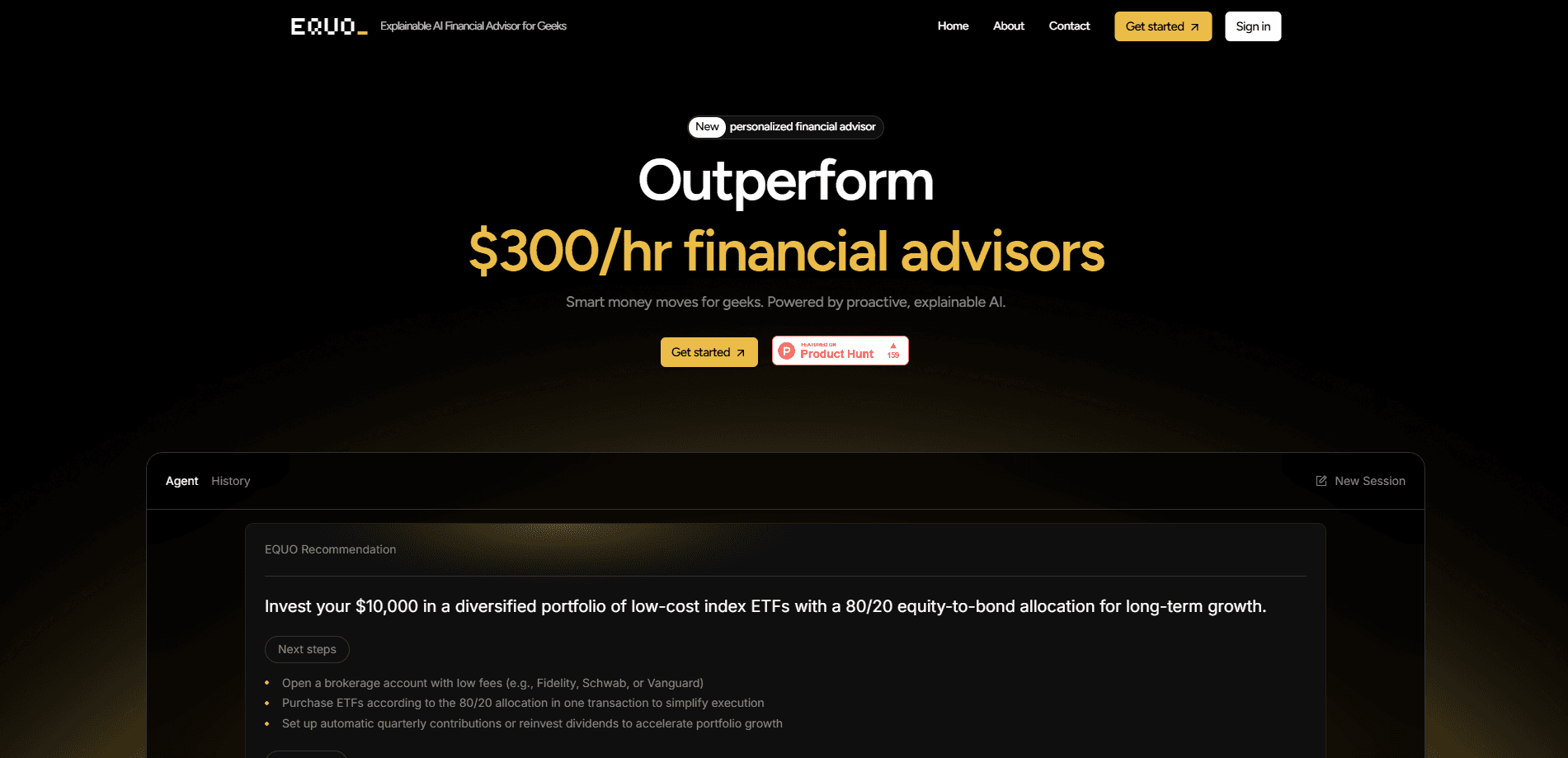
EQUO is an AI personal finance app aimed at people who want straight answers about money without sitting through a sales pitch. As an AI financial advisor, it works a little differently from the usual chatbot. You connect your accounts, ask a question like "how should I start investing 10K," and it drafts a personalized strategy it can actually explain. The pitch is simple: skip the $300-an-hour advisor and the one-size-fits-all budgeting app, and get targeted guidance on demand.
About EQUO
What Is EQUO
EQUO is a web-based AI financial advisor that handles personal finance questions the way a patient analyst would. Instead of a chat box that spits out generic tips, it factors in your full financial picture before answering. The company markets it to "geeks" who want explainable AI, meaning they can see the reasoning rather than just the verdict.
The core problem it targets is a gap in the market. A traditional wealth manager costs a lot and takes weeks to book. Budgeting apps track what you already spent but rarely tell you what to do next. EQUO pitches itself as a financial planning tool that sits in between, giving you planning and investment guidance whenever a question comes up.
The biggest limitation is that advice is only as good as the data it can see, and it's a newer product with a thin public track record that independent reviewers haven't had time to stress-test against real portfolios. It hasn't been around long enough for independent performance reviews, and it isn't a licensed personal advisor replaced in human form. Treat it as a well-informed second opinion, not a fiduciary in your corner.
Getting Started
- Go to app.tryequo.com and create an account with your email.
- Connect your financial accounts so EQUO can see your income, assets, and debts.
- Ask your first question in plain language, such as how to allocate a lump sum or pay down a loan.
- Review the strategy and the explanation behind it, then adjust your inputs and ask follow-ups.
- Revisit the conversation as markets or your situation change to keep the plan current.
Product Information
A quick look at EQUO's pricing, supported platforms, and performance.
Best for
The users, tasks, and scenarios where this tool fits best.
Users
- DIY investors
- People priced out of advisors
- Detail-oriented savers
Tasks
- Deciding how to invest a lump sum
- Comparing debt payoff versus investing
- Building a first financial plan
Scenarios
- A bonus or tax refund lands
- You're weighing a major purchase
- Markets move and you want a gut check
Key features
Explainable Recommendations
EQUO's selling point is that it shows its work. Behind each answer is a set of agents that analyze your data and test the logic before presenting a conclusion. You see the reasoning trail. That makes it easier to judge whether an idea fits your situation or is off base.
Connected Financial Picture
The advisor connects to your accounts and factors in the whole picture before replying. That means an answer about investing accounts for your existing debt and cash flow, not just the number you typed in. The more accounts you link, the more specific the guidance gets. You do have to be comfortable sharing that data. Not everyone is.
Generative UI Answers
Rather than a wall of text, EQUO renders responses as visual interfaces built on the fly. Complex topics like portfolio allocation or payoff timelines come out as charts and structured views you can actually read at a glance. It beats scrolling through a paragraph of percentages.
Market-Aware Guidance
EQUO checks live market conditions before it answers, so advice reflects the current environment rather than a static model that was frozen the day the company shipped the product. A strategy it gave last month may shift as rates or prices move. Timing matters here. That keeps recommendations current, provided you trust the timing of its data pulls.
Conversational Planning
You interact the way you'd talk to an analyst. Ask a question, get a plan, push back, ask again. What if the first answer misses? Just say so. Follow-up questions keep their context, so you don't have to re-explain your whole financial situation from scratch each time you come back to revisit a decision you were unsure about.
Pros and cons
Pros
- Explains its reasoning, so you can evaluate whether a recommendation makes sense for you.
- Turns complex money questions into visual answers instead of dense text.
- Builds recommendations around your connected accounts rather than generic rules.
- On-demand access beats waiting weeks for an advisor appointment.
- Market-aware answers stay relevant as conditions change.
Cons
- Not a licensed human fiduciary, so it can't replace professional advice for high-stakes or regulated needs.
- Advice quality depends entirely on how much account data you're willing to connect and share.
- Pricing and free-tier details aren't published, so you can't judge cost before signing up.
- It's a new product with little independent track record to verify outcomes.
- No mobile app yet, which limits checking on your plan away from a browser.
Frequently asked questions
EQUO answers personal finance and investing questions with tailored, explained strategies. It connects to your accounts, considers your full situation, and returns a visual answer rather than generic advice.
Related content
Explore related tools, skills, and articles for EQUO.
EQUO Alternatives
Liveplan
Palo Alto Software · BusinessLivePlan is business plan software that helps founders and small business owners turn an idea into a funder-ready plan. It combines AI-assisted writing, market research with cited sources, and connected financial forecasting so your income statement, cash flow, and balance sheet move together when you change one number. Over 1.5 million businesses have used it to plan, forecast, and track performance against real accounting data. That's a lot of founders. It's also a signal the tooling survived contact with real lenders.

Swms
Swms AI · Writing · Productivity · BusinessSwms is an AI safety compliance tool that turns a plain description of a job into ready-to-use safety documents. Describe your project, trade, and known hazards, and it writes a safe work method statement, job hazard analysis, safe work procedure, RAMS, or safety data sheet in seconds. It also ships with Oscar, a chat assistant that answers workplace safety questions in any language. Teams in construction, mining, transport, and warehousing use it to cut the paperwork that usually eats into a workday.

Rows
Rows (Superhuman) · Productivity · BusinessRows is an AI spreadsheet and data analysis tool that imports live data from more than 50 sources, then lets you work with it using plain language instead of SQL queries or nested formulas. You can pull numbers out of PDFs, connect ad platforms, databases, and bank accounts, and ask the AI to build reports, merge datasets, or set up models that recalculate themselves. It runs in the browser, works like a spreadsheet, and now sits under the Superhuman umbrella.