

ExplainTXT
ExplainTXT · Leaning
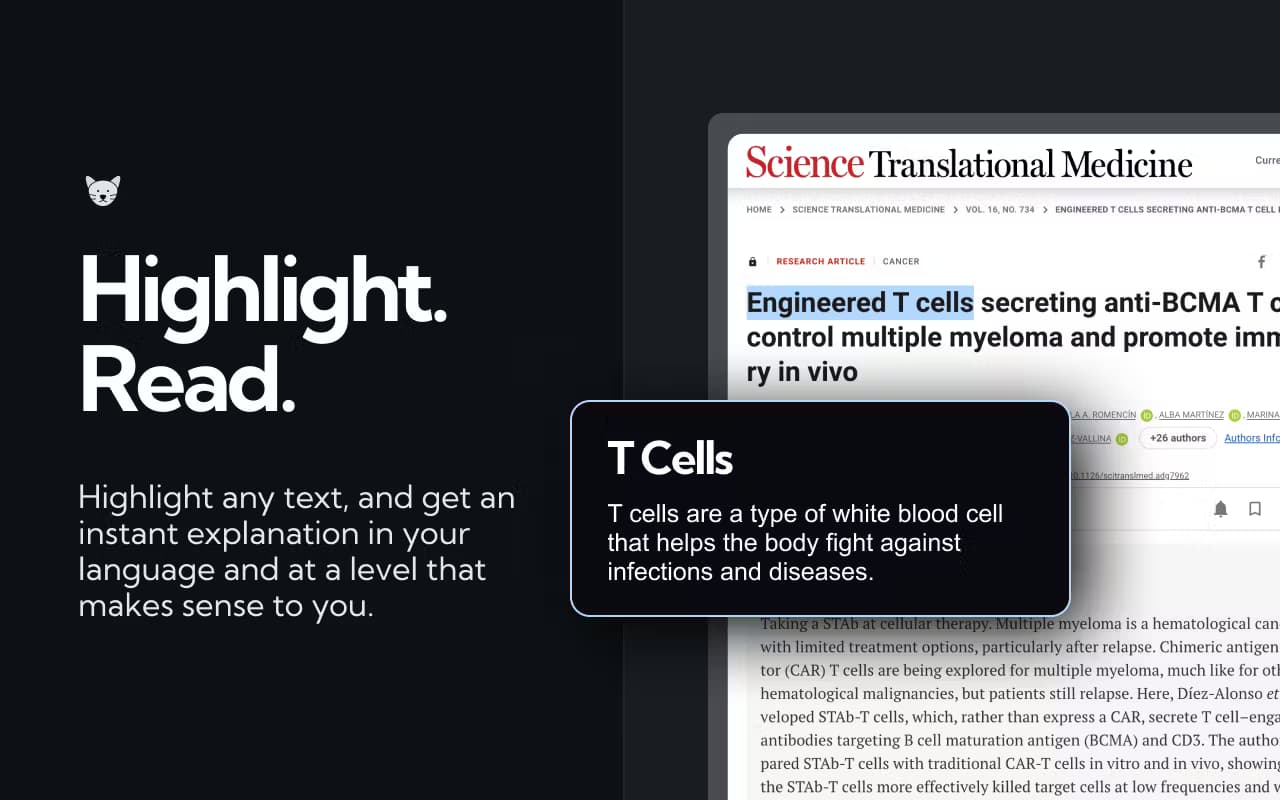
ExplainTXT is a Chrome extension that summarizes any web page or explains highlighted text after you press one shortcut, then answers follow-up questions in a sidebar.
About ExplainTXT
What Is ExplainTXT
ExplainTXT is an AI page summarizer and text explainer built for people who read on the web and keep running into walls of text. Instead of copying a paragraph into a separate chatbot, you press ⌘⇧E on any page and the tool works right where you already are.
The idea is simple. Nothing selected means it summarizes the whole page. Something highlighted means it explains just that word, clause, or paragraph in plain words. Either way, the answer shows up in a sidebar next to the content you're reading, so you never lose your place.
Think of it as an AI reading assistant rather than a full AI workspace. It covers reading tasks, not image generation, coding, or document editing. You also need an account to use it, and the paid tier is the only published plan.
Getting Started
- Install the ExplainTXT extension from the Chrome Web Store and pin it to your toolbar.
- Open any article or document, then press ⌘⇧E on Mac or Ctrl+Shift+E on Windows to summarize the page.
- Highlight a term or paragraph first and press the same shortcut to get an explanation of just that part.
- Type follow-up questions in the sidebar to dig into anything the first answer missed.
- Prefer a mouse, or want a different key? Select text and use the menu, click the toolbar icon, or rebind the shortcut in Chrome at any time.
Product Information
A quick look at ExplainTXT's pricing, supported platforms, and performance.
Best for
The users, tasks, and scenarios where this tool fits best.
Users
- Students
- Researchers and analysts
- Non-native English readers
Tasks
- Skimming a long article
- Understanding a single term or clause
- Following up on a summary
Scenarios
- Reading news, contracts, or documentation during work hours
- Working through a research paper or a dense report
- Reading on the go in Chrome
Key features
One Shortcut, Two Modes
ExplainTXT runs on a single keyboard shortcut. With nothing selected, it can summarize web pages in full; with text highlighted, this highlight text explainer covers only that selection. The split means you don't pick a mode from a menu first, which keeps the flow to a single keystroke.
Sidebar That Keeps Your Place
Answers appear in a sidebar rather than a new tab. The page you're reading stays open next to the summary or explanation, so you can compare the two without switching windows. This matters most on long documents where losing your spot costs time.
Plain-Language Explanations
When you highlight a term, a clause, or a paragraph, ExplainTXT rewrites it in everyday words. The tool is aimed at jargon-heavy material such as contracts, academic writing, and technical documentation, where the original phrasing is the main obstacle to understanding.
Follow-Up Questions
After the first summary or explanation, you can keep asking questions in the sidebar. That turns a one-shot summary into a short back-and-forth, which helps when the initial answer covers the gist but not the detail you need.
Mouse and Rebindable Shortcut
You don't have to use the keyboard. Highlight text and pick from the on-page menu, or click the toolbar icon. If ⌘⇧E or Ctrl+Shift+E clashes with another tool, you can rebind it inside Chrome whenever you want.
Works on Any Website
The extension runs across the sites you browse rather than inside one platform. News articles, docs, comment threads, and PDFs opened in Chrome are all fair game, which is why it fits general reading rather than a single app.
Pros and cons
Pros
- Turns a full page or a single selection into a short answer with one keystroke.
- The sidebar layout keeps the original text visible while you read the explanation.
- Follow-up questions let you dig deeper without starting a new chat.
- Works on the sites you already read, with no copy-and-paste between apps.
- The shortcut can be rebound, so it won't clash with tools you already use.
Cons
- It runs only as a Chrome extension, so Firefox, Safari, and mobile browsing aren't covered.
- There's no published free plan; the listed price is $119.99 per year.
- It focuses on reading and explanation, so it can't write, generate images, or edit documents.
Frequently asked questions
ExplainTXT summarizes a web page or explains highlighted text using one keyboard shortcut. With nothing selected it reads the whole page; with text highlighted it explains only that part, and both answers appear in a sidebar.
Related content
Explore related tools, skills, and articles for ExplainTXT.
ExplainTXT Alternatives

HireKey
HireKey · Voice & Language · Productivity · LeaningHireKey is an AI job search copilot built by a former tech recruiter. It checks role fit, tailors resumes, runs interview practice and tracks every application.

Lune
Retrograde Labs · Productivity · LeaningLune is a research search engine for scientific AI agents. It runs as an MCP server that lets Claude, ChatGPT and Cursor search peer-reviewed computer science papers and cite them.
Coddy
Coddy · Coding · LeaningCoddy is a gamified platform to learn to code through short interactive lessons in 20+ languages, with a browser editor, an AI tutor and free certificates.