

Face Recognition Attendance system
Okulr Techminds · Image
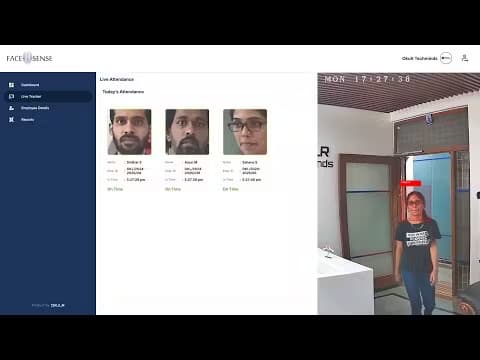
Face Recognition Attendance system is Okulr's AI tool that turns your existing CCTV cameras into an automated attendance tracker for offices, schools, and stores.
About Face Recognition Attendance system
What Is Face Recognition Attendance system
Face Recognition Attendance system is Okulr's AI attendance product, sold under the name FaceSense. It's a retrofit video analytics application, which means you don't rip out your current IP cameras or CCTVs. The cameras you already own become the eyes of the system. A small on-site box called the Facesense Edge Controller does the actual face matching. What does that mean in practice? You keep the hardware you've already paid for and add software on top of it.
Okulr built it for time and attendance management rather than general surveillance. Companies of every size use it, along with schools, colleges, and training centers. Think of it as a biometric attendance system that skips the fingerprint reader. When someone walks into the lobby, the camera captures the footage. The system marks them present. Their phone gets a notification through the Facesense mobile app.
Before you commit, one thing deserves a closer look: the Edge Controller. You can't just sign up online and start scanning faces. You need the hardware on your own network. That's a one-time purchase on top of the subscription, and every site you want to cover needs its own controller, which is the detail most buyers miss when they compare FaceSense to a pure cloud service.
Most face recognition attendance tools stop at clocking people in. This one goes further, tracking repeat customers in retail and rolling every branch into a single cloud view.
Getting Started
- Buy the Facesense subscription along with the Facesense Edge Controller. The controller is a one-time purchase, and the subscription runs pay-as-you-use.
- Connect the Edge Controller to your existing network at the premises, along with the display or monitor you want to use.
- Activate the controller using the OTP sent to your email when you bought it, then log in to the Facesense Central Command Center (F3C) in the cloud.
- Open the preloaded Facesense Lite application and add your entry and exit cameras, swapping them out later whenever you change hardware.
- Enroll employees and let the system capture attendance as people walk in.
Product Information
A quick look at Face Recognition Attendance system's pricing, supported platforms, and performance.
Best for
The users, tasks, and scenarios where this tool fits best.
Users
- HR teams managing attendance across multiple offices
- Schools and colleges tracking student and staff presence
- Store owners in retail chains
Tasks
- Marking daily attendance without swipe cards or fingerprint scanners
- Running shift-based schedules
- Generating attendance reports for payroll
Scenarios
- A mid-size office with half a dozen entry points
- A retail chain checking staff attendance per store
- A campus that needs contactless check-in
Key features
Works With Your Existing Cameras
This is the core pitch. FaceSense doesn't ask you to buy new cameras. It reuses your IP cameras or CCTVs, so the hardware cost stays low and the switch is mostly software. Because the whole system is designed to retrofit whatever cameras already hang on your walls, you can add entry and exit cameras through the Facesense Lite application and swap a camera later without redoing the setup.
Face Matching That Works in the Dark
The system decodes video the way the human eye and brain do, capturing footage and extracting the data it needs to identify a face, and it also handles low-light conditions, including pitch-dark spaces, and people wearing masks. That matters for factories and warehouses where a bright lobby isn't a given. Not every camera setup can pull that off.
Cloud Command Center
Attendance from every connected branch lands in the Facesense Central Command Center (F3C) on the cloud. HR logs in from anywhere and sees the full picture: attendance and logs, daily and periodic registers, and shift-based summaries. This is what makes the attendance management system useful for multi-site teams. Branch managers see their own store. Head office sees all of them.
Offline Data Sync
If the internet drops, the Edge Controller keeps recording. When the connection comes back, it replicates the stored data automatically into the F3C cloud, so a spotty network doesn't turn into a permanent gap in your attendance record.
Mobile App Alerts
Employees get notified through the Facesense app on iOS or Android when attendance is logged. HR uses the same app to monitor and manage. Approvals and follow-ups don't have to wait until someone reaches a desk.
Shift and Workforce Management
There's a built-in shift module, so face-recognition attendance can be organized per shift with different timings per team. Pair that with the in/out logs. HR gets a clean view of who's on the clock and who isn't. No manual reconciling.
Retail Customer Tracking
Beyond staff attendance, FaceSense tracks regular or repeated customers in a store and links them to loyalty programs, and a cataloguing feature generates periodic reports of these regulars. It's a useful extra if you run a shop. Fair warning: it leans further into analytics than plain attendance.
Pros and cons
Pros
- Reuses your existing IP cameras and CCTVs, so you avoid a full hardware refresh.
- Face matching holds up in low light and works with masks on.
- Offline sync means network outages don't create gaps in attendance records.
- Branch attendance rolls up to one cloud dashboard, handy for multi-site teams.
- Mobile app keeps employees and HR in the loop without extra manual steps.
Cons
- No standalone online signup. You need the Edge Controller, which is a one-time purchase, plus the subscription.
- Pricing isn't published, so you have to request a quote before you know the real cost.
- Every premises needs its own Edge Controller, which adds up if you run many small locations.
- Cross-site tracking still depends on each site having local hardware in place.
Frequently asked questions
FaceSense is Okulr's face recognition attendance product. It marks employee attendance automatically from camera footage, handles shifts and in/out logs, and sends reports to HR. It also supports student attendance in schools and colleges, plus customer tracking in retail.
Related content
Explore related tools, skills, and articles for Face Recognition Attendance system.
Face Recognition Attendance system Alternatives

Google EmbeddingGemma 2
Google DeepMind · Writing · Image · CodingGoogle EmbeddingGemma 2 is a 740M-parameter open model that turns text, code, images, audio, and video frames into vectors in one 768-dimension space, running on phones and laptops.

Tractionwave
TractionWave · Image · MarketingTractionWave is an AI attention heatmap tool for static ads. Upload a PNG or JPG and it returns predicted attention, ranked hotspots, and fixes before you spend budget.

Imejis.io
Imejis.io · Image · MarketingImejis.io is an AI design studio for agents and marketing teams. Describe an image in plain words, and it writes the copy, builds the layout, reflows it to every size, then exports a finished file.