

Face to Many
Redesign With AI · Image
Face to Many is a web tool from Redesign With AI that redraws a single portrait in six preset styles: 3D, emoji, pixel art, video game, clay, and toy.
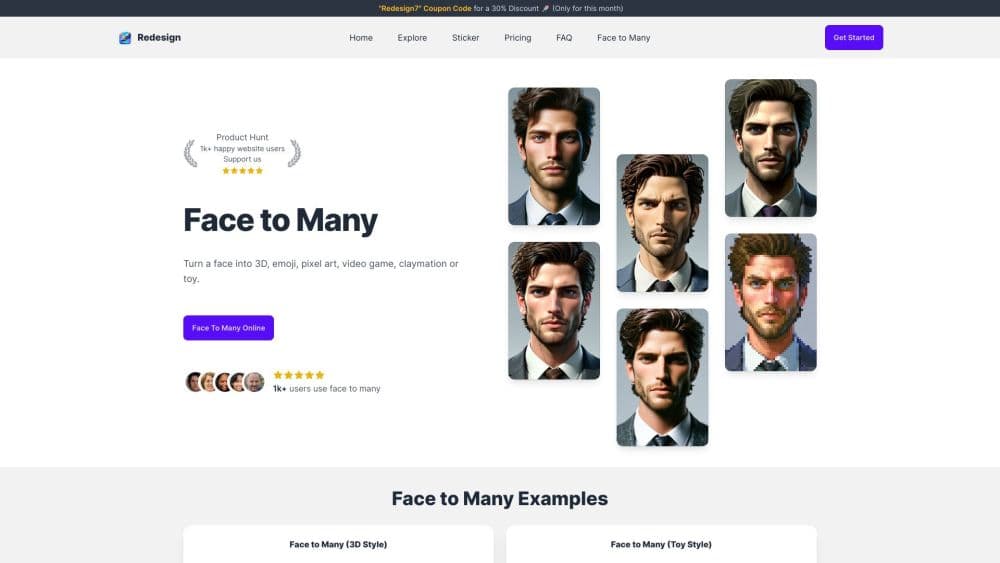
About Face to Many
What Is Face to Many
Face to Many by Redesign takes a photo of a face and repaints it. You don't describe a person and wait for a model to invent one. You upload someone who already exists, pick a look, and the tool returns the same face as a 3D character, an emoji, a pixel sprite, a video game hero, a clay figure, or a plastic toy.
The tool sits inside Redesign With AI, a design platform that also generates icons, logos, posters, and stickers. Face to Many is the portrait arm of that platform, and it's the closest thing there to a dedicated AI face style generator or AI portrait generator. The method comes from a 2023 research baseline of the same name. A depth map holds the shape of the head and the pose, while an image adapter carries the texture and color of the chosen style. That's why the output still reads as your friend rather than a random cartoon.
Two limits matter before you pay. The style list is fixed at six, so there's no custom style training and no upload-your-own reference. The result is also illustration work. It won't rescue bad lighting or a face turned away from the camera, and it isn't a retouched photograph. A sharp, front-facing shot with even light gives the cleanest output.
Getting Started
- Sign in at redesignwithai.com with a Google account or an email magic link. The dashboard is the same one that hosts the design tools.
- Open Face to Many and upload a photo. A tight crop around the head works better than a full-body shot where the face is small.
- Pick one of the six styles: 3D, Emoji, Pixel, Video Game, Clay, or Toy.
- Add a short prompt to steer hair, clothing, or expression. Concrete nouns work better than long descriptions.
- Generate the image. Each run costs one credit, and the result lands in your image history for download or a second pass in another style.
Product Information
A quick look at Face to Many's pricing, supported platforms, and performance.
Best for
The users, tasks, and scenarios where this tool fits best.
Users
- Streamers and social media creators
- Tabletop players and fan artists
- Small business owners
- Designers in the concept phase
Tasks
- Making a profile picture that holds up inside a small circle
- Building a matching avatar set for a team, a guild, or a group chat
- Testing how a character reads in pixel or toy style before paying for custom art.
- Producing playful images for invitations, birthday cards, and printed gifts.
Scenarios
- A new handle needs a face
- A birthday card for a friend who lives in retro games
- A game jam prototype needs placeholder characters
Key features
Six Preset Styles
3D, Emoji, Pixel, Video Game, Clay, and Toy. Each one changes the rendering rather than laying a color filter over the photo. Pixel art drops the resolution on purpose, clay adds a soft sculpted surface, and the toy style gives skin a plastic finish. Running all six on one photo costs six credits and shows you the full range in a single sitting.
Prompts That Steer the Result
The style sets the medium. The prompt sets the details. Short, concrete phrases work best, such as "red hood," "silver hair," or "angry expression." Long paragraphs tend to get ignored or produce muddled output. This is the main difference between a fixed face filter and a tool you can direct.
Face Structure Retention
A depth pass keeps the proportions of the head and the direction of the gaze, so the eyes stay in place and the jaw keeps its shape. That's why a 3D face generated here still looks like the person in the photo. Profiles and extreme angles degrade, and the model does noticeably better with a straight-on shot.
One Credit per Image
Every run costs a single credit, the same currency the rest of Redesign With AI uses. Starter at $9.99/mo includes 800 credits, and Premium at $17.99/mo includes 1,600. For this tool alone, 800 images a month is more than most individuals will ever use.
Image History
Generations stay in your account. You can compare two styles side by side, download the one that works, and rerun the same photo without uploading it again. History also helps when someone asks for a variation a week later.
Browser Only, No Install
There's no desktop app and no mobile app. The tool runs in a browser tab on Windows, macOS, Linux, Android, and iOS. Uploads work on a phone, but the small preview makes it harder to judge detail before you spend a credit.
Pros and cons
Pros
- Six distinct looks from one photo, so a single session can produce an avatar, a sticker, and a game token.
- Likeness holds up better than with generic image-to-image filters, because the depth pass anchors the facial geometry.
- One credit per run keeps experimentation cheap once you're on a paid plan.
- The prompt box adds range beyond a fixed filter, which matters when you need a specific outfit or mood.
- Nothing to install and no rendering setup, so the first image arrives within a couple of minutes.
Cons
- Face to Many isn't part of the free plan. The three free credits apply to the design tools, so you need at least the $9.99/mo Starter plan to try it.
- Six styles is the entire menu. No custom style, no reference image, no photoreal option.
- No API and no batch upload, so a set of 50 portraits means 50 manual runs.
- The output is illustration, not photography. It won't serve as a retouched headshot for a résumé or a large print portrait.
Frequently asked questions
It repaints one face photo in a style you choose. You upload a portrait, pick 3D, emoji, pixel art, video game, clay, or toy, and the tool returns the same person rendered in that look, with the facial structure kept intact.
Related content
Explore related tools, skills, and articles for Face to Many.
Face to Many Alternatives

Google EmbeddingGemma 2
Google DeepMind · Writing · Image · CodingGoogle EmbeddingGemma 2 is a 740M-parameter open model that turns text, code, images, audio, and video frames into vectors in one 768-dimension space, running on phones and laptops.

Tractionwave
TractionWave · Image · MarketingTractionWave is an AI attention heatmap tool for static ads. Upload a PNG or JPG and it returns predicted attention, ranked hotspots, and fixes before you spend budget.

Imejis.io
Imejis.io · Image · MarketingImejis.io is an AI design studio for agents and marketing teams. Describe an image in plain words, and it writes the copy, builds the layout, reflows it to every size, then exports a finished file.