

Ferndesk
Ferndesk · Productivity · Business
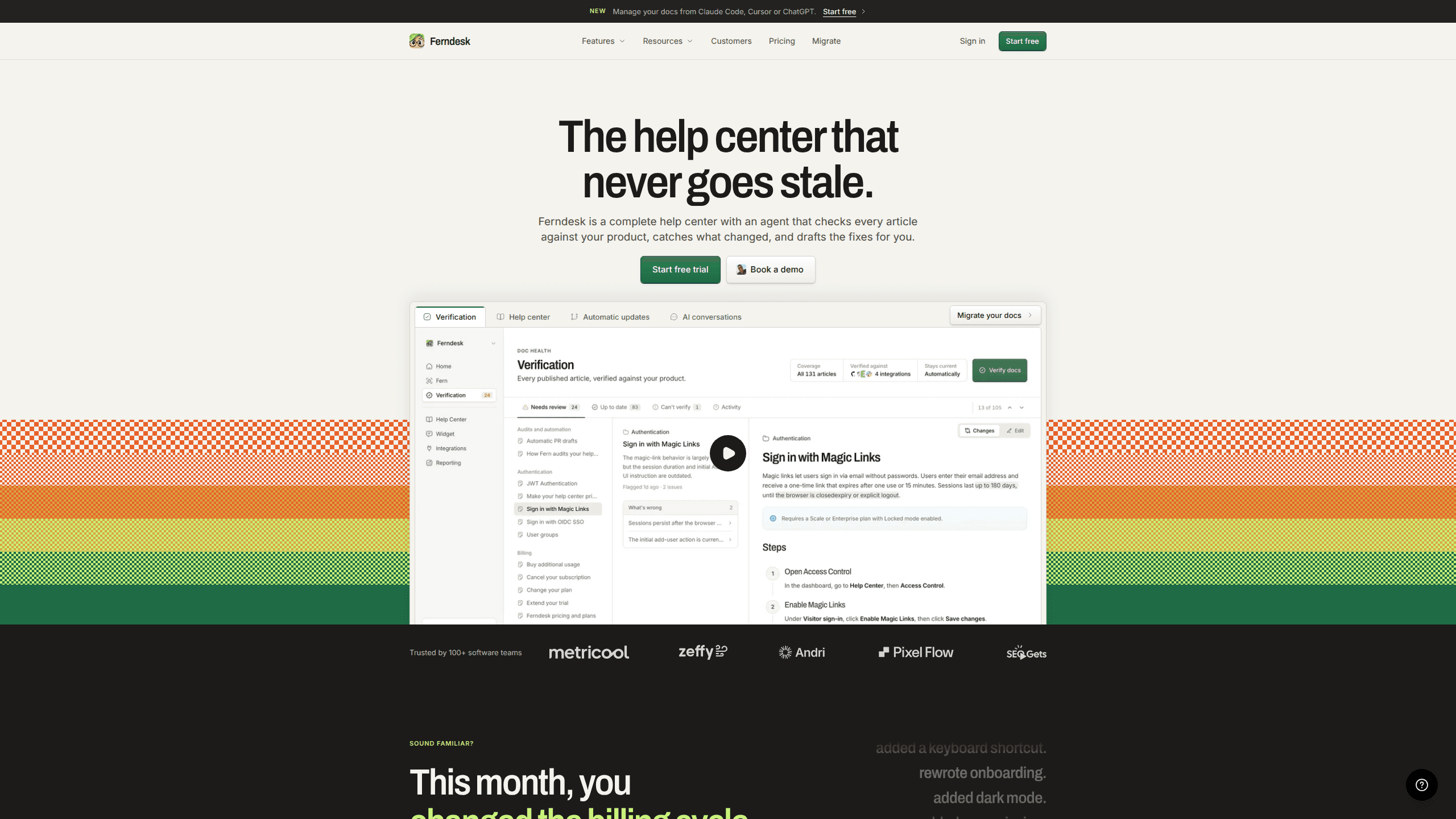
Ferndesk is an AI help center platform whose agent, Fern, checks each article against your actual product, drafts corrections, and publishes only after you approve them.
About Ferndesk
What Is Ferndesk
Ferndesk is a hosted help center for software companies, with an AI agent named Fern built into it. You import your existing articles, and Fern compares the claims in them against your codebase, your live product, and your support inbox. Anything that no longer matches comes back as a suggested edit with the reason attached.
The problem it targets is familiar to anyone who ships every week. A default changes, a button moves, a pricing page gets rewritten, and dozens of help articles quietly turn into wrong answers. Most AI knowledge base software waits for a human to notice. Ferndesk reads the product and starts the correction itself, which is what makes the self-updating knowledge base claim concrete rather than a slogan.
Two limits are worth knowing before you sign up. Fern only verifies articles that live inside Ferndesk, so docs sitting in Zendesk or Intercom get imported first, while your support tool stays where it is for tickets. Pricing is the other one. There's no free tier, just a seven-day trial, and the Pro plan runs $149 a month.
Getting Started
- Create an account at ferndesk.com and start the seven-day trial. No card is needed.
- Import your current help center. Ferndesk pulls articles, images, and URLs across from Intercom, Zendesk, Help Scout, HubSpot, GitBook, Document360, Crisp, and most other tools, then creates redirects so existing links keep working.
- Connect the sources Fern should read: the codebase, the live product, the support inbox, launch videos, and changelogs.
- Run the first audit. Fern flags articles that contradict the product and drafts a fix for each one, with its reasoning shown.
- Review the drafts, approve what looks right, and publish. Nothing goes live without your sign-off.
Product Information
A quick look at Ferndesk's pricing, supported platforms, and performance.
Best for
The users, tasks, and scenarios where this tool fits best.
Users
- Seed-stage SaaS founders without a technical writer
- Support leads at small teams
- Engineers who inherited the docs
Tasks
- Fixing articles that broke after a release
- Moving off Zendesk, Intercom, or GitBook
- Writing docs for a feature that just shipped
Scenarios
- A two-person startup ships weekly and nobody owns documentation
- A support team keeps answering the same five questions
- A product with a public portal plus private customer docs
Key features
Article Verification Against the Live Product
Fern reads each article and checks its claims against what the product actually does, using the connected codebase and a working copy of the app. A screenshot that shows an old menu, a step that references a removed button, a pricing detail that shifted: each one is flagged with the specific mismatch. You get a list of proposed edits rather than a vague warning that something may be out of date.
Migration With URLs Preserved
The importer brings over articles, images, and URL paths in one pass, then sets up redirects for anything that has to move. That matters for search rankings, because a help center rebuild usually costs months of organic traffic when old links start returning 404s. Imports from Intercom, Zendesk, Crisp, Help Scout, HubSpot, GitBook, and Document360 are supported, and the company says a typical migration finishes in about ten minutes.
Drafts Triggered by Releases
When a pull request merges, Fern can write the help article before the release ships. It reads the change, works out which customer-facing behavior moved, and drafts an update or a new page. A founder who used to write docs a month late ends up publishing on the same day as the feature, which is the difference between a help center that helps and one that misleads.
Weekly Content Audits
Every week, Fern scans the support inbox, community threads, and recent releases to find articles that are missing, stale, or contradicted by the product. Each finding becomes an issue you can assign back to Fern, and the fix comes back as a draft within minutes. The Pro plan includes 1,000 scheduled audits a month, well past what most small teams use.
Editing From Claude Code, Cursor, or ChatGPT
Ferndesk exposes API and MCP access, so you can manage docs from the tools you already have open. Ask Claude Code to rewrite a set of articles for a new feature name, or have Cursor check whether a documented endpoint still exists. Fern applies the changes inside Ferndesk as a person would, and you review the result before it publishes. For teams that live in an editor, this removes the context switch to a separate admin panel.
The Full Help Center Stack
Beyond the agent, Ferndesk ships the parts a support site needs: a public portal, AI answers built from your articles, an in-app widget, API documentation, private and authenticated docs with SSO, OIDC, or magic links, translations, analytics, and white labeling with five branded instances included. Five seats come with the plan, and role-based permissions separate who can draft from who can publish.
Pros and cons
Pros
- Verification runs against the codebase and the live product, not just against other articles, so outdated screenshots and removed settings get caught.
- Migration keeps URLs and creates redirects, which protects the search traffic a rebuild usually puts at risk.
- Release-triggered drafts mean documentation can ship with the feature instead of a sprint later.
- MCP access lets a team work from Claude Code, Cursor, or ChatGPT without opening the admin panel.
- One plan covers the whole product, with seats, white label instances, and 1,000 scheduled audits included rather than sold as add-ons.
Cons
- Fern only maintains articles hosted in Ferndesk. If you want your existing Zendesk or Intercom articles corrected in place, this isn't that tool.
- No free tier. The seven-day trial is enough to test an import, not enough to judge a year of maintenance.
- $149 a month is a real cost for a solo founder, and the $75 rate only lasts twelve months.
- Verification quality depends on how much product access you grant. A codebase Fern can't read limits it to public pages and tickets.
- Enterprise features such as SAML SSO, SCIM, and custom integrations sit behind a $399 monthly minimum.
Frequently asked questions
It hosts your help center and keeps the articles accurate. An agent called Fern checks each article against your codebase, your live product, and your support inbox, then drafts corrections for anything that changed. You approve each edit before it publishes.
Related content
Explore related tools, skills, and articles for Ferndesk.
Ferndesk Alternatives

Base Code
Base44 (Wix) · Coding · ProductivityBase Code is a shared cloud development environment from Base44. Teammates describe changes to an existing GitHub codebase in chat, preview them live and send them back as pull requests.

Knocket
Knocket (Tencent RTC team) · Productivity · Business · ChatbotKnocket is a free live chat and contact page tool that lets visitors message you from your website, app, or a shareable link, with every reply handled from Telegram or one inbox.

FloorGen
Vinit Kumar (FloorGen) · Productivity · China AIFloorGen is a browser-based floor plan maker that turns a sentence or a sketch into an editable 2D plan and a 3D walkthrough. Export to PDF, DXF or video, and draw without an account.