

Figy.ai
MyLens · Leaning
Figy.ai is an AI flashcard generator that converts a topic, a PDF, an image, or a document into interactive study cards in seconds. You type what you want to learn or upload your own notes, and the tool builds question-and-answer cards with hints. The cards expand as you go, so the deck grows harder or easier depending on what you already know. It works as an AI study app for exam prep, quick PDF to flashcards conversion, and everyday review. It's free to start and aimed at students, teachers, and anyone picking up a new skill.
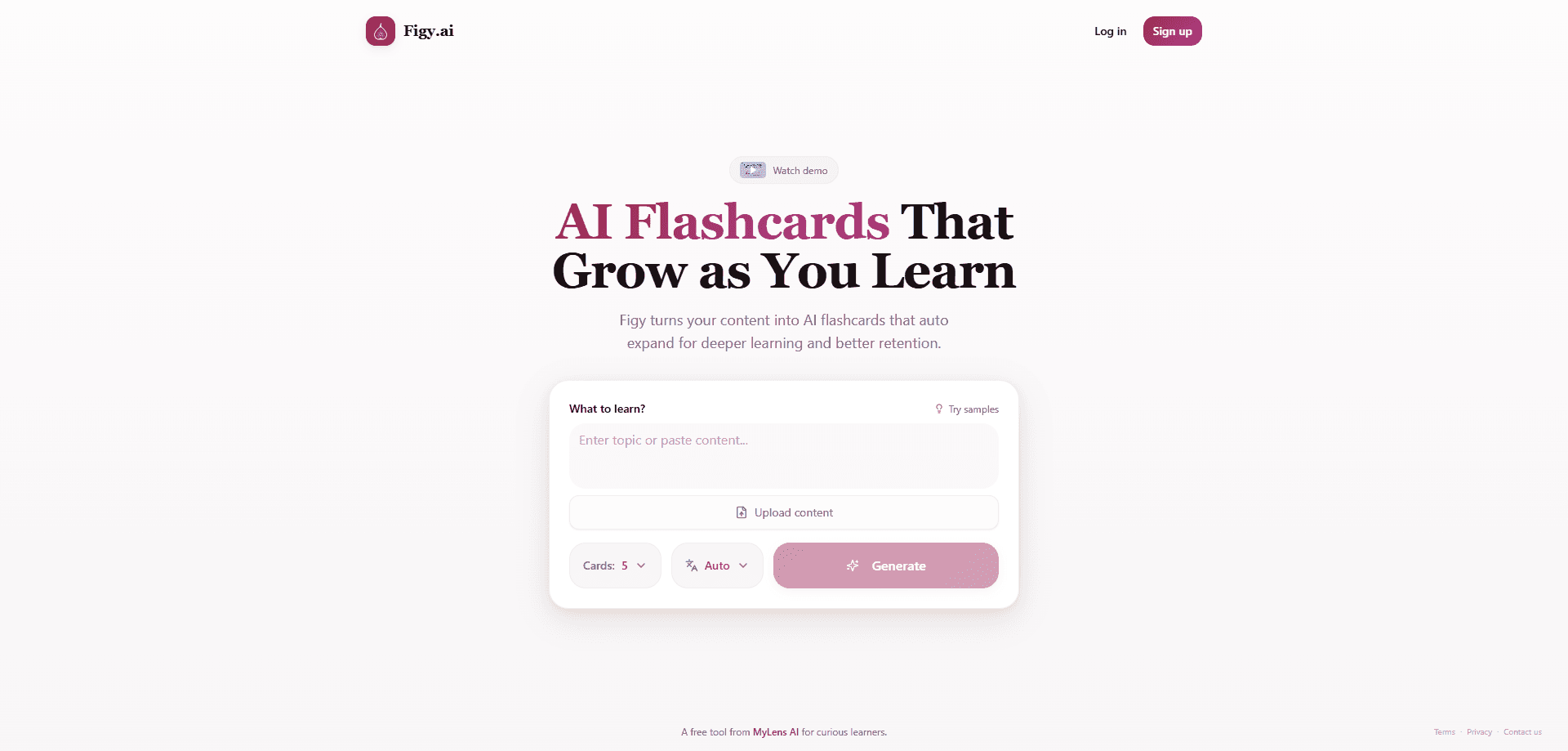
About Figy.ai
What Is Figy.ai
Figy.ai is a study tool built around one idea: flashcards that adapt to the person using them. Most flashcard makers give you a static deck you review the same way every time. So what does Figy do differently? It generates cards from whatever content you feed it and then adds harder or easier material as your knowledge changes.
It sits in the browser, so there's nothing to install. You can start with a single word, a topic you already have questions about, or a lecture PDF you've been carrying around all semester. The tool handles the hard part, which is turning dense material into questions you can actually answer.
The catch is scope. Figy is young, and the free tier caps how many cards you get per generation, which matters if you're building a large deck fast. It's also browser-only. No mobile app yet.
Getting Started
- Create a free account with an email address on the Figy.ai site.
- Type a topic into the prompt box, or upload a file. Supported inputs include PDFs, images, and documents.
- Pick your card format, such as Q&A or multiple choice, and set how many cards you want per generation.
- Hit Generate and wait a few seconds while the tool extracts the key concepts.
- Review the deck, then generate more cards to deepen the same subject, or share the set by link.
Product Information
A quick look at Figy.ai's pricing, supported platforms, and performance.
Best for
The users, tasks, and scenarios where this tool fits best.
Users
- Students
- Teachers
- Professionals
- Lifelong learners
Tasks
- Converting a dense PDF into a study deck
- Generating multiple-choice practice questions
- Building a shareable study set for a group
- Refreshing material you already studied
Scenarios
- The night before an exam when your notes are a mess and you need questions fast.
- Preparing onboarding or certification material for a team without a full afternoon of card writing.
- Exploring a brand-new subject where you don't yet know what the important questions are.
- Studying in a second language by generating cards in the language you're learning.
Key features
AI-Powered Flashcard Generation
Type a topic or drop in a document, and Figy builds a set of study cards in seconds. Each card comes with a question, an answer, and often a hint, which cuts out the manual work of writing cards one at a time. Fast. That's the core of the AI flashcard maker, and it's what separates it from a plain flashcard app.
Adaptive Card Expansion
Decks aren't fixed. As you move through a set, Figy adds harder or easier content based on how you're doing. That's adaptive learning in practice, and it means the same deck keeps working as your knowledge grows, instead of going stale after the first pass. For exam prep, it means you can keep pushing into the material that's still shaky.
Multiple Card Formats
You're not locked into one style of question. The tool supports Q&A, multiple choice, and fill-in-the-blank formats, so you can match the card type to what you're testing. Multiple choice is handy for quick recognition drills. Fill-in-the-blank forces actual recall.
Upload Anything
Figy accepts PDFs, images, and documents, and pulls the key concepts out for you. If your material lives in a scanned handout or a screenshot of a slide, you can still turn it into cards without retyping anything. The free plan allows a single file per upload, and the Pro plan allows several at once.
Instant Deck Sharing
Every set gets a shareable link. Send it to a study group and everyone reviews the same cards, which is a small thing that saves a lot of copying. Study groups and classrooms get the most out of this feature.
Multi-Language Support
You can generate flashcards in any language, which makes the tool useful for language learners and for students studying outside their first language. The company lists support for more than 50 languages.
Pros and cons
Pros
- Turns a topic or file into usable cards in seconds, no manual typing
- Cards adapt and expand, so a single deck stays useful as you learn
- Free plan covers the basics, including Q&A and multiple-choice cards and set sharing
- Accepts PDFs, images, and documents, so messy source material still works
- Generates cards in 50+ languages, helpful for language learning
Cons
- The free plan caps a generation at 10 cards, which is slow going for anyone building a large deck
- No mobile app, so you're tied to a browser for now
- The free plan takes just one file per upload, which adds steps for multi-chapter material
- It's a young product from a small studio, so the feature set is still filling out
Frequently asked questions
Figy.ai turns a topic or a document into flashcards you can study. You give it a subject, a PDF, an image, or another file, and it generates question-and-answer cards with hints. It's built for exam prep, certification study, and picking up new material quickly.
Related content
Explore related tools, skills, and articles for Figy.ai.
Figy.ai Alternatives

HireKey
HireKey · Voice & Language · Productivity · LeaningHireKey is an AI job search copilot built by a former tech recruiter. It checks role fit, tailors resumes, runs interview practice and tracks every application.

Lune
Retrograde Labs · Productivity · LeaningLune is a research search engine for scientific AI agents. It runs as an MCP server that lets Claude, ChatGPT and Cursor search peer-reviewed computer science papers and cite them.
Coddy
Coddy · Coding · LeaningCoddy is a gamified platform to learn to code through short interactive lessons in 20+ languages, with a browser editor, an AI tutor and free certificates.