
Final Round AI
Final Round AI · AI Assistant · Business
Final Round AI is an AI interview copilot that listens to your live interview and shows private answer suggestions in a window only you can see. It runs on macOS and Windows.
About Final Round AI
What Is Final Round AI
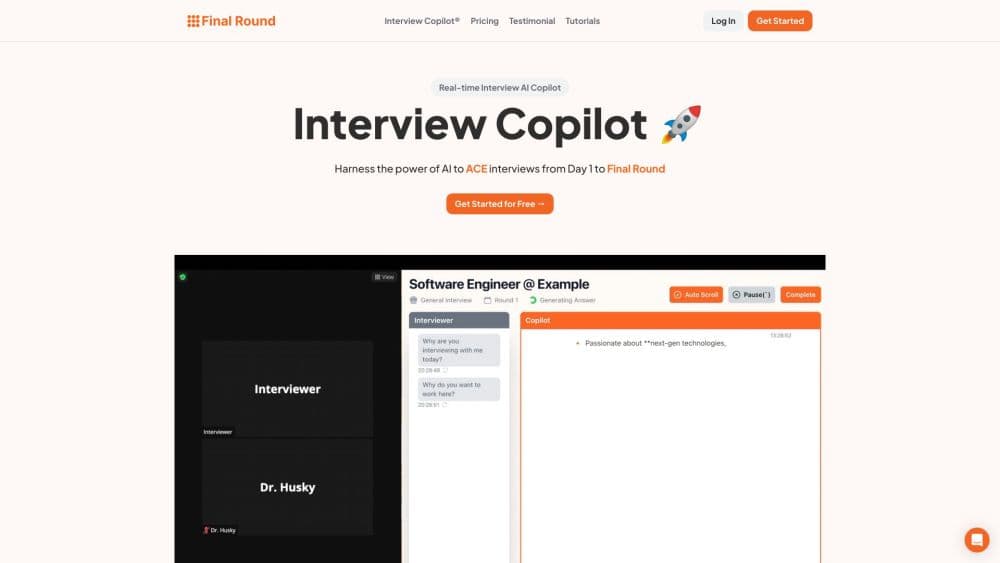
Final Round AI is a desktop app that sits beside you during a job interview and feeds you suggested answers as the questions land. Its main piece is Interview CoPilot, which listens to a live call and streams a short answer written the way you would actually say it. You glance at it and put it in your own words, instead of reading a script off the screen. The same account covers practice rounds and a written debrief after each session, so one job interview turns into a loop rather than a stack of separate tools.
The pitch is confidence under pressure. When your mind blanks on a system design question or a behavioral prompt, CoPilot hands you a starting point in seconds. From there you lead the answer yourself.
Two limits shape who this fits. Live CoPilot needs the paid Pro plan, since there is no free trial and the free tier only covers setup and materials. And the app is desktop only on macOS and Windows, so mobile interviews depend on a workaround. For candidates who interview often and freeze under pressure, it lands well.
Getting Started
- Download the desktop app for macOS or Windows, then create an account and sign in.
- Set up a Goal for the job you are chasing. Add the role, your resume, and any prep materials, then follow the checklist for what's still missing.
- Practice out loud. Launch a practice interview in one of eight scenarios, from coding to salary negotiation, and rehearse against the same job.
- Go live. Start Interview CoPilot before a supported call, and a private answer appears seconds after each question, hidden from screen sharing.
- Review the debrief. When the session ends, CoPilot writes a plain-language summary of what worked and what to fix, which feeds your next round.
Product Information
A quick look at Final Round AI's pricing, supported platforms, and performance.
Best for
The users, tasks, and scenarios where this tool fits best.
Users
- Job seekers who interview often
- Software engineers and technical candidates
- Career switchers and nervous candidates
Tasks
- Handling a live video interview
- Rehearsing for a specific role
- Solving a coding or system design problem on screen
- Negotiating salary or handling a recruiter screen
Scenarios
- A final round at a company you really want
- Back to back interviews in one week
- Interviewing in a second language
Key features
Live Interview CoPilot
Interview CoPilot listens to the real call and streams a short answer written the way you'd speak it, so you can glance and improvise rather than read. It works on Zoom, Google Meet, Teams, Webex, HackerRank, CoderPad, and phone screens through a second device. It detects behavioral, coding, system design, case, and domain questions without you switching modes, which means one setup covers the whole interview.
Practice Interview
Practice launches from a Goal, so the AI interviewer already knows your role, company, resume, and materials before it opens its mouth. Eight scenarios cover General, Coding, System Design, Behavioral, Product Case, Data and ML, Salary Negotiation, and Recruiter Screen. A Re-drill option replays the weak spots your last debrief flagged, and every run attaches to the Goal so progress stays visible across rounds.
Interview Debrief
The moment a session ends, CoPilot writes a plain-language debrief with what worked, what to fix, and how ready you sound. There's no button to press, since it lands in History and the Goal's Sessions tab on its own. Coding and system design solutions from the results panel are saved alongside it, and readiness signals feed the Goal so your next session starts sharper.
Screen Help
Screen Help reads what's on your display when a question is visual. Auto-capture grabs the screen when it helps, and Solve screen does it on demand, with no coding mode to switch into. It works on the problem, diagram, document, spreadsheet, or error in front of you and writes out full coding and system design solutions in the results panel, while your spoken answer stays short.
Stealth Mode
Stealth Mode keeps CoPilot's floating windows out of screen shares and recordings in Zoom, Meet, Teams, and others. It's on by default and you control it under Settings, then Privacy & Stealth, and it covers both screen sharing and screen recording. No bot joins your call and the assistant never speaks for you, so nothing appears where an interviewer could spot it.
Pros and cons
Pros
- Live answers arrive seconds after each question, written in spoken style so you can say them naturally instead of reading.
- One app covers the whole loop: preparation, live guidance, practice interviews, and an automatic debrief after every session.
- Stealth Mode is on by default and keeps the guidance windows out of screen shares and recordings on the major meeting platforms.
- Screen Help handles coding and system design questions, pulling a full written solution into the panel while you keep your spoken answer short.
- The free plan lets you set up Goals, resumes, and materials with no cost before you decide on Pro.
Cons
- Live Interview CoPilot needs the paid Pro plan, and there is no free trial, so you can't test a real session before paying.
- The app runs on macOS 14.4+ and Windows only, so anyone interviewing on a phone or an older Mac has to work around it.
- The debrief and readiness scores depend on the AI's read of your answers, so treat them as a second opinion rather than a verdict.
Frequently asked questions
Final Round AI is an AI interview assistant for job seekers. Interview CoPilot listens during supported live and practice interviews, understands the question, and offers private, role-specific answer guidance based on your resume and the job description.
Related content
Explore related tools, skills, and articles for Final Round AI.
Final Round AI Alternatives
Agibot
Agibot · Productivity · AI Assistant · ChatbotAgibot is a personal AI agent for Mac that keeps running after you close the window, runs routines on a schedule, and works from Telegram or Slack with your own API keys.

Foley
Hanamori Labs, LLC · Voice & Language · Productivity · AI AssistantFoley is a voice to-do list that turns a spoken sentence into a filed task, complete with project, date and time, then helps you plan the day around what is already there.

Ghost Core
Ghost · Productivity · AI AssistantGhost Core is a $3,499 screenless personal AI computer that runs local AI models on its own hardware, builds context from your apps and devices, and acts without waiting for a prompt.