

Flavorithm
Bullven LLC · AI Assistant
Flavorithm is an AI recipe app that turns a photo of your fridge, pantry, or a recipe card into a saved recipe, then sends three curated meal ideas every week.
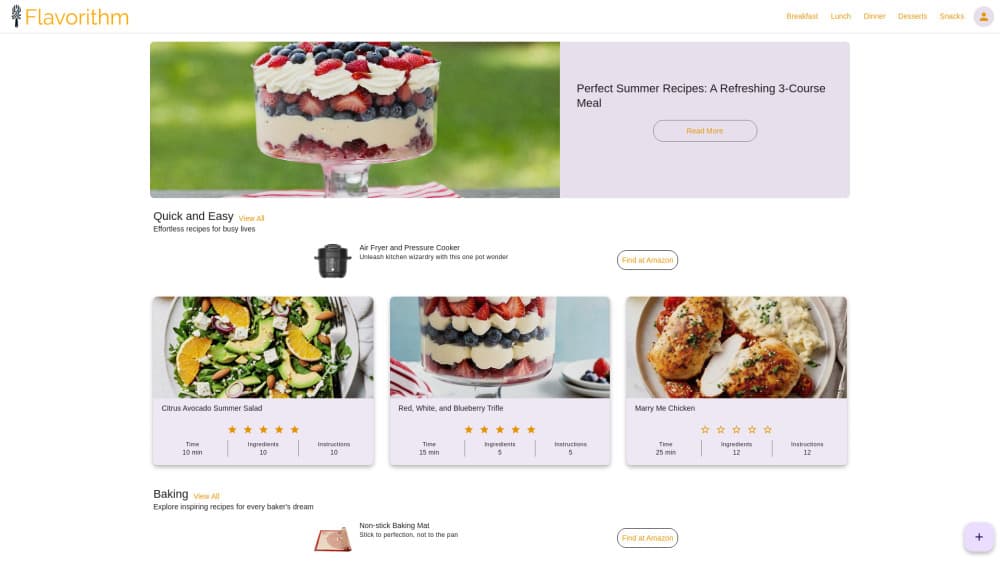
About Flavorithm
What Is Flavorithm
Flavorithm is a cooking app from Bullven LLC, a small studio in Leander, Texas. It started on the App Store in August 2024 and now runs on iOS, Android, and the web. The pitch is narrow and practical: you tell it what food you already own, and it hands back something you can cook tonight.
The recipe from photo feature carries most of the weight. Point the camera at an open fridge, a pantry shelf, or a plate of leftovers, and the AI recipe generator builds a recipe around what it sees. You can also type the fridge ingredients by hand when the light is bad or the shelves are crowded. A second scanner handles paper: photograph a recipe card or a page from a cookbook, and Flavorithm imports it as a clean, searchable entry in your digital cookbook.
The weekly angle is what separates it from a plain recipe box. Every week the app publishes three curated meal ideas, balanced between quick weeknight dinners and something more ambitious. A free account saves them, and a taste profile nudges later picks toward what you actually cook. The limits are worth knowing up front: the Android listing reports 500+ installs, so the community recipe feed stays thin, and the free tier carries ads. There's no public API, and the store listings don't spell out exactly what the Pro subscription unlocks.
Getting Started
- Download Flavorithm from the App Store or Google Play, or open flavorithm.com in a browser, then create a free account with an email address.
- Give the app camera access, then photograph your fridge, a pantry shelf, or a single ingredient you want to use up. Typing the list works too.
- Review the suggestions and save the one that fits your night. Each saved recipe lands in your personal cookbook with its own photo.
- Add a recipe card scan or a photo of a dish you ate, then check the weekly meal ideas to fill out the rest of the week.
Product Information
A quick look at Flavorithm's pricing, supported platforms, and performance.
Best for
The users, tasks, and scenarios where this tool fits best.
Users
- Home cooks with a half-full fridge
- People who inherited a stack of recipe cards
- Beginner cooks who freeze at "what do I make"
Tasks
- Turning leftover vegetables into a real dinner
- Digitizing a family recipe
- Rebuilding a dish you ate at a restaurant
- Planning a week of meals without a spreadsheet
Scenarios
- Sunday fridge clear-out before a grocery run
- Cooking for one during a busy work week
- Testing a new cuisine without buying a full spice rack
Key features
Recipe From a Photo
Snap a picture of a finished dish, and Flavorithm writes a draft recipe with ingredients and steps you can edit. It's the fastest route from "I want to remake this" to something you can follow at the stove, and the draft stays editable so you can fix what the model guessed wrong.
Fridge and Pantry Scan
The core feature reads a photo of your fridge or pantry and suggests recipes built around those fridge ingredients. Typing the list instead of photographing it works just as well, which matters in a dim kitchen or when items sit behind each other.
Recipe Card Scanner
Paper recipes get the same treatment. Scan a card, a magazine clipping, or a cookbook page, and Flavorithm imports it into your digital cookbook as structured text rather than a flat image. Handwriting recognition is the weak spot here, so expect a short cleanup pass on older cards.
Weekly Curated Ideas
Every week brings three fresh recipes picked by the Flavorithm team, mixing quick dinners with a seasonal dish and something sweet. It's a small number on purpose. You get a decision made for you instead of a feed to scroll.
Personal Cookbook and Taste Profile
Saved recipes collect in one place, organized by categories such as mealtime favorites, global flavors, baked goods, drinks, and special diets. A taste profile tracks what you save so the weekly picks drift toward your habits instead of generic suggestions.
AI Food Images and Sharing
Submissions without a good photo get an AI generated image, so a shared recipe doesn't sit there looking grey. You can also browse recipes from other users and publish your own. The community is still small enough that a browse session runs dry quickly, so treat sharing as a personal archive first.
Pros and cons
Pros
- Photo to recipe works from ingredients you already own, which cuts both shopping and food waste
- Recipe card scanning saves years of handwritten notes from turning into clutter
- Three weekly ideas keep the app useful without demanding daily attention
- Free account covers saving, scanning, and the weekly feed, so you can judge it before paying
- Available on iOS, Android, and the web, with the same cookbook across devices
Cons
- Recognition quality depends on photo clarity, and cluttered shelves or bad light produce vague drafts you have to rewrite
- The free tier serves ads, which is noticeable during a cook-along
- Community recipes are thin, so the browse feed won't replace a large recipe site
- The listings don't detail what Flavorithm Pro includes, which makes the $9.99 to $79.99 in-app range hard to judge before buying
Frequently asked questions
It reads a photo of your ingredients, fridge, pantry, or a recipe card and turns what it finds into a saved recipe. It also publishes three curated meal ideas each week, which you can save to a personal cookbook.
Related content
Explore related tools, skills, and articles for Flavorithm.
Flavorithm Alternatives
Agibot
Agibot · Productivity · AI Assistant · ChatbotAgibot is a personal AI agent for Mac that keeps running after you close the window, runs routines on a schedule, and works from Telegram or Slack with your own API keys.

Foley
Hanamori Labs, LLC · Voice & Language · Productivity · AI AssistantFoley is a voice to-do list that turns a spoken sentence into a filed task, complete with project, date and time, then helps you plan the day around what is already there.

Ghost Core
Ghost · Productivity · AI AssistantGhost Core is a $3,499 screenless personal AI computer that runs local AI models on its own hardware, builds context from your apps and devices, and acts without waiting for a prompt.