

FlowSavvy: AI Schedule Planner
Schezzy LLC · Productivity
FlowSavvy is an AI schedule planner that turns your to-do list into calendar blocks, then rebuilds the plan when meetings, deadlines, or priorities change.
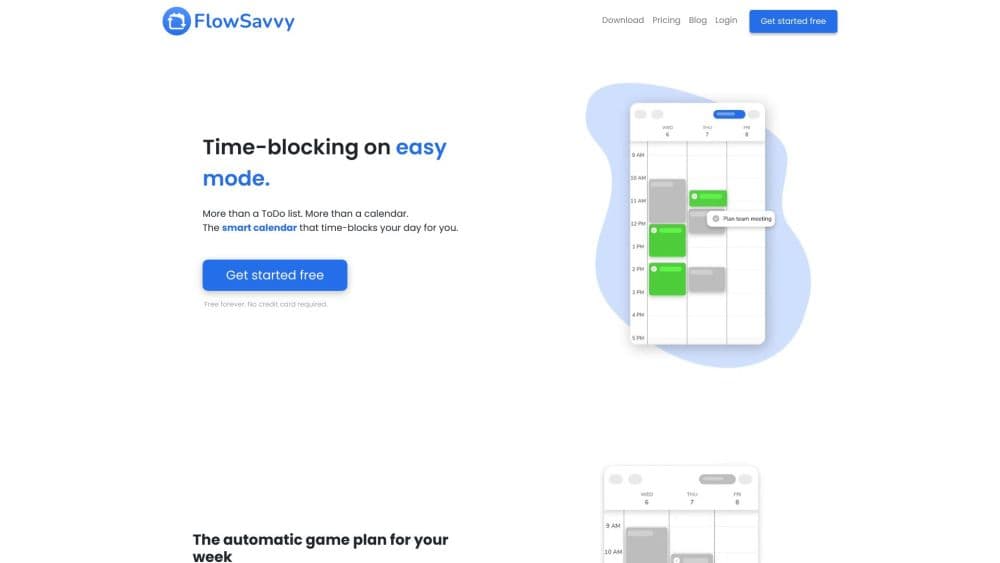
About FlowSavvy: AI Schedule Planner
What Is FlowSavvy
FlowSavvy is an AI calendar built by Schezzy LLC. You add tasks with a duration and a due date, and the app places them into open slots on your calendar. Everything else, including meetings and personal events, stays where you put it. The company says more than 100,000 people have signed up since the app launched in April 2022.
The problem it targets is manual time blocking. Planning a week by hand takes an hour, and one unexpected meeting ruins the whole layout. FlowSavvy turns that chore into automatic time blocking. FlowSavvy recalculates the schedule in a click, so a missed task or a new deadline doesn't send you back to dragging blocks around.
The limits are worth knowing before you commit. The scheduling engine only plans tasks you mark for it, and it trusts the duration you enter, so a bad estimate produces a plan that slips. Priorities and task dependencies sit behind the paid plan. Teams and shared calendars aren't supported, which makes this a personal planning tool rather than a workload manager for a group.
Getting Started
- Create a free account at flowsavvy.app, or install the iOS or Android app. No card is needed for the free plan.
- Connect Google Calendar, Outlook, or iCloud so FlowSavvy can see when you're already busy.
- Add a few tasks with a duration and a due date, then switch on Auto-Schedule for each one.
- Open the schedule view and check where the tasks landed. Drag any block you want to keep at a fixed time, and it stays there.
- Hit recalculate after a disrupted day, or start the 7-day Pro trial if you need priorities, dependencies, and the 8-week planning window.
Product Information
A quick look at FlowSavvy: AI Schedule Planner's pricing, supported platforms, and performance.
Best for
The users, tasks, and scenarios where this tool fits best.
Users
- Students juggling coursework and a part-time job
- Freelancers and solo consultants
- People who lose hours to planning, including many with ADHD
Tasks
- Clearing a backlog of small errands
- Protecting recurring habits
- Working toward a fixed deadline
- Rebuilding a schedule after a sick day
Scenarios
- Sunday evening planning
- A week packed with meetings
- A project with dependencies
Key features
Auto-Scheduling from a To-Do List
You give each task a duration and a due date, and the AI schedule planner finds open time for it. Tasks can live in an inbox first, then move into a list when you're ready to plan them. This is the core of the product: a to-do list that turns into a calendar without a manual drag-and-drop session. Most task scheduling software stops at a list and leaves the placement to you.
Automatic Recalculation
When a meeting runs long or a new task appears, hit recalculate and the whole schedule rebuilds around the change. Completed and missed tasks are handled in the same pass, so catching up after a bad day takes one click. The app also recalculates right after you finish a task, which keeps the rest of the day accurate.
Workload Balancing and Auto-Splitting
If a three-hour task won't fit in any single open slot, FlowSavvy splits it across days instead of pushing it past the deadline. It also spreads work when one day is overbooked and shows an overcommitment warning when the available hours fall short. Buffer and travel time can be added between blocks, which matters if your day includes commutes or back-to-back calls.
Scheduling Hours and Priorities
Scheduling hours profiles define when the planner is allowed to book work, personal, morning, or evening tasks. The free plan includes one profile; FlowSavvy Pro unlocks unlimited profiles plus priority levels, so urgent work takes the good slots first. Task dependencies are also part of Pro, and they keep multi-step projects in the right order.
Calendar Sync and Two-Way Task Sync
FlowSavvy reads events from Google Calendar, Outlook, and iCloud, and it never moves them. On Pro, you can push FlowSavvy tasks back to those calendars, plus sync with Todoist, Google Tasks, Microsoft To Do, and Apple Reminders. A task only blocks your availability in an external calendar when it's close to missing its deadline, which stops a full task list from making you look unavailable.
API, MCP, and Zapier Access
FlowSavvy Pro includes a public API and an MCP server at my.flowsavvy.app/mcp, so an AI assistant can add tasks or read your schedule without opening the app. Zapier covers no-code workflows, and the API suits bulk imports from a spreadsheet. The company opened the API and MCP server in May 2026 and has kept adding integrations since.
Pros and cons
Pros
- The free plan is usable on its own: unlimited recalculations, two weeks of scheduling, and full web, iOS, and Android apps.
- Recalculation is the standout feature. One tap rebuilds the week, which is the part manual time blocking apps never solve well.
- Buffers, travel time, and overcommitment warnings make the schedule realistic instead of optimistic.
- Sync covers the three calendars most people use, and task sync now reaches Todoist, Google Tasks, Microsoft To Do, and Apple Reminders.
- The API and MCP server let you add tasks from a chat assistant or a script, which is rare in this category.
Cons
- Priorities, task dependencies, and the 8-week horizon require FlowSavvy Pro at $14/mo, or $10/mo billed yearly.
- There are no shared calendars, assignees, or team views, so it doesn't help a manager plan for other people.
- The planner trusts your duration estimates. Underestimate a task and the schedule quietly drifts until the deadline warning appears.
- Auto-scheduling only applies to tasks you switch on, so a messy task list still needs a cleanup pass before the plan is useful.
Frequently asked questions
It takes tasks from your to-do list and places them into free time on your calendar. When something changes, it recalculates the layout instead of asking you to move blocks by hand.
Related content
Explore related tools, skills, and articles for FlowSavvy: AI Schedule Planner.
FlowSavvy: AI Schedule Planner Alternatives

Base Code
Base44 (Wix) · Coding · ProductivityBase Code is a shared cloud development environment from Base44. Teammates describe changes to an existing GitHub codebase in chat, preview them live and send them back as pull requests.

Knocket
Knocket (Tencent RTC team) · Productivity · Business · ChatbotKnocket is a free live chat and contact page tool that lets visitors message you from your website, app, or a shareable link, with every reply handled from Telegram or one inbox.

FloorGen
Vinit Kumar (FloorGen) · Productivity · China AIFloorGen is a browser-based floor plan maker that turns a sentence or a sketch into an editable 2D plan and a 3D walkthrough. Export to PDF, DXF or video, and draw without an account.