

FLUX IMAGE
Black Forest Labs · Image
FLUX IMAGE is a browser based AI image generator built on Black Forest Labs' FLUX.1 models. Schnell runs free, while Dev, Pro and the Realism-LoRA build take paid credits.
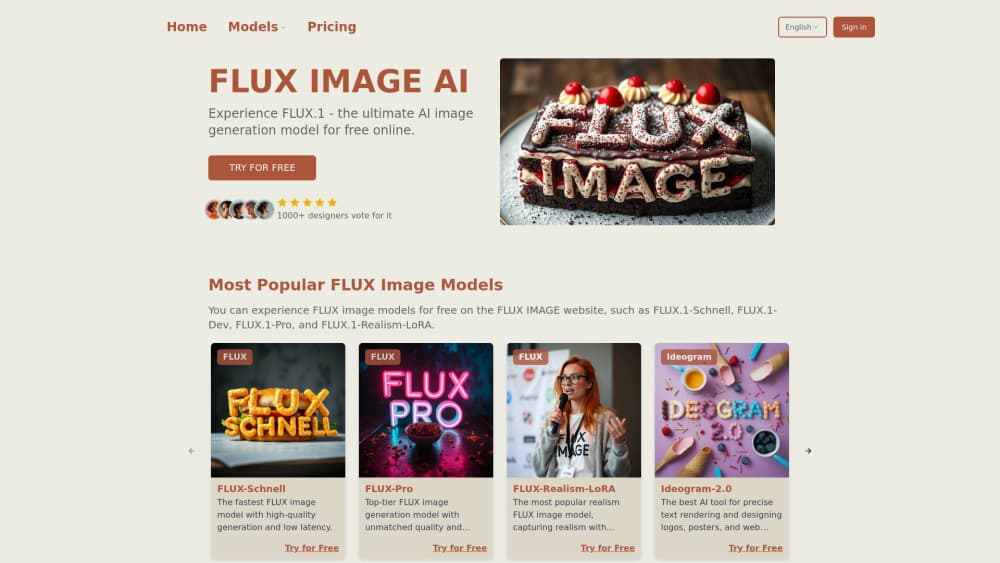
About FLUX IMAGE
What Is FLUX IMAGE
FLUX IMAGE is a website that puts the FLUX.1 model family behind one prompt box. You type a description, pick a model, and get an image back in the same tab. Four options sit in the menu: FLUX.1 Schnell, FLUX.1 Dev, FLUX.1 Pro, and a Realism-LoRA variant tuned for lifelike faces and skin.
The platform doesn't train or own any of these models. Black Forest Labs builds FLUX.1, and fluximage.app is an independent site that hosts them, so it isn't the company's own product page. What the site adds is the part that's annoying to set up yourself: a queue, a credit balance, and a download button.
That matters because running FLUX.1 locally is a real project. The full weights are a 12B parameter model, and ComfyUI or a similar node editor needs the VAE, the CLIP and T5 text encoders, and enough VRAM to hold all of it. For someone who needs six images for a blog post by Friday, that's a weekend gone. A free AI image generator that works in a browser skips the whole thing.
The tradeoffs are real too. You get no API, no batch jobs and no control over sampling settings. Model choice, prompt and aspect ratio are about the full set of knobs. If you need reproducibility or automation, this isn't the tool.
Getting Started
- Open fluximage.app in any modern browser. The prompt box sits on the home page, and Schnell is the default model.
- Write your prompt in plain language. Name the subject, the light, and the framing before you add style words, since FLUX.1 follows concrete descriptions better than stacked adjectives.
- Switch models if the free run doesn't land. Realism-LoRA costs 3 credits per image and suits portraits, Pro costs 5 and handles crowded scenes and text inside the frame, and both draw from the same credit balance.
- Download the result at the size the site offers. There's no upscale step built in, so plan your output size before you generate.
Product Information
A quick look at FLUX IMAGE's pricing, supported platforms, and performance.
Best for
The users, tasks, and scenarios where this tool fits best.
Users
- Bloggers and social media managers
- Portrait and character artists
- Hobbyist illustrators without a strong GPU
- Small teams scouting concepts
Tasks
- Profile photos and author headshots
- Pet and product mockups
- Prompt drafting for a local workflow
- Text inside an image, like a poster or a sign
Scenarios
- You need a header image tonight and your desktop is busy rendering something else.
- You're shortlisting a visual direction for a client and want four variants in an hour.
- You're deciding whether FLUX.1 is worth installing at all, and want to see the output quality first.
Key features
Four FLUX.1 models behind one prompt box
Schnell, Dev, Pro and Realism-LoRA share the same interface, so comparing them takes a dropdown change rather than a new install. That side by side view is the fastest way to learn what each model is good at, and it's the feature most competing front ends skip.
Schnell at no cost
FLUX.1 Schnell is a distilled model that produces an image in a few sampling steps, so free generations come back quickly. The site describes Schnell use as unlimited on paid plans and open to everyone on the free tier, which makes it the default way to test prompts before spending credits.
Realism-LoRA for faces and skin
The LoRA build adds photographic detail to a base model that otherwise leans illustration. Pores, stray hairs and catchlights show up without a paragraph of realism keywords padding the prompt. At 3 credits per image it's cheaper than Pro and the best route to photorealistic AI images of people.
Pro tier for crowded scenes and lettering
FLUX.1 Pro costs 5 credits and handles the two things small models fumble: several subjects in one frame, and legible text on signs or packaging. It's the option to reach for when a composition has to be right the first time.
Credit plans sized for light use
Paid plans run $7.9 for 150 credits, $9.9 for 250 and $17.9 for 500 per month, and all three unlock the full model list plus Ideogram-2.0. A 150 credit plan covers roughly 30 Pro images or 50 Realism-LoRA images a month, which fits a solo creator better than a studio.
Nothing to install
Everything happens in the browser, including the download. There's no Python environment, no model files measured in gigabytes, and no driver conflicts to chase. You can generate from a Chromebook or a work laptop with no admin rights.
Pros and cons
Pros
- Free access to FLUX.1 Schnell with no local hardware requirement.
- Realism-LoRA output is strong on close portraits, a weak spot for most free generators.
- Four models in one interface makes comparison quick.
- Plans start at $7.9 a month, low enough to test before committing.
- Runs on any browser, including low power machines.
Cons
- No API and no batch generation, so it can't slot into an automated pipeline.
- Sampling steps, seed and guidance aren't exposed, which rules out exact reproduction of an image.
- Peak hour queues slow down even paid generations.
- Free tier limits push heavier users toward credits faster than the plan math suggests.
Frequently asked questions
Yes, in a limited way. Schnell generations are open to everyone at no cost, and paid plans add credits for Dev, Pro and Realism-LoRA plus faster queue priority.
Related content
Explore related tools, skills, and articles for FLUX IMAGE.
FLUX IMAGE Alternatives

Google EmbeddingGemma 2
Google DeepMind · Writing · Image · CodingGoogle EmbeddingGemma 2 is a 740M-parameter open model that turns text, code, images, audio, and video frames into vectors in one 768-dimension space, running on phones and laptops.

Tractionwave
TractionWave · Image · MarketingTractionWave is an AI attention heatmap tool for static ads. Upload a PNG or JPG and it returns predicted attention, ranked hotspots, and fixes before you spend budget.

Imejis.io
Imejis.io · Image · MarketingImejis.io is an AI design studio for agents and marketing teams. Describe an image in plain words, and it writes the copy, builds the layout, reflows it to every size, then exports a finished file.