

FluxAI.art
FluxAI.art · Image
FluxAI.art is a browser AI image generator that runs Nano Banana, FLUX.2, Seedream and ChatGPT-4o Image in one workspace, covering text to image, image to image and AI photo editing.
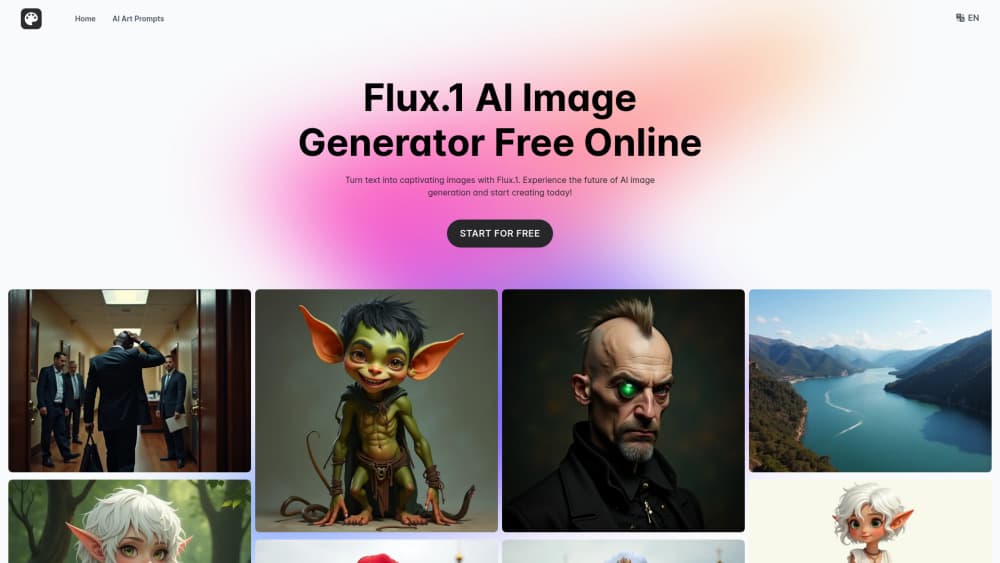
About FluxAI.art
What Is FluxAI.art
FluxAI.art bills itself as a free AI image generator, and the free tier does work, with limits. It turns a written prompt or an uploaded photo into a finished image inside a browser tab. You choose a model from a short list, describe the result you want, and download what comes back. You don't install anything, and you don't need a GPU.
The model lineup is the main draw. Nano Banana handles precise edits and keeps a character recognizable from one image to the next. FLUX.2 and its Kontext variant lean toward sharp, prompt-faithful renders. Seedream covers fast stylized output, and ChatGPT-4o Image sits behind the playful Ghibli and Pixar looks. One credit balance covers all of them, so switching models doesn't mean paying twice.
Two limits matter before you start. The free tier gives you a handful of generations, keeps those images for seven days, may display them publicly, and stamps a watermark on the file. Paid plans lift all of that for $6 per month on annual billing.
Getting Started
- Open fluxai.art in a browser and create an account with an email address, or sign in to an existing one.
- Pick a model from the dropdown, then choose text to image or image to image depending on whether you have a reference photo.
- Type your prompt, or upload the photo and describe the edit in plain language. Add a style preset if you want a specific look.
- Wait for the preview, then download the file or share it straight from the result page.
Product Information
A quick look at FluxAI.art's pricing, supported platforms, and performance.
Best for
The users, tasks, and scenarios where this tool fits best.
Users
- Social media creators who need a steady supply of post images
- First-time AI art users
- Freelance designers on a tight tool budget
Tasks
- Turning a written concept into a post-ready image
- Cleaning up an existing photo
- Keeping a character consistent across a series
- Chasing a specific trend look
Scenarios
- Comparing models before you commit
- Beating a same-day deadline for a thumbnail or cover
- Testing a one-off effect
Key features
Several Models in One Prompt Box
Nano Banana, FLUX.2, FLUX.2 Kontext, Seedream 5.0 and ChatGPT-4o Image all sit in the same dropdown. Model choice shapes the output more than prompt wording does, because each one draws differently: Kontext follows long instructions closely, Nano Banana holds a face steady, ChatGPT-4o Image pushes hard into cartoon territory. Running the same prompt through two of them takes one extra click. Doing that on separate platforms takes two subscriptions.
Text to Image and Image to Image in One Session
You start from a sentence or from a photo, and the workflow barely changes. Text to image suits mood boards, blog headers and concept sketches. Image to image suits anything already shot: a product shot that needs a new background, a portrait that needs a new setting. Both modes share the same model list and the same credit balance, so a session can move between them without switching tools.
Nano Banana Editing That Holds a Character Steady
Character consistency is the feature that separates FluxAI.art from a plain prompt box. Upload a reference portrait, describe a new scene, and Nano Banana keeps the face, hair and clothing recognizable across every version. Multi-image fusion works the same way, blending two references into one frame. That's what makes a six-panel comic or a recurring mascot practical rather than a re-prompting marathon.
Style Presets and Single-Purpose Tools
The preset shelf runs from the Ghibli AI look to Pixar and Chibi styles, each a one-click change rather than a paragraph of prompt engineering. Below that sit narrow tools that do exactly one job: an action figure generator, an age filter, a beard remover, a 2D to 3D converter, a pet-to-human filter. The narrow tools exist because most people want one specific result, not a blank canvas.
A Three-Step Browser Workflow
The whole loop is upload, generate, download. There's nothing to install and no local model to configure, so a phone browser works as well as a laptop. Generation usually lands in seconds on the faster models, and the result page gives you the file plus a share option. For a workflow that lives inside a content calendar, that speed compounds.
Prompt Gallery for a Blank-Page Problem
A prompt library sits next to the generator, sorted by style and use case. Each entry shows the prompt behind a finished image, which is the fastest way to learn what phrasing the models respond to. Copy one, change the subject, and you have a working prompt without guessing at keywords. New users get usable output on the first try instead of a dozen failed attempts.
Pros and cons
Pros
- A free tier with no card, so you can test a model against your own prompt before paying.
- Watermark-free downloads on paid plans, from $6 per month with annual billing.
- One credit balance across five image models instead of five separate subscriptions.
- Character consistency tools cut the re-prompting that a series of images normally requires.
- Runs in a browser tab on desktop and phone, with no install step and no local hardware.
Cons
- Free plan images vanish after seven days and may be shown publicly, so anything private needs a paid plan or an immediate download.
- Credits don't roll over. Unused generations expire at the end of each billing cycle, which punishes occasional users.
- Plan changes and cancellations happen over email, so upgrading or quitting takes a round trip instead of a button.
- Output quality moves with the model. A prompt that looks great on Nano Banana can come back flat on Seedream, and you spend credits finding out.
Frequently asked questions
Yes. The free tier runs without a card and gives you a small batch of generations. Those files carry a watermark and stay on the server for seven days. Paid plans start at $6 per month on annual billing, or $10 month to month.
Related content
Explore related tools, skills, and articles for FluxAI.art.
FluxAI.art Alternatives

Google EmbeddingGemma 2
Google DeepMind · Writing · Image · CodingGoogle EmbeddingGemma 2 is a 740M-parameter open model that turns text, code, images, audio, and video frames into vectors in one 768-dimension space, running on phones and laptops.

Tractionwave
TractionWave · Image · MarketingTractionWave is an AI attention heatmap tool for static ads. Upload a PNG or JPG and it returns predicted attention, ranked hotspots, and fixes before you spend budget.

Imejis.io
Imejis.io · Image · MarketingImejis.io is an AI design studio for agents and marketing teams. Describe an image in plain words, and it writes the copy, builds the layout, reflows it to every size, then exports a finished file.