

Focu
focu-app · Productivity · Other
Focu is a free, open-source mindful productivity app for macOS that uses a private, local AI to guide journaling, check-ins, and focused work.
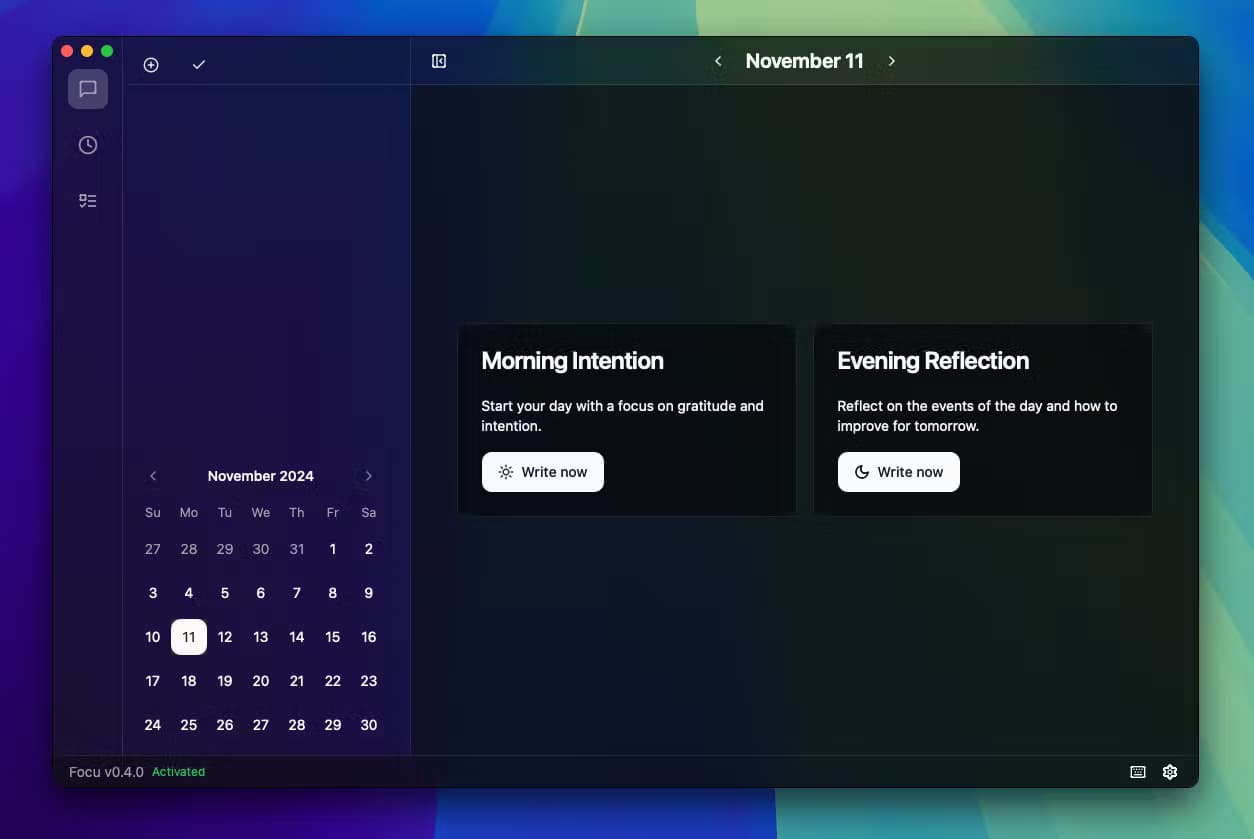
About Focu
What Is Focu
Focu is a desktop app that turns your workday into a rhythm of short reflections instead of one long grind. It runs on macOS and pairs an AI assistant with journaling prompts, periodic check-ins, and focused work sessions, so you always know what you're doing and why.
The thing that sets it apart is privacy. The AI runs on your own Mac through a bundled local model, so your notes, mood entries, and reflections never leave the device. There's no subscription and no account to create. Nothing to cancel. That matters if you write about client work, personal struggles, or anything you'd rather not hand to a cloud service.
It's a young product. The developers label it as active development, which means features shift between releases and the odd rough edge shows up. It's also Mac-only. Windows and Linux users are out of luck for now. If you want a polished, cross-platform app with mobile sync, this isn't it. If you want something local, calm, and free, it's worth a look.
Getting Started
- Download Focu from the official website and open the disk image on your Mac.
- Launch the app and let it finish first-run setup, which prepares the local AI model.
- Pick a starting point such as kickstarting your day or finding focus, then write a few lines when the assistant prompts you.
- Start a focused work session and let the periodic check-ins nudge you back on track.
- End the day by reflecting on what you finished and journaling a short note.
Product Information
A quick look at Focu's pricing, supported platforms, and performance.
Best for
The users, tasks, and scenarios where this tool fits best.
Users
- Freelancers and remote workers who spend long hours alone at a Mac and want a lightweight way to stay intentional, with no account or subscription required.
- Writers, developers, and designers who lose hours to distraction and want an on-device assistant that nudges them back without sending their notes to a server.
- Privacy-conscious professionals who keep journals or client notes and don't want that text sitting in a cloud account.
Tasks
- Planning the day
- Running focused work sessions
- Journaling and reflection
- Winding down
Scenarios
- Starting a work-from-home morning when you're not sure what to tackle first.
- Getting pulled into Slack and email and needing a fast way back to your main task.
- Studying for an exam or deep-writing a report on a focus app for Mac, where drifting costs you hours.
- Ending the day with a clear head instead of a pile of unfinished threads.
Key features
Local AI guidance
Focu bundles a local language model, so the AI that guides your reflections runs on your Mac rather than in a data center. Think of it as a private AI assistant that never phones home. You get conversational prompts and responses without handing your text to a cloud provider. It works offline once the model is in place, which is handy on a plane or a locked-down network.
AI-guided journaling
The app prompts you to write about your day in short, low-pressure entries instead of facing a blank page. You can reflect on what went well, what dragged, and what you want to change. Over time, those entries become a personal log you can scroll back through. It quietly doubles as a daily check-in app if you only want the prompt and a one-line answer.
Smart check-ins
Throughout the day, Focu checks in to ask how things are going. Are you still on the task you meant to do? It's the difference between a passive timer and something that actually questions your drift. You can answer in a sentence and get back to work.
Focused work sessions
You start a session, name what you're working on, and let Focu hold the frame for you. That's the work focus sessions side of the app in practice. The app tracks each session and pairs it with check-ins, so long stretches where you meant to work but kept scrolling don't turn into silent procrastination. It's less about rigid pomodoro counts and more about staying honest with yourself.
Daily planning and use-case modes
Focu ships with guided flows for common needs: kickstarting your day, finding focus, staying on track with goals, timely reminders, clearing your mind, and keeping a journal. Each mode frames the assistant's prompts around that goal, so you're not staring at a generic chatbot. Pick the one that matches your mood and go.
Privacy by design
Your data stays on your device. There's no account, no sync, and no server holding your entries, which is the whole point of running the model locally. The developers built it this way deliberately, not as an afterthought.
Free and open source
Focu is free to download and use, and the source code is public on GitHub under the focu-app organization. Developers can clone the repo and build it themselves. That also means you can check exactly what the app does with your machine before you trust it with your notes.
Pros and cons
Pros
- Free, with no subscription and no paywalled features.
- Runs its AI locally, so your journal and reflections stay on your Mac.
- Open source, so the code is auditable if privacy is your priority.
- Covers the full day, from morning planning to end-of-day reflection.
- Guided modes make it easier to start than a blank journal or chatbot.
Cons
- macOS only, so there's no Windows, Linux, or mobile version yet.
- It's in active development, so features and screens can change between releases.
- Local AI needs a capable Mac, and the first model setup takes a while.
- No cloud sync means entries stay on one machine unless you back them up yourself.
Frequently asked questions
Yes. Focu is free to download and use, and it's open source, so there's no subscription and no paid tier. You only need a Mac capable of running the local model.
Related content
Explore related tools, skills, and articles for Focu.
Focu Alternatives

Lune
Retrograde Labs · Productivity · LeaningLune is a research search engine for scientific AI agents. It runs as an MCP server that lets Claude, ChatGPT and Cursor search peer-reviewed computer science papers and cite them.

Skreno
Skreno · Video · ProductivitySkreno is a browser screen recorder that captures a tab, a window or your whole display, then attaches AI transcripts, summaries and console logs to one share link.

Microsoft-Decision-1
Microsoft · Productivity · BusinessMicrosoft-Decision-1 is a decision scoring model in Microsoft Foundry that returns a calibrated probability for each fixed answer option instead of writing a response.