

Foglamp
Foglamp Labs · Coding
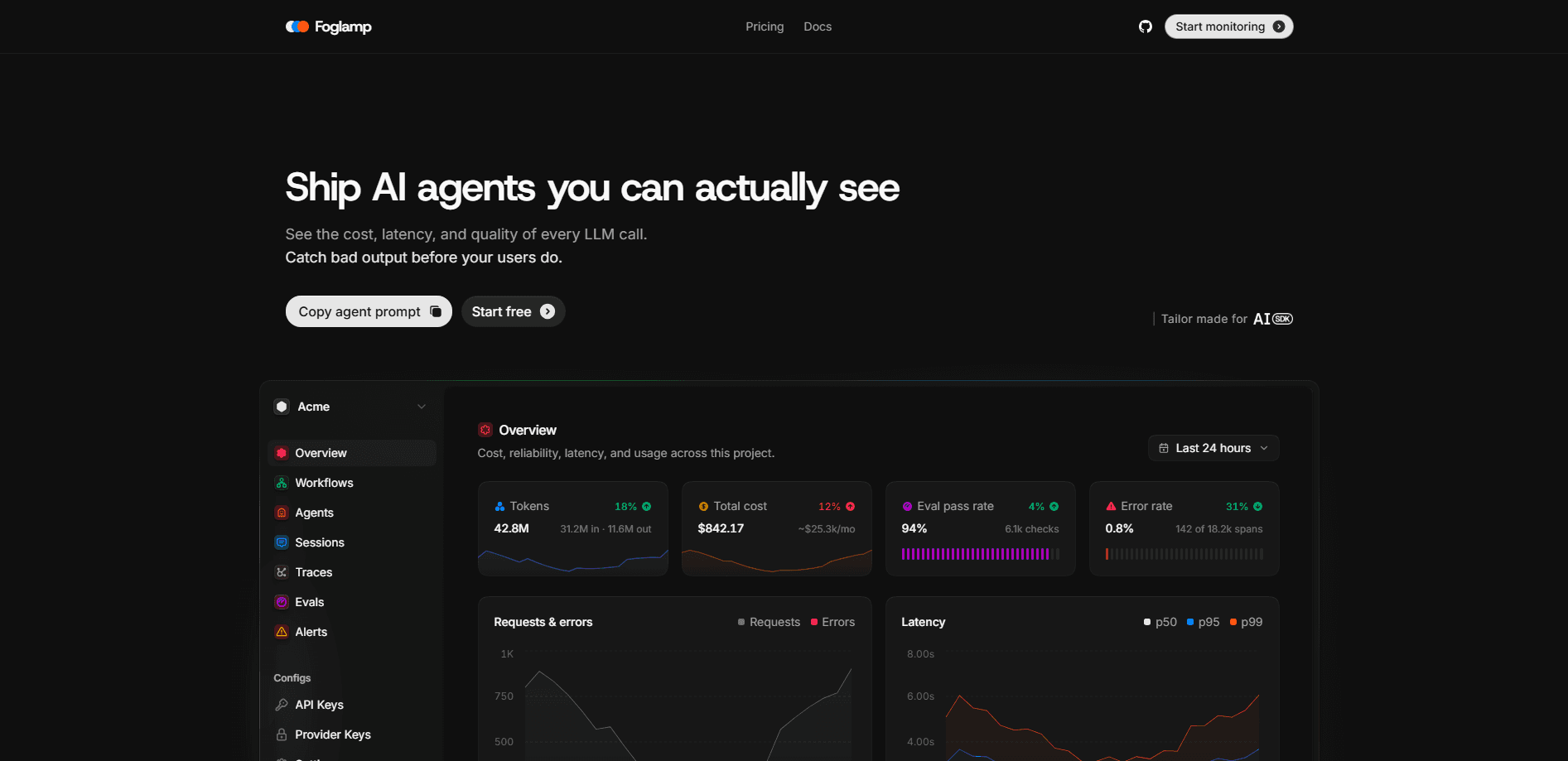
Foglamp is an observability platform for AI agents that watches the LLM calls your app makes and turns them into costs, latency numbers, distributed traces, evaluations and alerts. It plugs into the Vercel AI SDK with two lines of code, so teams building AI agents can see what every model call cost, how slow it ran, and where outputs went wrong before users notice.
About Foglamp
What Is Foglamp
Foglamp is the observability layer for the Vercel AI SDK. It handles AI agent observability by capturing every generateText and streamText call your code runs, then breaking those calls down by model, agent, and customer so you stop guessing where your budget and your bugs come from. As an AI monitoring tool, it sits between your agent code and the models it calls.
The problem it solves is simple to state and painful to live with. Once you ship an AI agent, cost and quality drift quietly. A prompt change can double token usage. A model swap can add seconds of latency. A bad output can slip through without anyone catching it. Foglamp makes those shifts visible.
It's open source under Apache 2.0, and you can self-host it. That matters if your prompts and responses can't leave your infrastructure. The catch is the focus. Foglamp is built for the Vercel AI SDK first. Teams on other frameworks get less value out of it today.
Getting Started
- Create a Foglamp API key in the dashboard, or print one from the seed script if you self-host. The key starts with
fl_. - Install the package with
npm i foglamp(also available for pnpm, bun, and yarn). - Set
FOGLAMP_API_KEYin your environment. If the key is missing, Foglamp does nothing and nothing breaks, which makes it safe to leave in every environment. - Wrap the
aimodule withwrap()and name your calls usingfog.with({ agentName: "..." }). On AI SDK v7, add the integration to each call's telemetry array instead. - Run your app, then open the dashboard to watch traces, costs and latency roll in.
Product Information
A quick look at Foglamp's pricing, supported platforms, and performance.
Best for
The users, tasks, and scenarios where this tool fits best.
Users
- AI engineers shipping agents on the Vercel AI SDK
- Small product teams watching AI spend
- Privacy-conscious companies
Tasks
- Tracking LLM cost by model and customer
- Debugging slow agent runs
- Scoring production traffic
Scenarios
- Launching a new agent into production
- Auditing a model migration
- Running multi-agent workflows
Key features
Cost intelligence
Foglamp tracks what every call costs and breaks it down by model, agent, and customer. Instead of one blurry monthly bill, you get a line for each caller. That makes it possible to spot the single agent or customer draining your budget. Money leaks fast.
Distributed traces
Each run turns into a waterfall view, with the exact prompt and response captured per span. When an agent returns something odd, you can walk the whole call flow and find the step that broke rather than guessing from logs.
Evals on production traffic
You can score real traffic with code checks and LLM judges. This means quality isn't only measured in a test suite. Bad outputs that slip past your staging tests get flagged on live data, which is where they actually matter. That's the whole point.
Alerts on cost, latency, and error rate
Threshold rules watch cost, latency, and error rates, and the Pro plan adds email and Slack alerting. You set the line, and Foglamp tells you when a run crosses it. Not ideal to learn about a latency spike from your users.
Per-agent tracking
The Agents view shows spans, latency, and spend for each agent, along with its full call flow. Teams running several agents can compare them directly and see which one is slow or expensive without digging through shared dashboards.
Two-line SDK
Wrapping the ai module takes two lines, and the functions you get back keep the AI SDK's own types. Your existing code keeps working the same way. That low setup cost is the main reason small teams actually turn it on. Why does that matter? Because the tool nobody installs catches nothing.
Open source and self-hostable
Foglamp runs under Apache 2.0, and the source lives on GitHub. If your data can't leave your infrastructure, you can host it yourself and still get the same traces and dashboards. Big difference for regulated teams.
Pros and cons
Pros
- Setup is close to free: two lines of code instrument every generateText and streamText call.
- Cost tracking breaks spend down by model, agent, and customer, not just by total.
- Distributed traces capture the exact prompt and response per span, which makes debugging concrete.
- Apache 2.0 license with a self-hosting path keeps sensitive prompts on your own infrastructure.
Cons
- Built for the Vercel AI SDK first, so teams on other frameworks get limited value.
- The free plan caps you at 10,000 spans a month with only 3 days of retention, which won't cover a busy production agent.
- Email and Slack alerting sit behind the $49/mo Pro plan, so free users may miss the notification when something breaks.
Frequently asked questions
It records the LLM calls your app makes and turns them into cost figures, latency numbers, traces, evals, and alerts. Think of it as a monitoring dashboard for the AI parts of your product, not a model or a chatbot.
Related content
Explore related tools, skills, and articles for Foglamp.
Foglamp Alternatives
Forefront
Forefront · CodingForefront is a web platform for building with open-source AI. It lets you fine-tune leading open-source language models on your own data, evaluate how they perform, and run them through an API or export them to host yourself. Developers who want the convenience of a closed-source platform but insist on owning their models and data are the target audience here.

Startkit
StartKit.AI · CodingStartkit is a boilerplate for building AI SaaS and AI wrapper products. Think of it as an AI startup boilerplate with the boring parts already wired up: authentication, Stripe and Lemon Squeezy payments, usage limits, transactional email, and an AI API starter that talks to OpenAI, Anthropic, Groq, or Llama. You clone the repo, set your price, and start on the part of your product that people actually pay for. It's Next.js under React and Tailwind, so most of the boilerplate code already feels familiar.
Testim
Tricentis · CodingTestim is an AI-powered test automation platform for building and running end-to-end tests across web, mobile, and Salesforce applications. It leans on machine learning to keep tests stable when an interface changes, so teams spend less time fixing broken selectors. Not bad for an automated testing tool you can start using today. You create tests by recording actions in a browser, then optionally add JavaScript when you need more control. It's a solid pick for busy QA teams.