

formsflow.ai
AOT Technologies · Productivity
formsflow.ai is a low-code form automation platform that pairs an AI form builder with BPMN approval workflows, so each submission reaches the right reviewer without manual chasing.
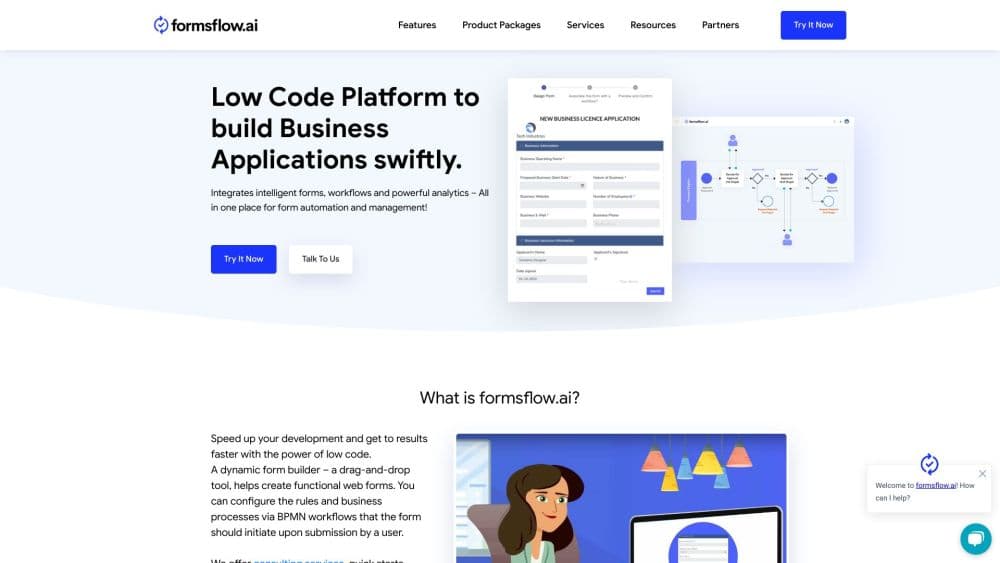
About formsflow.ai
What Is formsflow.ai
formsflow.ai is a low-code platform for building forms and the approval process that follows them. AOT Technologies, a software firm based in Victoria, British Columbia, assembles it from open source parts: Form.io for the form builder, Camunda for BPMN workflows, Redash for dashboards, and Keycloak for sign-in.
The product exists because most form tools stop at the submit button. A leave request, a mortgage application, or a permit filing lands in an inbox, gets forwarded twice, and then goes quiet. formsflow.ai keeps the whole chain in one place. The form collects the data, the workflow engine assigns the next task, decision tables settle who signs off, and the audit trail records every step.
Three limits matter before you commit. The open source form platform is free, but your team runs and patches it. Multi-tenancy, enterprise connectors, and support sit behind paid plans. Everything runs in a browser, with no native iOS or Android app for submitters. The AI builder also returns a working draft, not a finished form, so someone still has to check field types, validation, and routing.
Getting Started
- Pick a deployment. The public cloud Go plan starts free with 250 submissions a month; private cloud and self-hosted options cover stricter data rules.
- Build the form. Drag fields onto the canvas, or hand Flow-E a written brief and edit the draft it returns.
- Attach a process. Use the simplified builder for a straight approval chain, or open the BPMN modeler when the process needs parallel tasks, gateways, and decision tables.
- Publish and connect. Embed the form on a site, add webhooks or REST calls for other systems, and track submissions on the dashboards.
Product Information
A quick look at formsflow.ai's pricing, supported platforms, and performance.
Best for
The users, tasks, and scenarios where this tool fits best.
Users
- Operations teams handling regulated paperwork
- Business analysts without a development team
- Government digital service teams
- Developers and IT administrators
Tasks
- Mortgage or loan intake
- Employee onboarding
- Permit and license applications
- Replacing spreadsheet approvals
Scenarios
- A department needs 20 forms and an approval chain this quarter
- Compliance review requires data inside your own network
- A process changes every few months
Key features
AI and MCP Form Builder
Flow-E takes a written brief and returns a draft form with fields, sections, and basic validation. You refine it by typing instructions or editing the canvas directly. Every public cloud plan also lists an MCP endpoint, which lets an AI assistant connected to your workspace create and adjust forms through the Model Context Protocol. Treat the output as a first pass: field types and conditional logic still need a human check before the form goes live.
Drag-and-Drop Form Builder With Conditional Logic
The builder covers the parts a real intake form needs: validation, conditional fields, file uploads, signatures, multi-step wizards, and form bundling for related documents. Custom CSS and white-labeling remove vendor branding on paid plans. Forms can be embedded, versioned, and filled offline, which helps field staff working in buildings with poor connectivity.
BPMN 2.0 Workflow Engine
The BPMN workflow engine follows the 2.0 standard, the same notation Camunda uses, so a process diagram means what a trained analyst expects. You get multi-step approvals, parallel task execution, gateways, and human tasks that wait for a named person or group. Custom Python and JavaScript scripts handle the steps a diagram can't express, such as calling an internal service or calculating a fee.
DMN Rules Engine
Decision Model and Notation tables separate business rules from the process diagram. A credit team can change a threshold, add a risk band, or reassign an approval level without redrawing the workflow. That split keeps auditors satisfied because each rule has a visible, testable definition instead of hiding in code or a consultant's notes.
Multi-Tenancy and Self-Hosted Deployment
Public cloud, private cloud, and self-hosted options share the same core, so a form definition and BPMN model can move between them. Multi-tenancy gives each department or client its own URL with separate forms, workflows, and analytics. Identity runs on Keycloak, with OpenID Connect, SAML, and OAuth2 support for Active Directory, Azure AD, Okta, or Google Workspace.
REST API, Webhooks, and Connectors
All three public cloud plans list REST API access and webhooks, so a submission can trigger work in other systems. Standard connectors cover Google Drive and Slack; enterprise plans add SAP, Salesforce, and SQL or PostgreSQL database connections. Teams with an unusual stack can call the API from a custom script inside the workflow.
Analytics Dashboards and Sentiment Analysis
Dashboards track submission volume, approval times, and bottlenecks, and the data exports to Tableau or Power BI. Higher plans add sentiment analysis and natural language processing on free-text answers, which helps when a few hundred comments arrive every week. The analytics module runs on Redash in the open source edition.
Pros and cons
Pros
- One system holds the form, the approval chain, the decision rules, and the audit record, which removes the handoffs that slow paperwork down.
- Every plan includes unlimited forms and unlimited users, so adding reviewers doesn't raise the bill.
- BPMN 2.0 and DMN are open standards, which lets process analysts and developers work from the same model.
- Self-hosted and air-gapped deployments suit banks, hospitals, and government agencies with strict data rules.
- The open source core on GitHub lets technical teams inspect the code, extend it, or run a pilot without a sales call.
Cons
- The free Go plan stops at 250 submissions a month with best-effort support, so it fits a pilot rather than a production process.
- SSO, audit logs, enterprise connectors, and white-labeling sit on Professional or Enterprise, and Enterprise pricing only comes as a quote.
- There's no native mobile app, so submitters rely on a mobile browser and offline mode.
- Self-hosting shifts patching, backups, and upgrades onto your own team, and the open source edition lacks multi-tenancy and the commercial connectors.
Frequently asked questions
It builds online forms and the approval process behind them. Teams use it for loan applications, permits, claims, onboarding paperwork, and any request that needs several people to review before a decision.
Related content
Explore related tools, skills, and articles for formsflow.ai.
formsflow.ai Alternatives

Base Code
Base44 (Wix) · Coding · ProductivityBase Code is a shared cloud development environment from Base44. Teammates describe changes to an existing GitHub codebase in chat, preview them live and send them back as pull requests.

Knocket
Knocket (Tencent RTC team) · Productivity · Business · ChatbotKnocket is a free live chat and contact page tool that lets visitors message you from your website, app, or a shareable link, with every reply handled from Telegram or one inbox.

FloorGen
Vinit Kumar (FloorGen) · Productivity · China AIFloorGen is a browser-based floor plan maker that turns a sentence or a sketch into an editable 2D plan and a 3D walkthrough. Export to PDF, DXF or video, and draw without an account.