

freddy: health context for AI
reThrive Labs LLC · AI Assistant
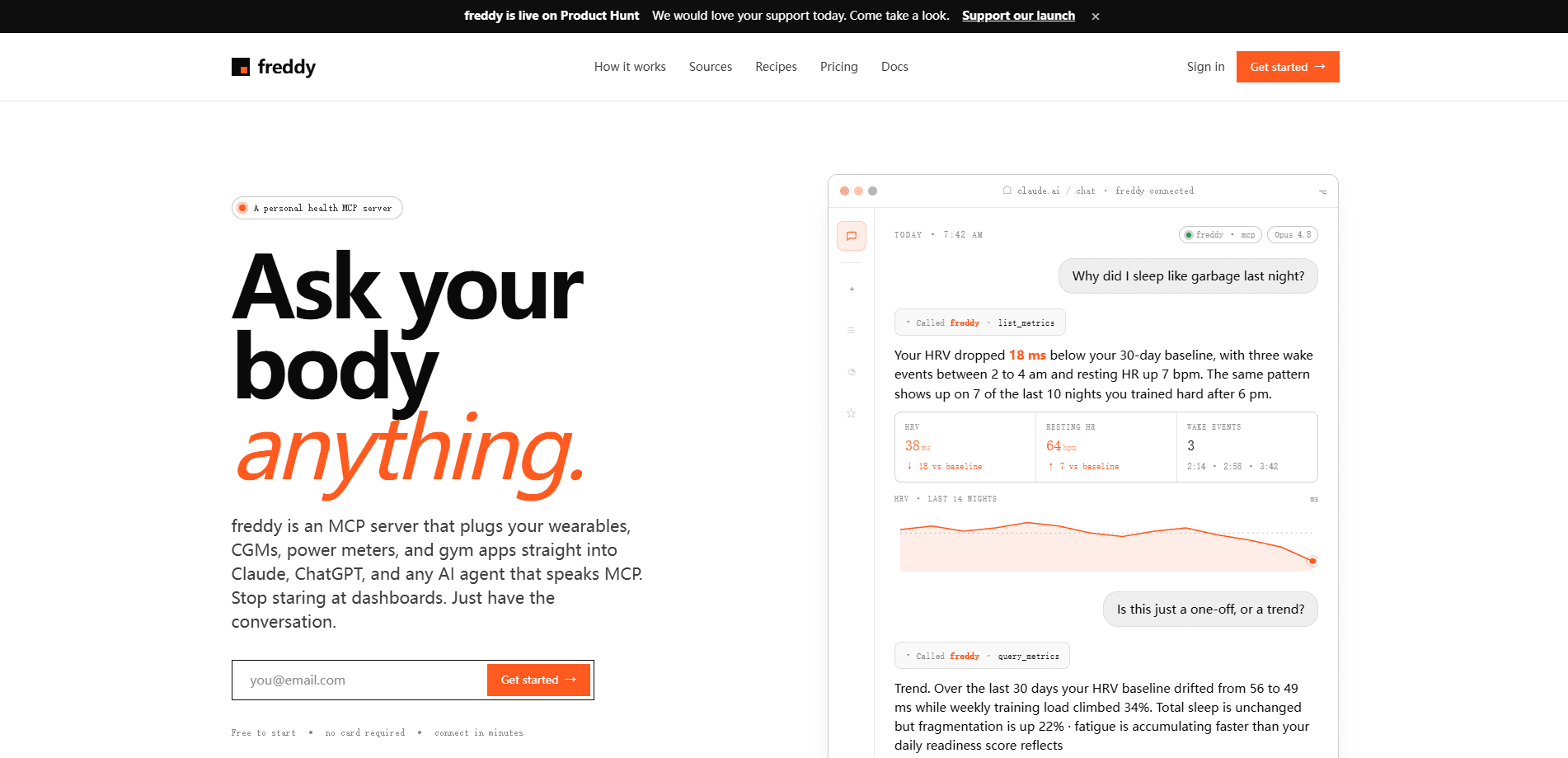
freddy: health context for AI is a private, read-only MCP server that pipes your health and training data into the AI assistants you already use. It links wearables, CGMs, power meters, and gym apps to Claude, ChatGPT, Gemini, and any MCP client. Ask about sleep, recovery, HRV, and workouts in plain English instead of opening a dozen dashboards. Setup takes a few minutes. The free tier needs no credit card.
About freddy: health context for AI
What Is freddy: health context for AI
freddy solves a gap most fitness apps create on purpose. You already collect serious signal from an Oura ring, a WHOOP strap, a Dexcom sensor, a Wahoo power meter, and a gym log, but each app shows a number in isolation. freddy is the health MCP server that sits between those sources and your AI assistant, translating your real data into context the model can reason about.
The question isn't which app you use. It's whether your AI can see your health data for AI at all. freddy is the health MCP server that sits between those sources and your AI assistant, translating your real data into context the model can reason about.
The product is read-only and private by design. You connect each source through OAuth, and freddy never writes back to your devices or sells what it reads. About 29 sources and more than 100 metrics are supported. That covers HRV, glucose, sleep stages, power, and lifting volume. Because it speaks the Model Context Protocol, it works with Claude, ChatGPT, Gemini, Grok, and newer clients like OpenClaw without a separate app to install.
The main limit is scope: freddy is a health context server, not a medical device, and it doesn't diagnose or treat anything. It's also only as useful as the data you feed it, so a single wearable will give you thinner answers than a full stack.
Getting Started
- Create a free account at freddy.coach. No payment details are needed.
- Connect your data sources one by one, authorizing each through OAuth so freddy can read it on your behalf.
- Copy your private MCP endpoint and paste it into Claude, ChatGPT, or any MCP client that supports custom servers.
- Ask your first question in plain language, like "why did I sleep badly last night," and let the assistant pull the underlying metrics.
Product Information
A quick look at freddy: health context for AI's pricing, supported platforms, and performance.
Best for
The users, tasks, and scenarios where this tool fits best.
Users
- Athletes tracking training load and recovery
- Biohackers running cross-source experiments
- Longevity-focused users
- Anyone who already pays for multiple health apps
Tasks
- Explaining a bad night
- Spotting trends
- Race and event prep
- Reviewing a training block
Scenarios
- Morning check-ins
- Post-workout reviews
- Long-term health reviews
Key features
One MCP Endpoint for Every Assistant
Instead of building integrations for each AI tool, freddy gives you a single private URL that Claude, ChatGPT, Gemini, Grok, and OpenClaw can all connect to. You authorize once, and the same endpoint serves every client you use. That means switching assistants doesn't mean re-connecting your data.
Read-Only Data Access
freddy only reads the sources you connect, and only on your behalf. It can't change settings on your devices, post workouts, or sync anything back to the platforms it pulls from. For people nervous about handing health data to an AI, that one-way design is the whole point. Nothing leaves your control.
29 Sources and 100+ Metrics
The server covers wearables and CGM data, power meters, and gym apps in one place. Metrics include HRV, glucose, sleep stages, power, and lifts, so questions can cross domains instead of staying inside one app's silo. One assistant. All your sources.
Plain-Language Queries Across Sources
You don't need to know metric names or API calls. Ask "did the late coffee wreck my deep sleep" and freddy maps that to the right sources, then hands your assistant the numbers it needs to answer. That's what a sleep and recovery tracking AI should feel like. The conversation is the interface.
Automatic Sync
As your devices sync to their own apps, freddy keeps the data current, so you're not manually exporting files or re-authorizing every week. Your assistant sees recent numbers rather than a stale snapshot.
Source Control and Account Deletion
You can see everything you've connected and disconnect any source at any time. Deleting your account removes your data as well. freddy states it doesn't sell your data or use it for advertising.
Pros and cons
Pros
- Works with the AI assistants you already pay for, so there's no new chat app to learn.
- Read-only design lowers the risk of handing over health data, since nothing writes back to your devices.
- Cross-source queries are the real draw: HRV, glucose, sleep, and power in one conversation.
- Free to start with no card required, and setup is measured in minutes rather than hours.
- Covers 29 sources, which cuts down on the manual copy-paste that normally feeds an AI your numbers.
Cons
- The value depends on how many sources you connect, so a single wearable gives noticeably thinner answers.
- It's a context server, not a diagnostic tool, so it won't tell you what a symptom means medically.
- MCP setup can feel technical if you've never added a custom server to an AI client before.
- Success hinges on each device syncing properly; a slow source can delay what the assistant sees.
Frequently asked questions
It's a health MCP server that reads your wearables, CGMs, power meters, and gym apps, then makes that data available to AI assistants like Claude and ChatGPT. You ask a question in plain English. The assistant answers using your real metrics.
Related content
Explore related tools, skills, and articles for freddy: health context for AI.
freddy: health context for AI Alternatives

Iplan AI
Iplan AI · Productivity · AI AssistantIplan AI is an AI travel planner that turns a few trip details into a full day-by-day itinerary in seconds. You answer questions about your destination, interests, budget, and travel companions, and the tool builds a plan you can edit, share, and carry with you on any device. It targets travelers who want a solid draft without spending hours in spreadsheets and browser tabs. Think of it as an itinerary generator that does the tedious part for you.

Screenhelp
Screenhelp · Productivity · AI AssistantScreenhelp is an AI screen assistant that turns a single keyboard shortcut into real-time help. You press Ctrl+Shift+Space, it captures what's on your screen, and it streams an answer into a private panel in about two seconds. Think of it as an AI screenshot helper you trigger on demand. It runs on Mac, Windows, and the web, starts free with 30 answers a month, and stays invisible during screen sharing on Zoom, Teams, and Google Meet.

Rainbow
Rainbow · AI AssistantRainbow is an AI weather forecast app built around short-term precipitation nowcasting. Its engine pushes min-by-min rain and snow predictions up to four hours ahead, blending live satellite and radar feeds into hyperlocal forecasts. The app adds live rain radar, a seven-day outlook, precipitation alerts, home-screen widgets, and a hurricane tracker, and it runs on both Android and iOS with a free tier plus paid upgrades.