

Face Swap IO
Face Swap IO · Image
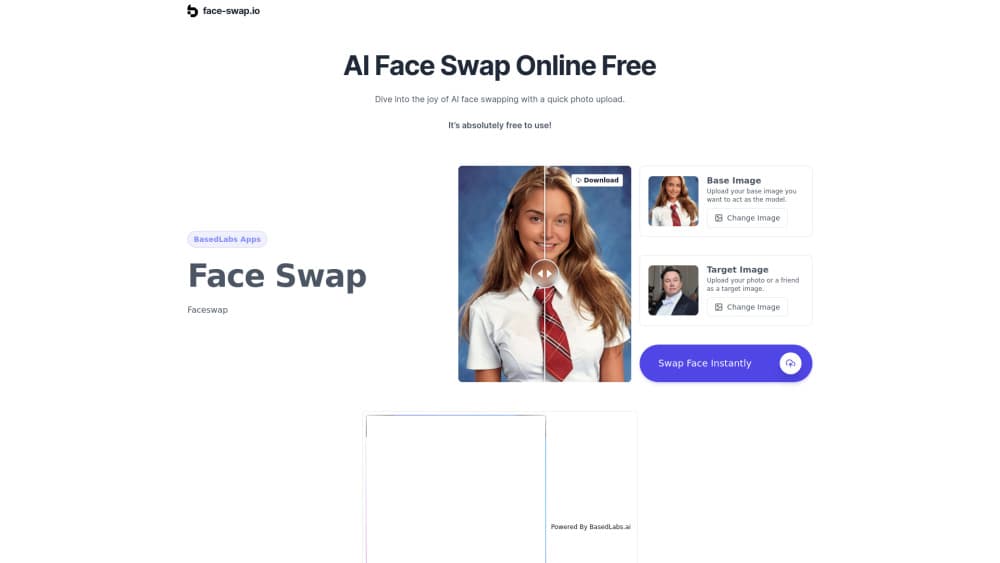
Face Swap IO is a free browser tool that swaps faces in photos within seconds. You upload a base image and a target face, sign in with Google, and download the result.
About Face Swap IO
What Is Face Swap IO
Face Swap IO is a web app that puts one person's face onto another photo. There's nothing to install: you open face-swap.io, pick two images, and the site returns a merged picture a few seconds later. The homepage says the tool runs on the Wireflow AI platform and that sign-in is handled by Basedlabs, which means one Google account covers the whole flow.
The job it replaces is the manual version of the same edit. In Photoshop or GIMP, a face move takes a cutout, a color match, a light fix, and hand blending along the jaw line. Face Swap IO cuts that to two uploads and a button. For a meme or a quick post, that trade is worth it.
An AI face swap also removes the gear problem. The model runs on the operator's servers, so an online face swapper works on the same phone that took the picture.
The limits show up as soon as you need control. There are no layers, no brush tools, and no slider for blend strength, so a result that lands slightly off can't be fixed inside the app. The tool is built around photos, the free tier covers the basics, and extra editing sits behind Basedlabs credits. You also need a Google login, which rules out email sign-up.
Getting Started
- Open face-swap.io in a desktop or mobile browser and click the Swap Face Instantly button.
- Sign in with a Google account when Basedlabs asks. No card is required for the free tier.
- Upload your base photo in the first slot, then the photo that holds the face you want in the second slot. JPG and PNG both work.
- Press the swap button and wait a few seconds. Save the finished image from the result panel.
Product Information
A quick look at Face Swap IO's pricing, supported platforms, and performance.
Best for
The users, tasks, and scenarios where this tool fits best.
Users
- Social media posters
- Meme page admins
- People testing a look
Tasks
- Building a meme
- Making group chat jokes
- Drafting a rough concept
Scenarios
- A birthday gag at short notice
- Filling a quiet week on a meme page
- Testing a thumbnail idea
Key features
Two-Image Swap Workflow
The whole tool is two upload fields and one button. The base image keeps its background, pose, and lighting, while the target image supplies the face. You don't draw a mask or align points, which is the part that usually eats the time in manual face swapping.
Google Sign-In Through Basedlabs
Access runs through a Google login handled by Basedlabs, so there's no new password to store and no email confirmation step. It also means the tool can't be used anonymously, and an account without Google can't get in at all.
Fast Browser Processing
Swaps finish in seconds according to the site, and the work happens on remote servers rather than your device. A Chromebook, an old laptop, or a mid-range phone can run it, since the heavy model never loads locally.
Automatic Skin Tone and Lighting Blending
The merge step matches color and light between the two faces without input from you. The homepage claims the output leaves no visible trace of editing. In practice, big differences in light direction or resolution are where artifacts show, and the app gives you no tool to correct them.
JPG and PNG Support
Both common photo formats are accepted, which covers screenshots, phone camera output, and most images pulled from the web. Formats such as HEIC from an iPhone or RAW from a camera need converting first.
Free Tier With Paid Extras
The basic swap costs nothing, and the site points to premium options for more advanced editing. Those extras run through Basedlabs credits, so heavy use eventually turns into a purchase rather than staying free.
Pros and cons
Pros
- The core face swap costs nothing, which makes it easy to test on one image before deciding whether you need a paid tool.
- No install and no dedicated account: a browser tab and a Google login are enough.
- Two uploads replace the masking, color matching, and blending work of a manual edit.
- Results come back in seconds, so you can try several pairings in one sitting.
- It runs on phones and desktops, which helps when the photo you want is already on your camera roll.
Cons
- A Google account is mandatory, so anyone who prefers email sign-up or works in a locked-down browser profile is stuck.
- There are no manual controls for blend strength, face position, or color, which means a near-miss result has to be redone with different source photos.
- Video face swapping isn't part of the workflow the site documents, so clip work needs another tool.
- Free use has limits, and the advanced options depend on Basedlabs credits whose price isn't listed on the page.
Frequently asked questions
Yes for the basic swap. The site states that basic features are free and that premium options exist for advanced editing. There's no published price list on face-swap.io, so check the Basedlabs account screen before you rely on the paid tier.
Related content
Explore related tools, skills, and articles for Face Swap IO.
Face Swap IO Alternatives

Google EmbeddingGemma 2
Google DeepMind · Writing · Image · CodingGoogle EmbeddingGemma 2 is a 740M-parameter open model that turns text, code, images, audio, and video frames into vectors in one 768-dimension space, running on phones and laptops.

Tractionwave
TractionWave · Image · MarketingTractionWave is an AI attention heatmap tool for static ads. Upload a PNG or JPG and it returns predicted attention, ranked hotspots, and fixes before you spend budget.

Imejis.io
Imejis.io · Image · MarketingImejis.io is an AI design studio for agents and marketing teams. Describe an image in plain words, and it writes the copy, builds the layout, reflows it to every size, then exports a finished file.