

稿定AI - Gaoding
Gaoding (Xiamen) Technology Co., Ltd. · Image · China AI
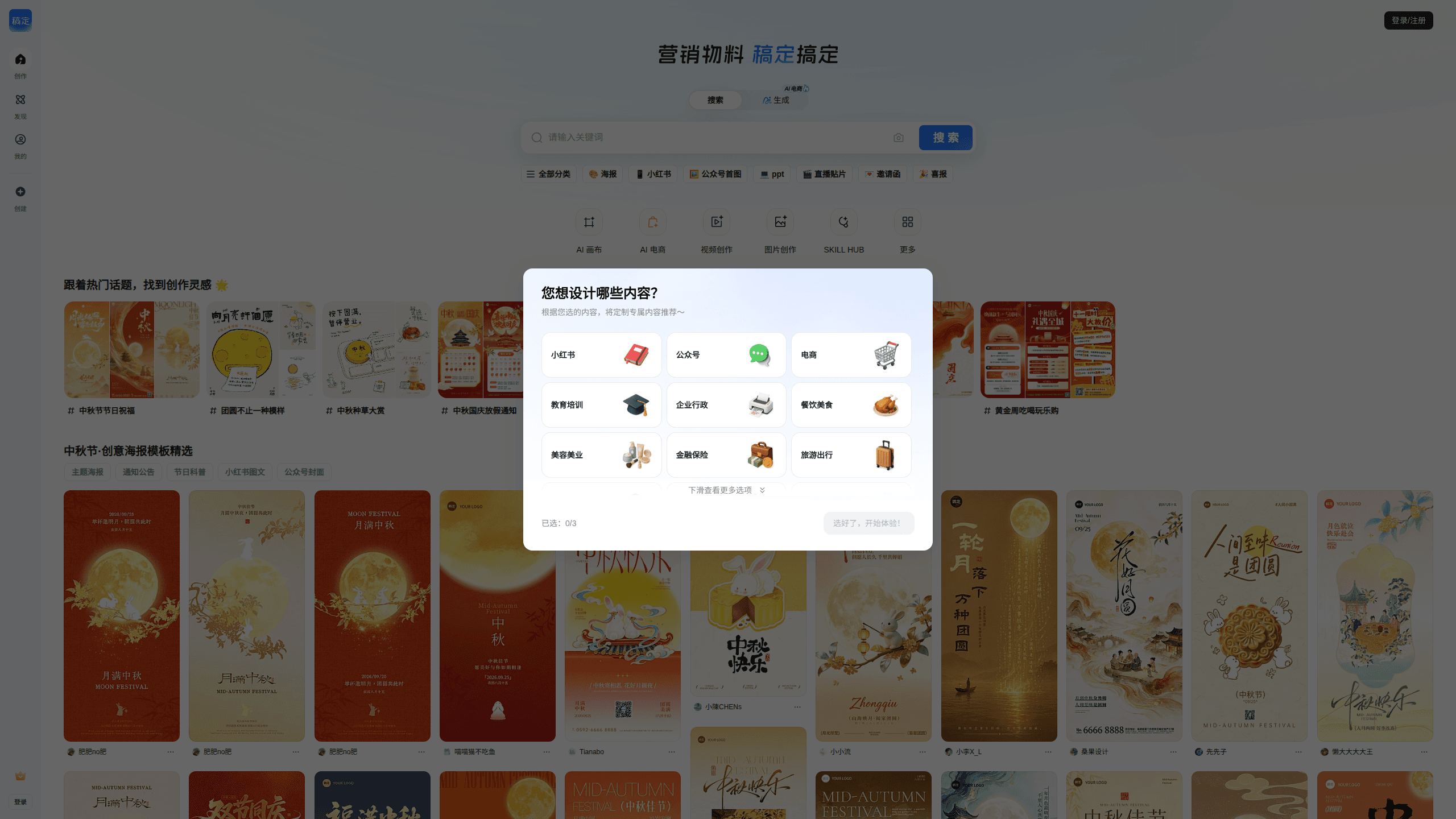
Gaoding is a web-based AI design platform that combines ready-made templates with AI generation tools. You can build posters, social media graphics, product images, presentations, and short videos without design experience, then let the AI fill in backgrounds, remove objects, upscale images, or write copy. It targets marketers, small-business owners, and creators who need finished visuals fast, and it runs in a browser rather than as a standalone desktop app.
About 稿定AI - Gaoding
What Is Gaoding
Gaoding is the AI layer of a Chinese online design platform run by Gaoding (Xiamen) Technology Co., Ltd. The core idea is simple. Instead of hiring a designer or learning professional software, you start from a template and let AI handle the slow parts. That covers background generation, object removal, image expansion, and copywriting. All of it lives in the same editor where you assemble the final piece.
The platform is built around a template library and a drag-and-drop editor, so most output is edited rather than drawn from scratch. Its AI image and video models are shared across the workbench, and one account feeds both static graphics and short clips generated from the same credit pool. The 1.0 AI version opened in March 2023. The service later passed China's generative AI filing process in early 2025.
The biggest limit is scope. The interface, templates, and billing are aimed at Chinese-speaking users. The site is web-only, so there's no offline mode. If your work happens in English on a desktop-first stack, the workflow will feel mismatched. Some templates and preview content assume you're marketing to a China-based audience.
Getting Started
- Open gaoding.com in a browser and sign up with a phone number or email.
- Pick a template from the library, or start a blank canvas for image or video work.
- Edit text, swap in your own photos, and apply AI tools like background generation, object removal, or image expansion.
- Adjust the output size and quality, then export the finished file or publish it straight to a social channel.
Product Information
A quick look at 稿定AI - Gaoding's pricing, supported platforms, and performance.
Best for
The users, tasks, and scenarios where this tool fits best.
Users
- Small-business owners
- Social media marketers
- Non-designers
Tasks
- Making a festival or promo poster
- Cleaning up product photos
- Writing ad copy
Scenarios
- A shop launching a weekend sale and needing three banner sizes by morning.
- A creator turning a single product shot into a set of scene images for a listing.
- A team assembling a quick presentation deck from a themed template instead of building slides by hand.
Key features
Template Library and Editor
The starting point for most projects is a template. The library covers posters, presentations, video, and H5 pages, and you edit everything with drag-and-drop, swapping images and text without touching layers or design rules. It's the feature that makes the platform approachable. It's also what keeps output looking consistent across a team.
AI Image Generation
Text prompts and reference images both feed the image models, which can produce backgrounds, scene shots, and product mockups. The point is speed. Describe what you want or drop in a photo, and the tool returns options you can refine rather than build from zero. Different models handle different styles, so results vary by task.
Object Removal and Image Expansion
Two editing tools do the heavy cleanup work. Object removal erases unwanted elements. Image expansion stretches a photo to fit a new aspect ratio without obvious gaps. For product listings and social crops, these two save the manual retouching that usually eats an afternoon.
AI Copywriting
The AI writer generates text for social posts, product descriptions, and campaign lines. You choose a platform template, give it a keyword or a sentence, and set a length, then polish the result in the editor. It's built for marketers who need a first draft fast, not long-form writing.
AI Video Generation
The platform doubles as an AI video generator. Short video clips come from the same account and credit pool used for images. You pick a model and a resolution, then generate footage for ads or promo cuts. The tradeoff is cost. Video burns credits faster than images, so budget accordingly.
Commercial Licensing
Paid tiers include a personal commercial license. It covers online and basic offline use, which matters if you're selling the finished work. Higher tiers add broader usage and material downloads. Check the license table before publishing, since coverage differs by plan.
Pros and cons
Pros
- Combines templates and AI in one editor, so you don't switch between a design app and a separate generator.
- Handles posters, product images, presentations, and short video under a single account.
- Free tier and low entry price make it easy to test before paying.
- Object removal and image expansion cut manual retouching time for product photos.
Cons
- The interface, templates, and billing are geared to Chinese-speaking users, which slows English-first teams.
- It's web-only, so there's no offline workflow for unstable connections.
- Video generation drains credits quickly, making cost hard to predict for heavy use.
- Some premium templates and asset downloads are tied to specific tiers, so not everything is available on the cheapest plan.
Frequently asked questions
It's built for visual content: posters, social media graphics, product images, simple presentations, and short videos. It works as a poster maker for campaign graphics and as a product image editor for listings. You start from a template or a blank canvas and use AI to generate backgrounds, remove objects, or write copy.
Related content
Explore related tools, skills, and articles for 稿定AI - Gaoding.
稿定AI - Gaoding Alternatives

X Ray Interpreter
X-ray Interpreter · ImageX Ray Interpreter is a web-based AI radiology tool that turns X-rays, CT scans, MRI, ultrasound, and PET images into plain-language reports. You upload a scan, get a preliminary X-ray interpretation in moments, then ask follow-up questions if something needs explaining. It works as a second opinion and a learning aid, not as a medical diagnosis.

Aieasypic
AIEasyPic · ImageAIEasyPic is an AI image generator that turns plain text prompts into finished artwork in seconds. You can also train custom models on your own photos, swap faces in existing images, and create short video clips from text, all from a browser. It suits casual creators who want quick visuals and hobbyists who want to build a personal model without touching any code.

Chargen
Chargen · ImageChargen is an AI character generator and worldbuilding toolkit built for Dungeons & Dragons and other tabletop RPGs. It turns a one-line idea into a painted character portrait, spins up NPCs, monsters, maps and encounters from the same session, and keeps every creature's details close at hand. The tabletop RPG art side runs on a credit system called Gold, while the text generators stay free for everyone.