

Gather
Gather · Productivity
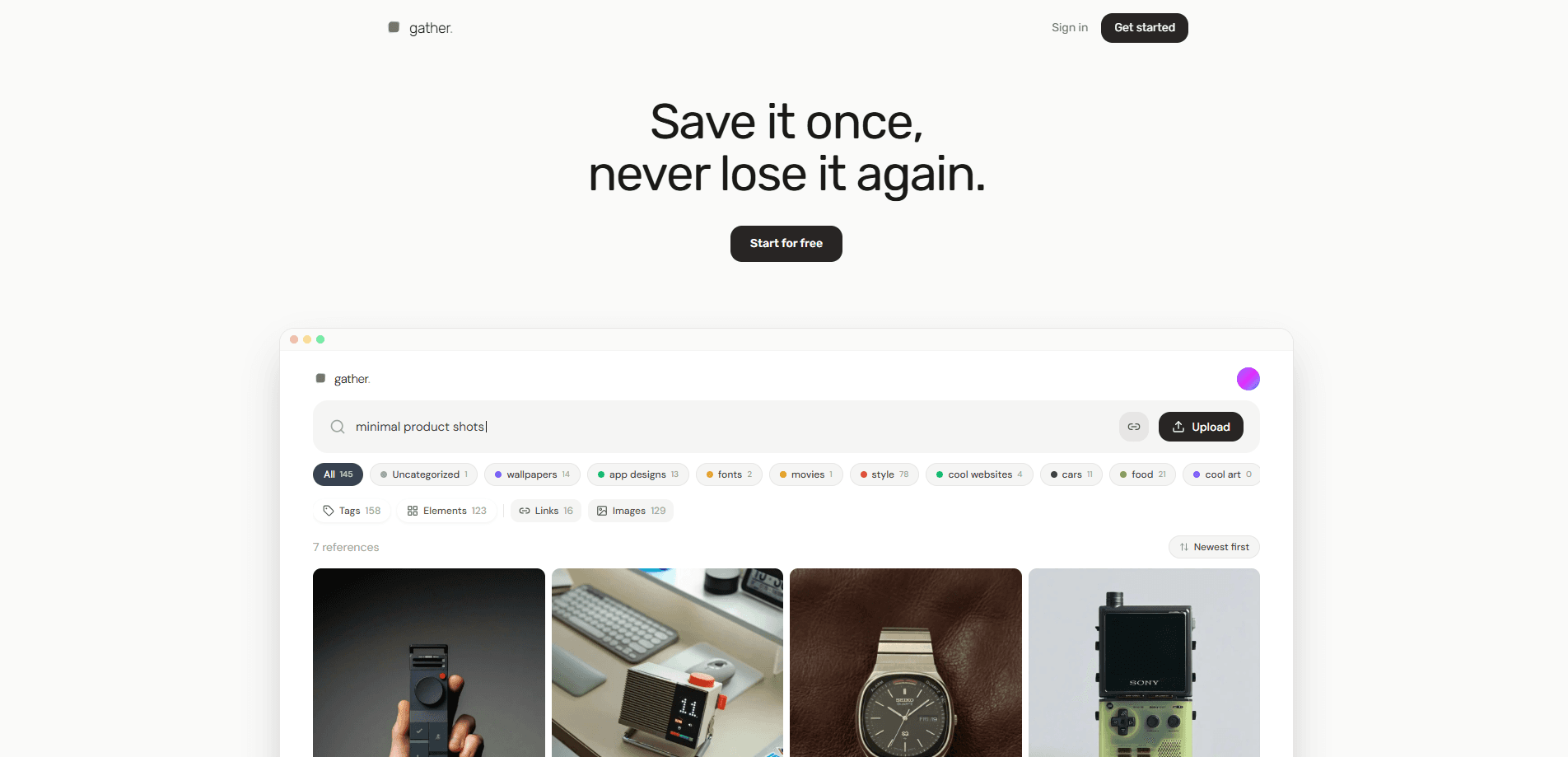
Gather is a private AI visual reference library for designers who save screenshots, photos, and links and then lose track of them. It describes and tags each reference automatically, so you can pull one back up by describing its mood, palette, or layout instead of hunting for a filename. The app also packages any saved reference into a ready-to-paste markdown handoff for AI tools like Claude, Cursor, or v0.
About Gather
What Is Gather
Gather is a visual reference manager and screenshot organizer that treats your saved screenshots the way you actually remember them. You rarely recall a file called screenshot-2024-11-03.png. You remember the muted car ad, the severe black-and-white layout, or the checkout page with unusually calm typography. Gather is built around that kind of memory.
The product solves a specific kind of clutter. Designers collect inspiration from social feeds, websites, and screens all day, then dump it into folders that become another place to lose things. Gather skips the filing. When a reference lands in the library, its visual qualities become searchable context: style, mood, palette, composition, subject, and useful interface elements.
The main limit is scale and precision. Visual analysis is helpful, not perfect, so an unusual reference can come back with a tag that misses. Gather lets you edit descriptions and tags and rerun analysis later, which keeps your corrections attached to the reference. It also runs in the browser as a web app rather than a native desktop or mobile app, so there's nothing to install offline.
Getting Started
- Create a free account at gatherit.app. No card is required, and the free tier starts you off with 20 references.
- Save your first references using the browser capture tool, or add screenshots, photos, and links directly.
- Let Gather describe and tag each item, then open any reference and correct the description or tags if the system guessed wrong.
- Search by vibe. Try a mood like "quiet editorial layout," a composition like "product centered in a large empty field," or a detail like "green vintage car in Paris."
- When a reference becomes direction for real work, hit Copy for AI to get a markdown handoff and paste it into your AI tool of choice.
Product Information
A quick look at Gather's pricing, supported platforms, and performance.
Best for
The users, tasks, and scenarios where this tool fits best.
Users
- Product and UI designers
- Brand and visual designers
- Design-minded developers
Tasks
- Recovering an old screenshot
- Building a mood board that stays findable
- Turning inspiration into a prompt
Scenarios
- Collecting design inspiration from social feeds and websites in one sitting, then searching it weeks later.
- Handing visual direction to an AI coding tool during a build without writing a paragraph of adjectives.
Key features
Visual Search
Gather searches the image itself, not just its text. When a reference enters the library, its style, mood, palette, composition, subject, and interface elements become searchable context. So what does that actually change when you sit down to find something you saved months ago? It gives retrieval more to work with than filenames and OCR alone. Queries can be approximate, since the point is to describe the thing the way you'd describe it to a collaborator.
Automatic Tagging
Collecting inspiration shouldn't turn into filing. Gather automatically describes and tags saved references so you build a searchable library without maintaining folders by hand. When the system guesses wrong, you can edit descriptions and tags and rerun analysis later. Those corrections stay attached to the reference instead of vanishing behind a recommendation feed.
Copy for AI
Copy for AI packages a visual reference and its context into a consistent markdown handoff, including the image URL and instructions to treat it as visual direction. You paste it into an AI tool that can fetch or inspect images, such as Claude, Cursor, or v0. The same handoff is generated by the web app and the API, so the wording doesn't quietly change between surfaces. A concrete reference, in other words, usually beats another paragraph of adjectives.
Browser Capture
Gather's browser capture lets you save a reference while you're looking at it, from a social feed, a website, or a product page. That keeps collection close to the moment of discovery, which is when most inspiration is actually found. The reference lands in the same searchable library as everything else.
Integrations and API
The product exposes an API alongside the web app, and the handoff for AI tools works through both. That matters if you want references flowing into a bigger workflow rather than living in one browser tab. For most everyday users the web app is enough, but an API opens the door to automating the collection, tagging, and retrieval of references across your own tools without copying and pasting by hand.
Pros and cons
Pros
- Search by mood, palette, or composition matches how designers actually remember references, not how files are named.
- Automatic tagging removes the folder maintenance that makes most inspiration libraries collapse.
- Correctable tags and descriptions keep you in control when the visual analysis misses.
- Copy for AI produces a clean markdown handoff you can drop straight into Claude, Cursor, or v0.
- Free tier with 20 references and no card makes it easy to test before paying.
Cons
- Visual analysis isn't infallible, so unusual references can come back mistagged until you fix them.
- It's a web app with no native desktop or mobile app, so offline and mobile-first capture are out.
- The value only shows up once the library gets large, which means the early experience can feel light.
Frequently asked questions
Gather is a visual reference library that saves screenshots, photos, and links, then tags and describes them automatically so you can find them again by describing what they looked like. It's aimed at designers who collect inspiration and lose track of it.
Related content
Explore related tools, skills, and articles for Gather.
Gather Alternatives

Base Code
Base44 (Wix) · Coding · ProductivityBase Code is a shared cloud development environment from Base44. Teammates describe changes to an existing GitHub codebase in chat, preview them live and send them back as pull requests.

Knocket
Knocket (Tencent RTC team) · Productivity · Business · ChatbotKnocket is a free live chat and contact page tool that lets visitors message you from your website, app, or a shareable link, with every reply handled from Telegram or one inbox.

FloorGen
Vinit Kumar (FloorGen) · Productivity · China AIFloorGen is a browser-based floor plan maker that turns a sentence or a sketch into an editable 2D plan and a 3D walkthrough. Export to PDF, DXF or video, and draw without an account.