

Genaimo
Ailive · Image
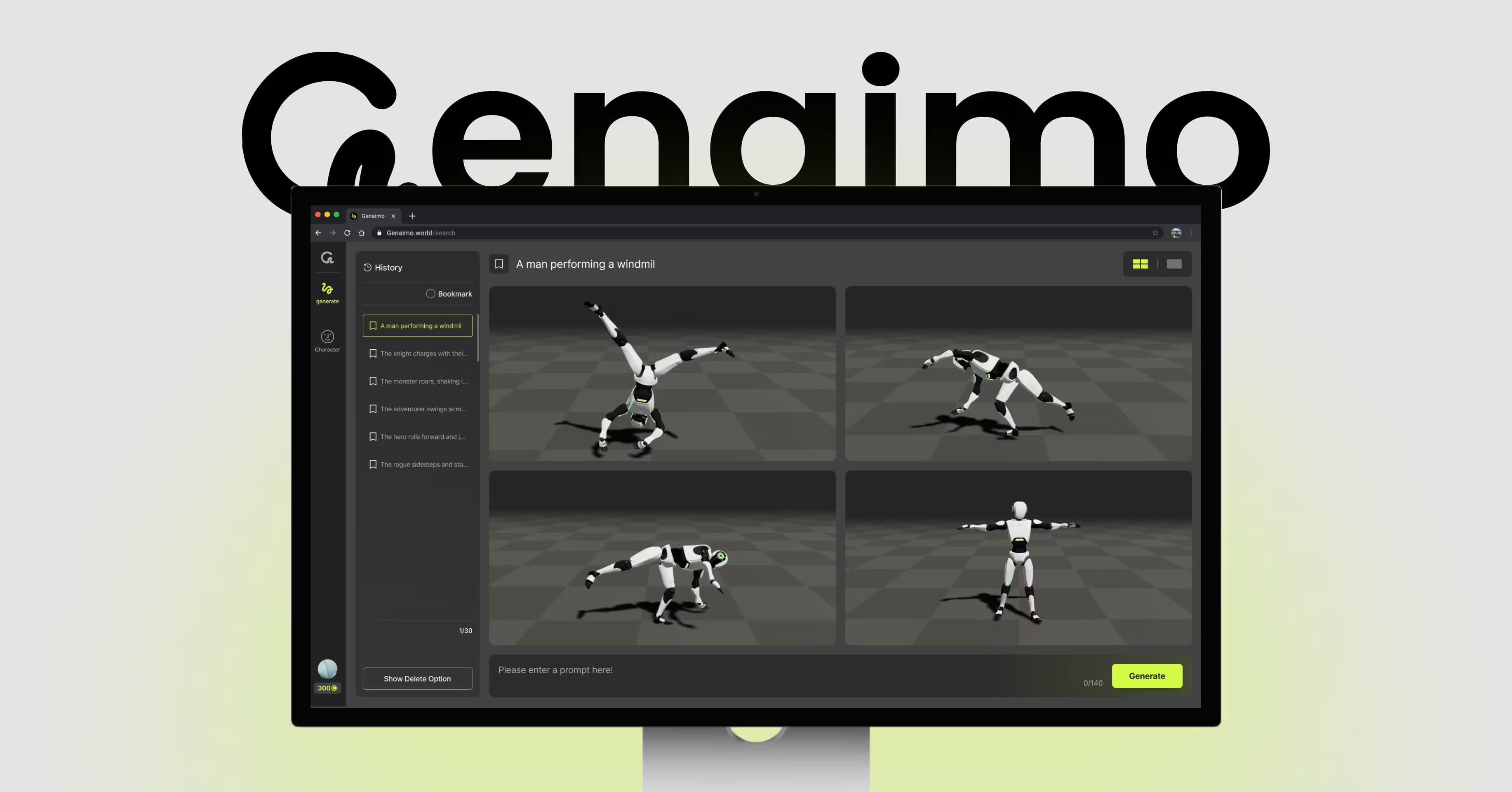
Genaimo is an AI animation tool that turns a text prompt into 3D character motion, offering four takes per prompt and exports for Unity, Unreal Engine, and Blender.
About Genaimo
What Is Genaimo
Genaimo is an AI 3D motion generator from Ailive, first released in 2025. As an AI animation generator, it turns a written description into full-body character motion, so animators, game developers, and 3D artists get usable movement without recording a motion capture session or keyframing every step by hand.
The pitch is speed and choice. You describe a motion in plain words, and Genaimo returns four different versions rather than one, which lets you pick a direction fast and stop rerunning the same idea. It also handles the fiddly parts of animation that eat hours: retargeting motion onto your own rig, styling a movement to match a mood, and cleaning up clips before they reach an engine. The output lands in the formats 3D teams already use, and there's a library of ready-made motion clips when writing prompts isn't the fastest path.
The limits matter too. Genaimo covers humanoid motion well, but it isn't a full animation suite, so you'll still finish timing, physics, and hand-authored tweaks in your usual 3D software. Prompt quality shapes results, and a vague description returns generic movement. Think of it as a fast first pass that hands your engine a solid starting clip.
Getting Started
- Create a Genaimo account on the official site. A free tier lets you test the core motion generation before you pay.
- Open the text-to-motion tool and describe the movement you want in plain language, such as a character turning to look over one shoulder.
- Generate and review the four motion variations, then keep the one that fits.
- Upload your own character model if you want the motion retargeted onto your rig instead of the default figure.
- Export the clip as FBX, GLB, or video and drop it into Unity, Unreal Engine, or Blender.
Product Information
A quick look at Genaimo's pricing, supported platforms, and performance.
Best for
The users, tasks, and scenarios where this tool fits best.
Users
- Game developers
- 3D animation artists
- Indie creators without a mocap setup
Tasks
- Turning a written action into a starting clip
- Retargeting motion onto your own rig
- Styling a movement to fit a mood
- Filling scene animation fast
Scenarios
- Early game prototyping
- Previsualization for films or cutscenes
- Virtual humans and avatars
Key features
Text-to-Motion Generation
You type a description of a movement and Genaimo produces the animation. The tool returns four distinct motions from a single prompt, so you compare options and keep the best rather than taking whatever comes first. Plain, specific language works better than broad words like "walk around."
Motion Styling
Motion Styling lets you push a generated clip toward a particular feel. You can make a stride heavier, a turn sharper, or an idle loop more relaxed, which saves the manual curve work that normally follows a raw motion sample. It's the step that turns technically correct motion into motion that reads.
Auto Retargeting
Auto Retargeting fits generated motion onto a character model you bring yourself. Instead of rebuilding a skeleton by hand, you upload your model and the tool maps the movement onto it, so the output drops into your existing pipeline.
Motion Explore Library
Motion Explore gives you a browsable library of over 500 cleaned full-body clips, including detailed finger movement. When you can't describe a motion well enough in words, you browse the collection and spend credits to own the clip you want.
Engine-Ready Exports
Genaimo exports finished motion as FBX, GLB, or video. That covers the common 3D tools, and clips move into Unity, Unreal Engine, or Blender without a conversion step in between, which keeps the handoff between motion generation and your engine short.
Custom Model Upload
You can upload your own character model and generate motion for that specific figure rather than a stock template. For studios with authored characters, this means the motion arrives on a rig that already matches the rest of the project.
Pros and cons
Pros
- Four motion variations per prompt keeps you from rerunning the same idea and lets you compare directions quickly.
- Engine-ready FBX, GLB, and video exports fit the tools most 3D teams already use.
- The 500-plus clip library covers cases where describing motion in words falls short.
- Retargeting onto your own model saves the manual skeleton work that usually follows a raw sample.
Cons
- It isn't a full animation suite, so timing, physics, and final polish still happen in your 3D software.
- Vague prompts return generic movement, so results depend on how well you describe the action.
- The library runs on credits, which adds a per-clip cost on top of any subscription.
Frequently asked questions
Genaimo is used to generate 3D character motion from text descriptions. It suits animators, game developers, and 3D artists who need believable movement without a motion capture session, and it delivers four variations per prompt for faster iteration.
Related content
Explore related tools, skills, and articles for Genaimo.
Genaimo Alternatives

Google EmbeddingGemma 2
Google DeepMind · Writing · Image · CodingGoogle EmbeddingGemma 2 is a 740M-parameter open model that turns text, code, images, audio, and video frames into vectors in one 768-dimension space, running on phones and laptops.

Tractionwave
TractionWave · Image · MarketingTractionWave is an AI attention heatmap tool for static ads. Upload a PNG or JPG and it returns predicted attention, ranked hotspots, and fixes before you spend budget.

Imejis.io
Imejis.io · Image · MarketingImejis.io is an AI design studio for agents and marketing teams. Describe an image in plain words, and it writes the copy, builds the layout, reflows it to every size, then exports a finished file.