

Get AI Courses
Get AI Courses · Leaning
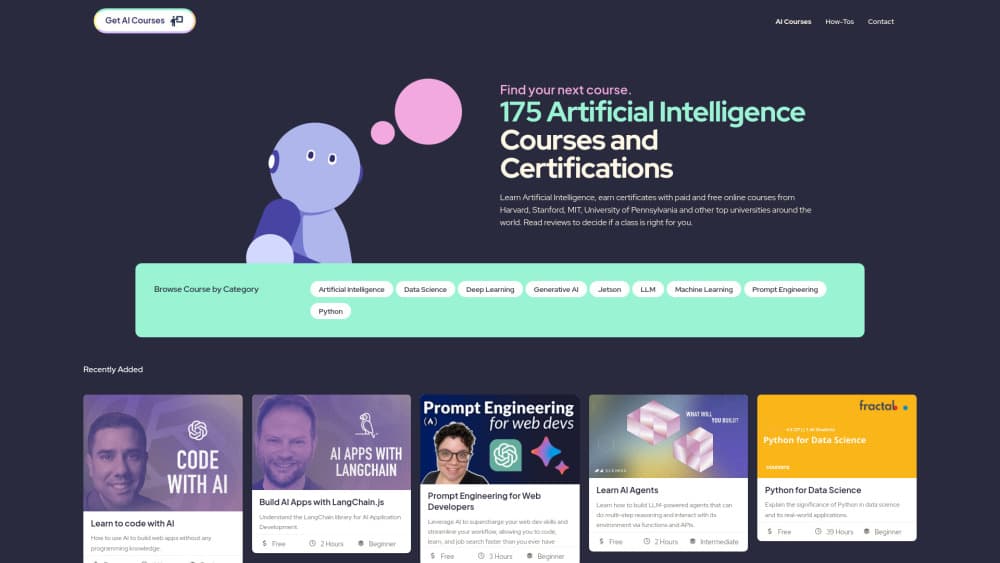
Get AI Courses is a free directory of 179 AI courses and certifications from Harvard, Stanford, MIT and other providers, with filters for level, price and certificates.
About Get AI Courses
What Is Get AI Courses
Get AI Courses is a web directory that collects online AI courses in one place. You browse by topic, then narrow the list by course level, self-paced status, certificate availability and price. Each card shows the course title, a short description, the workload in hours, the difficulty and what it costs.
The point is comparison without ten browser tabs. A single AI course directory entry tells you that Stanford's reinforcement learning class runs 20 hours and costs nothing, while a professional program from the same field asks $1,750 for 80 hours. That gap is the information most people need before they commit.
Its main limit is depth. Get AI Courses doesn't teach anything itself. It links out to the provider, and the enrollment, syllabus and refund terms live on that provider's site. If you want hands-on labs or a cohort to join, you still have to check the source.
Getting Started
- Open getaicourses.org and pick a category such as LLM, Generative AI or Data Science.
- Set the filters on the left: course level, self-paced yes or no, certificate available, and price range.
- Read the card details for workload and cost, then open the course page to see the provider's own outline.
- Compare two or three options from the same category before you sign up, since hours and prices vary widely.
- Check the How-Tos section if you want short walkthroughs of AI tools before committing to a longer course.
Product Information
A quick look at Get AI Courses's pricing, supported platforms, and performance.
Best for
The users, tasks, and scenarios where this tool fits best.
Users
- Beginners who want a structured first step
- Career switchers
- Students and self-taught developers
- Team leads comparing training options
Tasks
- Choosing a first course
- Finding a certificate program
- Comparing workloads
- Planning a study path
Scenarios
- A free weekend of learning
- Budget planning for a team
- Deciding between a university class and a vendor tutorial
Key features
One Catalog for 179 Courses
The directory gathers classes from Harvard, Stanford, MIT, the University of Pennsylvania and several tech companies into a single list. You see the same fields for every entry, which makes cross-checking realistic. No account is needed to browse.
Nine Topic Categories
Courses are grouped into Artificial Intelligence, Data Science, Deep Learning, Generative AI, Jetson, LLM, Machine Learning, Prompt Engineering and Python. Each category page opens with a one-line explanation of the topic, useful if you're new to terms like LLM or Jetson.
Filters for Level, Pace, Certificates and Price
The filter panel covers course level (beginner, intermediate, advanced), self-paced yes or no, certificate availability, and a price slider. You can combine them, so "beginner, self-paced, free, with a certificate" is a few clicks. A reset button clears everything at once.
Price and Workload on Every Card
Each entry lists cost and hours next to the title. Free classes are marked Free instead of showing $0, and paid ones show the exact figure. Workload ranges from 1 hour to 80 hours, which is the fastest way to spot a course that won't fit your week.
How-Tos Section
Beyond the course list, the site publishes short guides on AI tools such as Perplexity, Pika, Canva Magic Design and Gamma. They run a few minutes each and work as a trial run before you take a longer class on the same subject.
Provider Handoff Instead of Checkout
Get AI Courses doesn't sell seats. Every course points back to the school or company that runs it, so you enroll, pay and get support at the source. That keeps pricing accurate, and it means refunds and access issues are handled by the provider.
Pros and cons
Pros
- Free to use, with no account and no paywall on the course list.
- Consistent fields across 179 entries, so price and hours are easy to compare.
- Filters cover the four things that usually decide a course: level, schedule, certificate and cost.
- Mixes university classes with vendor tutorials, which suits both theory-first and tool-first learners.
- Short How-Tos give a feel for AI tools without a time commitment.
Cons
- No reviews or ratings from learners, so quality signals come from the provider's reputation alone.
- No keyword search on category pages, which means long lists are browsed with filters rather than typed queries.
- Course detail is thin: no syllabus breakdown, no instructor bios and no start dates on the directory side.
- No progress tracking or saved lists, since there are no user accounts.
Frequently asked questions
Yes. Browsing the directory costs nothing and doesn't require an account. The courses themselves set their own prices, and the listing includes both free AI courses and paid programs from $45 to $1,750.
Related content
Explore related tools, skills, and articles for Get AI Courses.
Get AI Courses Alternatives

HireKey
HireKey · Voice & Language · Productivity · LeaningHireKey is an AI job search copilot built by a former tech recruiter. It checks role fit, tailors resumes, runs interview practice and tracks every application.

Lune
Retrograde Labs · Productivity · LeaningLune is a research search engine for scientific AI agents. It runs as an MCP server that lets Claude, ChatGPT and Cursor search peer-reviewed computer science papers and cite them.
Coddy
Coddy · Coding · LeaningCoddy is a gamified platform to learn to code through short interactive lessons in 20+ languages, with a browser editor, an AI tutor and free certificates.