

GoCodeo
GoCodeo · Coding
GoCodeo is an AI coding agent for VS Code that scaffolds full-stack projects, writes production-ready code, runs tests and deploys to Vercel from a single prompt.
About GoCodeo
What Is GoCodeo
GoCodeo is an AI coding agent that lives inside Visual Studio Code. It turns a plain-language prompt, an image or a Figma-style reference into a working project, then keeps helping as you build. The idea fits the "vibe coding" workflow: describe what you want, let the agent handle boilerplate and config, and stay in your editor instead of switching tools.
The product aims at the boring parts of shipping software. GoCodeo scaffolds a project with a file structure and configs, writes code across your repo, generates unit tests, debugs failing terminal commands and pushes a deploy to Vercel. It also connects to outside tools through the Model Context Protocol (MCP), so the agent can raise a pull request on GitHub or seed a database in one step, not five.
Before you install it, know the limits. Everything runs as a VS Code extension, so there's no standalone IDE or web editor. The free tier caps premium model requests at 50 a month, and the strongest models sit behind paid plans. The agent also works best on greenfield builds and smaller repos; it won't magically understand a decade-old codebase on day one.
Getting Started
- Install the GoCodeo extension from the Visual Studio Marketplace and sign in, either from the free tier or a paid plan
- Pick a framework from the starter list, or attach an image for the agent to turn into a project structure
- Describe your feature in the chat, reference files with the @ symbol, and choose a model from the selector for harder tasks
- Run the generated code, let the built-in test runner check it, and deploy to Vercel when the build passes
Product Information
A quick look at GoCodeo's pricing, supported platforms, and performance.
Best for
The users, tasks, and scenarios where this tool fits best.
Users
- Solo developers and indie builders
- Frontend and full-stack engineers
- Teams drowning in manual testing
- Developers new to a framework
Tasks
- Scaffolding a new project
- Generating production-ready code
- Writing and fixing unit tests
- Deploying a build
- Pulling in live context
Scenarios
- Starting a side project on a weekend
- A test suite is failing before a release
- You need a quick internal tool
- Onboarding onto an unfamiliar stack
- Automating a repeated workflow
Key features
Project Scaffolding With 25+ Frameworks
GoCodeo's app builder turns a framework choice into a ready-to-code workspace. It generates the file structure and config for more than 25 frontend and backend frameworks, so a new project starts with the layout already in place. For developers who lose an afternoon to setup, that's the feature they notice first.
Production-Ready Code From a Prompt or Image
The core agent writes code that runs, not just snippets. You describe a feature in plain language, or attach an image and let the "Use Image" option generate a project structure from it, and GoCodeo produces the files and configs to match. An "Enhance Prompt" step expands a rough idea into a fuller spec with functional and technical detail before the code is written.
One-Prompt Supabase and Vercel Deployment
GoCodeo connects the backend and ships the frontend in a single step. It auto-connects to Supabase, generates the backend code and deploys to Vercel, with no separate setup pass. For a solo builder, that replaces a string of manual steps that usually involve copying API keys between dashboards.
MCP Agents That Reach 100+ Tools
Through the Model Context Protocol, GoCodeo plugs into more than 100 tools, including GitHub, Notion, Stripe and Perplexity. The agent can fetch live context, raise pull requests, seed databases or run end-to-end workflows inside your existing setup. That breadth is what separates it from extensions that only edit files.
Test Generation, Test Runs and Auto-Fix
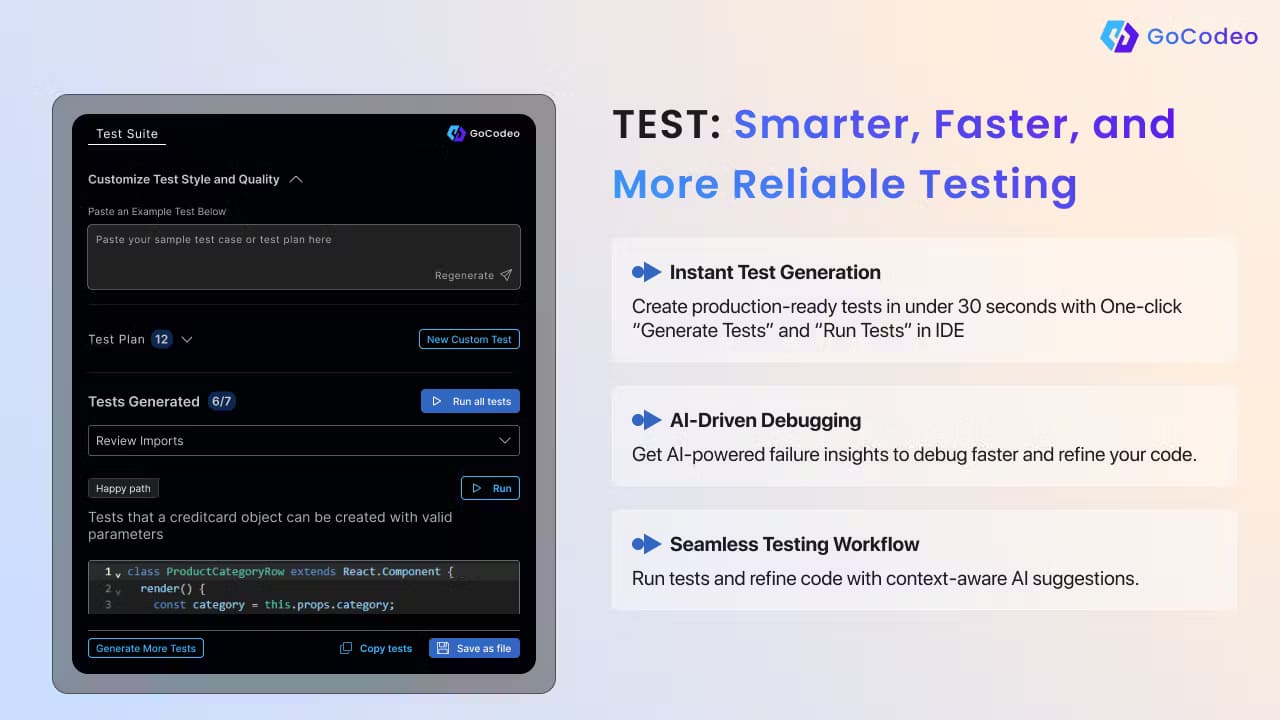
The extension handles testing end to end. Chapter-level features let you generate tests, run them through the built-in test runner, regenerate or expand them, and have AI diagnose failing cases with fixes tied to your code and framework. You can also set the code style, test framework and number of tests per run, so the output matches how your team already works.
Model Selector Across Major Providers
GoCodeo gives you a model selector rather than locking you to one provider. You can reach models from OpenAI, Anthropic's Claude, Google Gemini and DeepSeek, and switch between them per task. Premium models like GPT-4o and Claude Sonnet sit behind paid plans, while basic models stay open on the free tier.
Context via @ References and Web Search
You can point the agent at your own code with the @ symbol, which lists files and code symbols in your folder, and pull in outside answers with the @Web search feature. That search is powered by Perplexity and auto-writes queries based on your code, so the references and docs it returns relate to what you're building.
Documentation and Git Automation
GoCodeo scans your repo and generates a structured README.md or PRD saved to the root directory, which saves the write-up work most developers put off. It also automates repo initialization, commit management and pull request creation, giving you a link to share right after.
Pros and cons
Pros
- Works inside VS Code, so there's no new IDE to learn and no context switch away from your editor
- Combines scaffolding, coding, testing and deployment in one tool, so one product covers the full loop from prompt to live link
- The free tier is genuinely usable, with 50 premium model requests, 1,000 autocompletions and MCP integration at no cost
- MCP support reaches 100+ tools, so the agent can act on GitHub, Notion, Stripe and more, not just edit files
- Test generation with auto-fix targets the tedious part of development that most agents skip
Cons
- No standalone IDE or web editor, so you can't use it outside VS Code
- Premium models like GPT-4o and Claude Sonnet are capped, and heavy users on the free tier will hit the 50-request limit fast
- There's no public API listed, which blocks teams that want to build GoCodeo into their own CI pipelines
- Add-ons cost $10 for 250 extra premium requests, so costs add up for teams that run the agent all day
Frequently asked questions
GoCodeo is an AI coding agent for building and shipping software inside VS Code. It scaffolds projects, writes production-ready code, generates and fixes tests, and deploys to Vercel from a single prompt. For teams weighing GoCodeo vs Cursor, the draw is a built-in AI code generator that handles the full loop inside VS Code.
Related content
Explore related tools, skills, and articles for GoCodeo.
GoCodeo Alternatives

Udon
Udon · Coding · ProductivityUdon turns an Apple Silicon Mac into a home server you run from a browser, with container controls, file shares, and an optional AI sysadmin.

offstage
offstage cloud · Coding · Productivityoffstage gives AI coding agents and CI jobs a real Mac: a fresh macOS account on Apple silicon, driven over an API and billed by the second.

BotBus
Chengdu Tuyang Tusen Technology Co., Ltd. · Coding · ProductivityBotBus lets you control AI coding agents from your phone and watch: approve commands, start tasks and read results while the code stays on your desktop.