

Goodmeetings
Goodmeetings (founded 2021, India) · Productivity
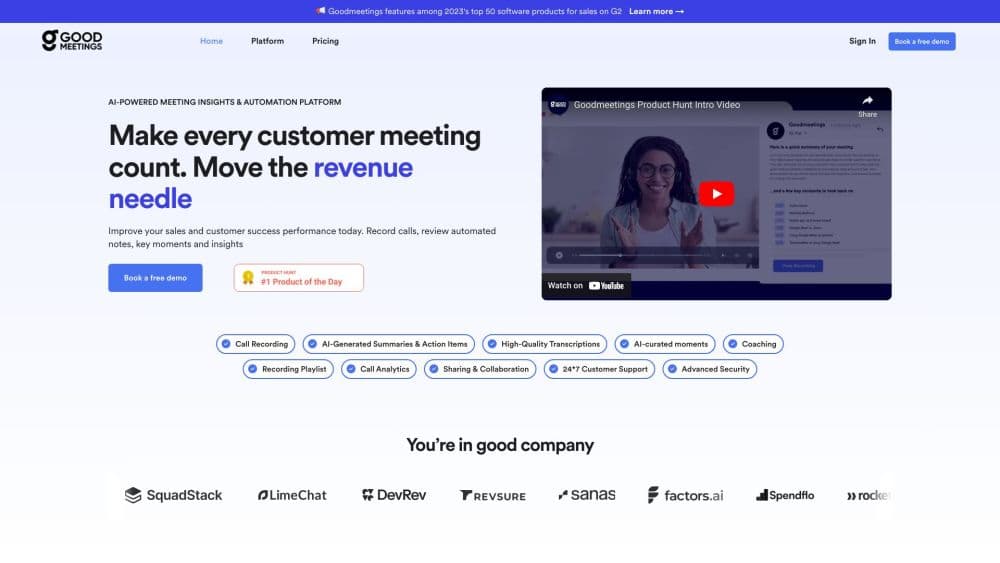
Goodmeetings is an AI sales meeting platform that records calls, transcribes them in several languages, and turns each conversation into summaries, action items and coaching data.
About Goodmeetings
What Is Goodmeetings
Goodmeetings is AI sales meeting software for sales and customer facing teams. It joins scheduled calls on Zoom, Google Meet and Microsoft Teams, records them, writes a transcript, and produces a summary with the decisions, objections and follow up tasks from the conversation. Recording and meeting transcription run on their own once a call sits on the calendar. The company behind it started in India in 2021 and aims the product at revenue teams rather than at general meeting note taking.
The job it takes over is the paperwork that follows every call. A rep finishes a demo, then spends twenty minutes writing notes, updating the CRM and remembering to send a recap. Goodmeetings does that part automatically, and a manager gets a searchable record of what was actually said on the call instead of a rep's version of it.
There are limits worth knowing before you book a demo. Pricing is not published, several advertised capabilities are still marked as coming soon, and there is no documented public API. Recording every sales call also needs a consent process that holds up in your region, which is admin work the tool does not do for you.
Getting Started
- Start the 14 day trial from the Goodmeetings site. No credit card is required at signup.
- Connect your calendar and conferencing account so the recorder knows which calls to join on Zoom, Google Meet or Microsoft Teams.
- Link your CRM, either Salesforce or HubSpot for most teams, and choose which fields the summary and action items should write back to.
- Take one live call, then open the transcript, summary and action item list to see whether the output matches how your team already writes notes.
- Set recording rules and notetaker branding, then build playlists and share clips so new reps can learn from calls that closed.
Product Information
A quick look at Goodmeetings's pricing, supported platforms, and performance.
Best for
The users, tasks, and scenarios where this tool fits best.
Users
- Sales reps on small and mid sized teams
- Sales managers and enablement leads
- Customer success and account teams
Tasks
- Recording and transcribing discovery and demo calls
- Writing follow up notes after a call
- Keeping the CRM current
- Onboarding new reps
Scenarios
- Distributed teams selling over video
- Teams running calls in more than one language
- Weekly pipeline reviews
Key features
Call Recording and Transcription
Goodmeetings joins scheduled meetings and records them automatically, with rules for which events should be captured. Each recording comes back with a transcript, speaker identification by name, and playback that follows the text, so you can jump to the moment a prospect raised a concern. Recordings stay available for two years on the Professional plan and three years on Business.
AI Summaries and Action Items
Summaries are written in plain language and split into the topics discussed, the decisions made and the next steps. Action items can be assigned and pushed into your CRM, which is the part most teams notice first, because it removes a manual step from every call. You can also ask questions of a single meeting in natural language, for example what objections came up about price.
Conversation Intelligence and Call Analytics
The analytics layer tracks talk time, topics and speaker balance across calls, and the dashboard can be filtered by rep, team or time window. Managers use it to spot patterns, like a rep who talks through the discovery questions or an account where sentiment drops after a pricing slide. Sentiment analysis and custom dashboards are listed as coming soon on the public plan comparison, so confirm what is live on your contract.
Real-Time Assistance During Calls
Inside a live call, the tool offers in-call support: natural language questions about the account, alerts when a key moment happens, and structured notes that build as the conversation moves. Screenshare analytics add a second layer by showing how a prospect reacted while a rep walked through a deck. This is the feature that separates Goodmeetings from a plain recorder, and it is also the one that takes the most getting used to.
CRM and Workflow Integrations
One-click connections cover Salesforce, HubSpot, Zoom, Google Meet, Microsoft Teams, LeadSquared, DevRev and Slack. Push integration sends summaries, notes and action items into the CRM, while Slack and email notifications keep the account owner informed. Custom push mapping is part of the Business plan, which matters if your CRM has required fields that the default mapping does not fill.
Coaching, Playlists and Meeting Library
Every recorded call lands in a searchable library with filters, tags, private and public playlists, and a preview that plays when you hover over a meeting. Managers can comment and tag teammates, share clips of a strong discovery or a handled objection, and build a library that new hires work through in their first month. Advanced search, folder organization and clip editing sit on the Business plan.
Pros and cons
Pros
- Recording, transcription and summaries run without anyone starting a bot or taking notes manually.
- Action items flow into Salesforce or HubSpot, which cuts the after-call admin that reps usually do at night.
- Multi-language transcription lets a manager review calls held in a language they do not speak.
- The meeting library with clips, tags and playlists makes sales coaching concrete instead of theoretical.
- The 14 day trial needs no credit card, so a team can test output quality on real calls before committing.
Cons
- No price is published, so you cannot compare cost against Gong or Fireflies without a sales conversation.
- Several advertised capabilities, including sentiment analysis, battlecards and live shadowing, are marked coming soon, which means the current product is narrower than the feature page suggests.
- Recording every call requires consent handling that varies by country, and the tool does not manage that process for you.
- There is no documented public API, so teams that want custom pipelines are limited to the supported CRM and Slack connections.
Frequently asked questions
It records and transcribes sales calls, then turns them into summaries, action items and coaching data. Teams use it to keep the CRM current and to review what actually happened on a call.
Related content
Explore related tools, skills, and articles for Goodmeetings.
Goodmeetings Alternatives

Base Code
Base44 (Wix) · Coding · ProductivityBase Code is a shared cloud development environment from Base44. Teammates describe changes to an existing GitHub codebase in chat, preview them live and send them back as pull requests.

Knocket
Knocket (Tencent RTC team) · Productivity · Business · ChatbotKnocket is a free live chat and contact page tool that lets visitors message you from your website, app, or a shareable link, with every reply handled from Telegram or one inbox.

FloorGen
Vinit Kumar (FloorGen) · Productivity · China AIFloorGen is a browser-based floor plan maker that turns a sentence or a sketch into an editable 2D plan and a 3D walkthrough. Export to PDF, DXF or video, and draw without an account.